40
There are four ways to add face pictures.
① Adding face pictures one by one
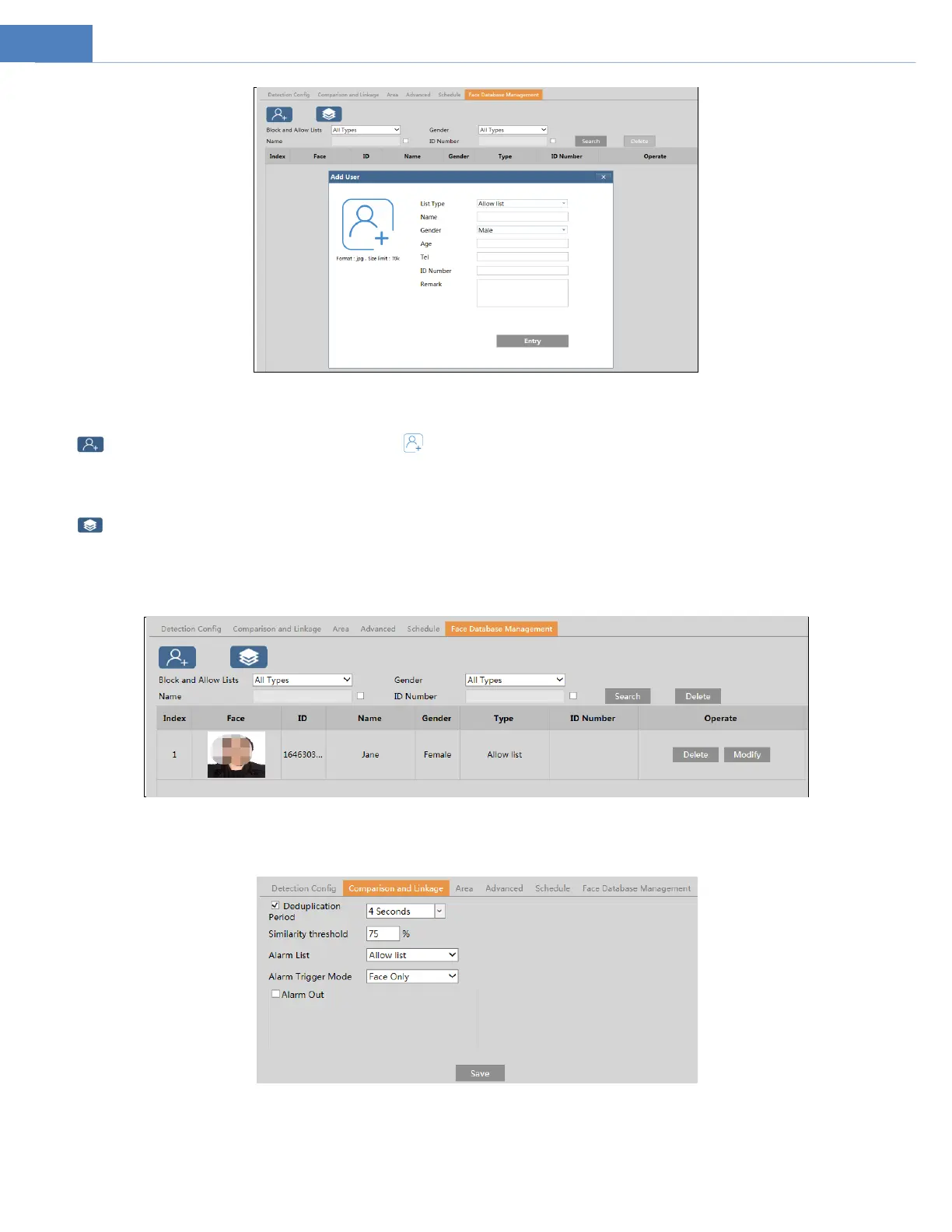
Click to pop up an adding user box. Then click to select a face picture saved on the local PC. Please select the picture
according to the specified format and size limit. After that, fill out the relevant information of the face picture and click “Entry” to
add.
③ Adding multiple face pictures at a time
Click and then add multiple face pictures once according to the prompted rules.
④ Add face pictures by using face album management tool
⑤ Add the captured picture in the live mode (See Add captured face pictures to the face database).
After adding face pictures, you can search them by name, gender, ID number and so on.
Click “Modify” to change people information and click “Delete” to delete this face picture.
5. Set face comparison trigger options. Click “Comparison and Linkage” to go to the following interface.
Deduplication Period: In the set period, delete the repeated comparison results.
Similarity threshold: When the similarity of the captured face picture and the face picture added into the face database exceeds the
similarity threshold, alarms will be triggered.



 To Next Page