Spectralink 7520 and 7540 User Guide
14158600 Version 10.0
March, 2014 58
4 Scroll to Active and press Select.
5 Activate
Off by pressing Select. Bluetooth is now deactivated, and any bluetooth device
connected to the handset has now been disconnected.
Activate Bluetooth Again
1 Press Menu to enter main menu.
2 Scroll to Settings
and press Select.
3 Scroll to
Bluetooth and press Select.
4 Scroll to Device list
and press Select.
5 Press Yes, and Bluetooth is activated again.
6 Press Options
and scroll to Connect.
7 Press Select to connect to the headset again.
Disconnect Wireless Headset.
1 Press Menu to enter main menu.
2 Scroll to Settings
and press Select.
3 Scroll to Bluetooth
and press Select.
4 Scroll to Active and press Select.
5 Scroll to Disconnect headset, press
Select and press Yes to disconnect the headset.
Connect Wireless Headset again
1 Press Menu to enter main menu.
2 Scroll to Settings and press
Select.
3 Scroll to Bluetooth and press Select.
4 Scroll to
Active and press Select.
5 Activate
On by pressing Select, then press Exit.
6 Press Options and scroll to Connect.
7 Press
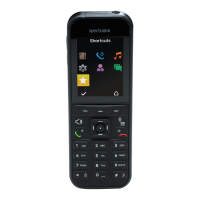
Select, then press OK. The wireless headset is now connected to your Spectralink
7540 Handset.
Remove Wireless Headset from the Device List
1 Press Menu to enter main menu.
2 Scroll to Settings
and press Select.
3 Scroll to Bluetooth and press Select.
4 Scroll to Device list
and press Select.


 To Next Page