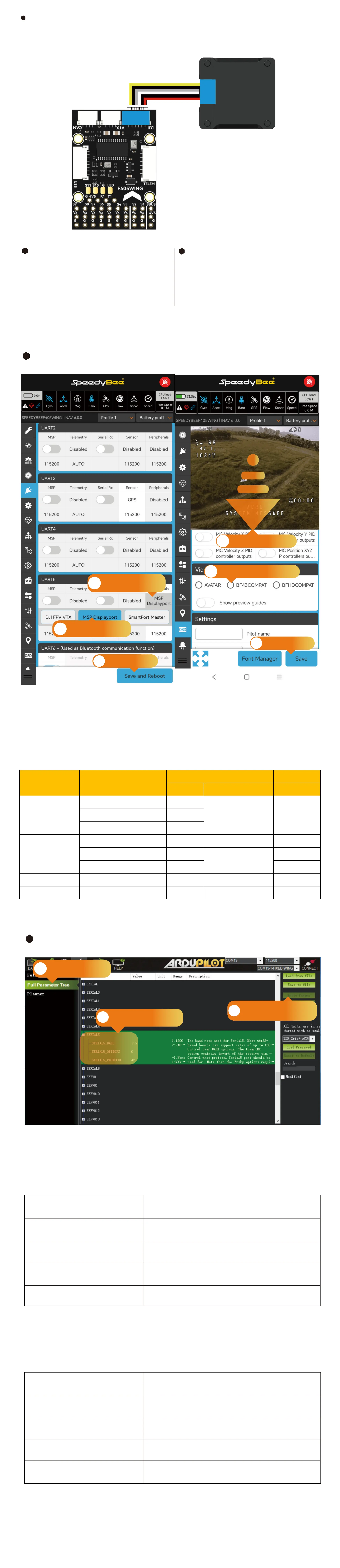
Digital VTX
SBUS
GND
RX5
TX5
GND
Vv
HDL
GND
TX
RX
GND
POWER
Disconnect HDL and SBUS signals
when using an external SBUS receiver.
Digital VTX Settings
Hardware Connection:
Use a Digital VTX cable to connect to the Digital VTX.
INAV Settings
①In the Pos tab, select "Peripherals" for
UART5 and choose the "MSP DisplayPo"
option, then save and reboot.
②In the OSD tab, scroll down to the "Video Format"
option and select the appropriate option based on
the following guidelines.
③Save and reboot.
1
ArduPilot Settings
Enter MissionPlanner's CONFIG settings, locate
the Full Parameter Tree, modify the corresponding
parameter values, and manually resta the ight
controller.
2
INAV Settings
1-1
Select "Peripherals"
for UART5
1-2
choose the "MSP
DisplayPo" option
3-1
Scroll to Video Format
3-2
select desired functionality
2
Save and reboot
4
Save and reboot
For DJI O3, DJI Air Unit V1 paired with DJI Goggles 2, RunCam Link paired
with DJI Goggles 2 , Caddx Vista paired with DJI Goggles 2.
For other digital VTX devices, consult the table below for parameter settings:
ArduPilot Settings
Compatible congurations: DJI O3, DJI Air Unit V1 paired with DJI Goggles 2,
RunCam Link paired with DJI Goggles 2 , Caddx Vista paired with
DJI Goggles 2, Caddx WS Avatar, and HDzero.
1
Navigate to the Full
Parameter Tree page
2
Set the corresponding
parameters
3
Click to write Params and
manually reboot the FC
SERIAL5_BAUD 115
SERIAL5_OPTIONS 0
SERIAL5_PROTOCOL 42
MSP_OPTIONS 4
OSD_TYPE 5
Set serial5 baud rate to 115200
Set serial5 operating mode to default
Set serial5 protocol to DisplayPo
Utilizes Betaight-compatible fonts
Set OSD mode to MSP_DisplayPo
SERIAL5_BAUD 115
SERIAL5_OPTIONS 0
SERIAL5_PROTOCOL 33
MSP_OPTIONS 0
OSD_TYPE 3
Set serial5 baud rate to 115200
Set serial5 operating mode to default
Set serial5 protocol to MSP
polling mode
Set OSD Type to MSP
For more detailed settings, please refer to the following link:
https://ardupilot.org/plane/docs/common-msp-osd-oveiew-4.2.html
Compatible congurations: DJI Air Unit V1 paired with DJI Goggles V2 ,
RunCam Link paired with DJI Goggles V2 , Caddx Vista paired with
DJI Goggles V2.
FPV goggles/VRX Air unit
Pos tab OSD tab
UART Peripherals Video Format
DJI G2
DJI O3 UART5
MSP DisplayPo BF43COMPATDJI Air Unit V1 UART5
RunCam Link/Caddx Vista UART5
DJI V2
DJI O3 UART5 MSP DisplayPo BF43COMPAT
DJI Air Unit V1 UART5
DJI FPV VTX
/
RunCam Link/Caddx Vista UART5 /
Caddx WS Avatar Caddx WS Avatar UART5 MSP DisplayPo AVATAR
HDzero HDzero UART5 MSP DisplayPo HDZERO


 To Next Page
 Loading...