Suppos dual
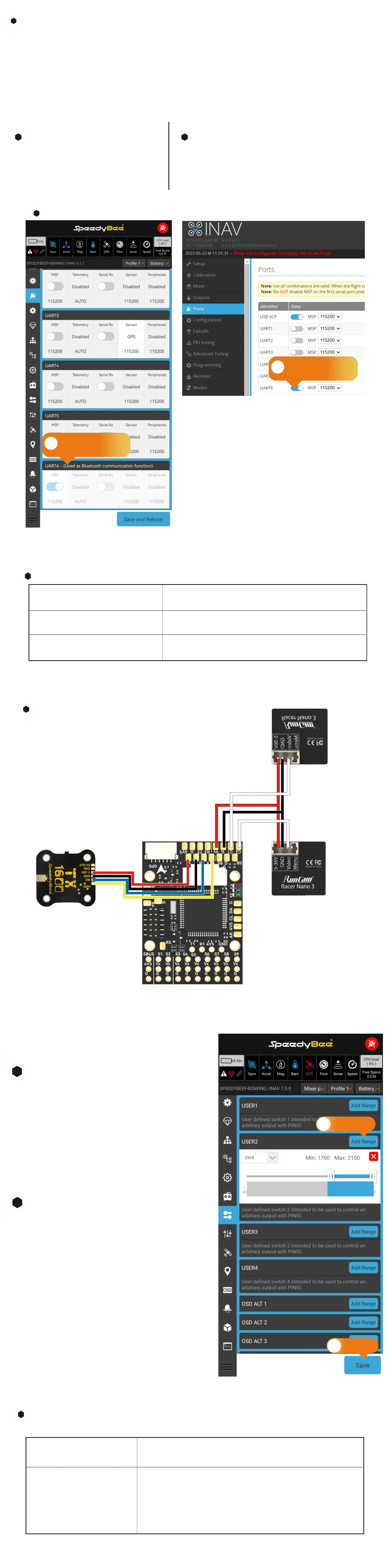
cameras with switching
Analog VTX
(This feature is suppoed in INAV 7.0 and later versions.
Two-Camera Switching Settings
Hardware Connection:
INAV Settings
①Go to "Mode" tab, select "USER2",
and press "Add Range".
②Choose camera switch control channel,
adjust blue bar for range
(white for Camera 1, blue for Camera 2).
③Click "Save".
1
ArduPilot Settings
Enter MissionPlanner's CONFIG settings,
locate the Full Parameter Tree, modify the corresponding
parameter values, and manually resta the ight controller.
2
1
Default setting for
wireless connection
2
Default setting for
wireless connection
ArduPilot Settings
RELAY_PIN 81
Dene the Camera switch pin GPIO81 as Relay.
Ardupilot Settings
SERIAL6_BAUD 115
SERIAL6_OPTIONS 0
SERIAL6_PROTOCOL 2
Set serial6 baud rate to 115200
Set serial6 operating mode to default
Set serial6 protocol to Mavlink2
Wireless board with FC settings
Hardware Connection:
Check the alignment and secure fastening of the pin headers and sockets between the wireless board
and the ight controller.
For INAV rmware, switch the wireless mode to BLE mode, indicated by a slow ashing green wireless
status indicator.
For ArduPilot rmware, switch the wireless mode to WiFi mode, indicated by a slow ashing white
wireless status indicator.
INAV Settings
Default parameters enable direct
connection. If wireless connection fails
and the batte indicator light shows
owing lights, please check this setting.
1
Ardupilot Settings
Default parameters enable direct connection. If wireless
connection fails and the batte indicator light shows
owing lights, please check this setting.
2
INAV Settings
1
Add Range
3
save
Connect power and signal wires for both cameras
separately as depicted in the diagram. Ensure both
cameras suppo the same PAL or NTSC video format.
Relay On/O: Use the CH_X on the transmitter
to control camera switching.Camera 1 is
activated when the auxilia switch's pwm
value falls below 1200, and Camera 2 is
activated when it exceeds 1800.
RC X_OPTION 28
C1 OFF/C2 ONC1 ON/C2 0FF



 To Previous Page