118158‐001REV.A 5OF20
1. TheeSLDigitalInterface
1.1. Ethernet
TheeSLsupportsEthernetcommunicationsonly.EachEthernetcommandwillconsistofa
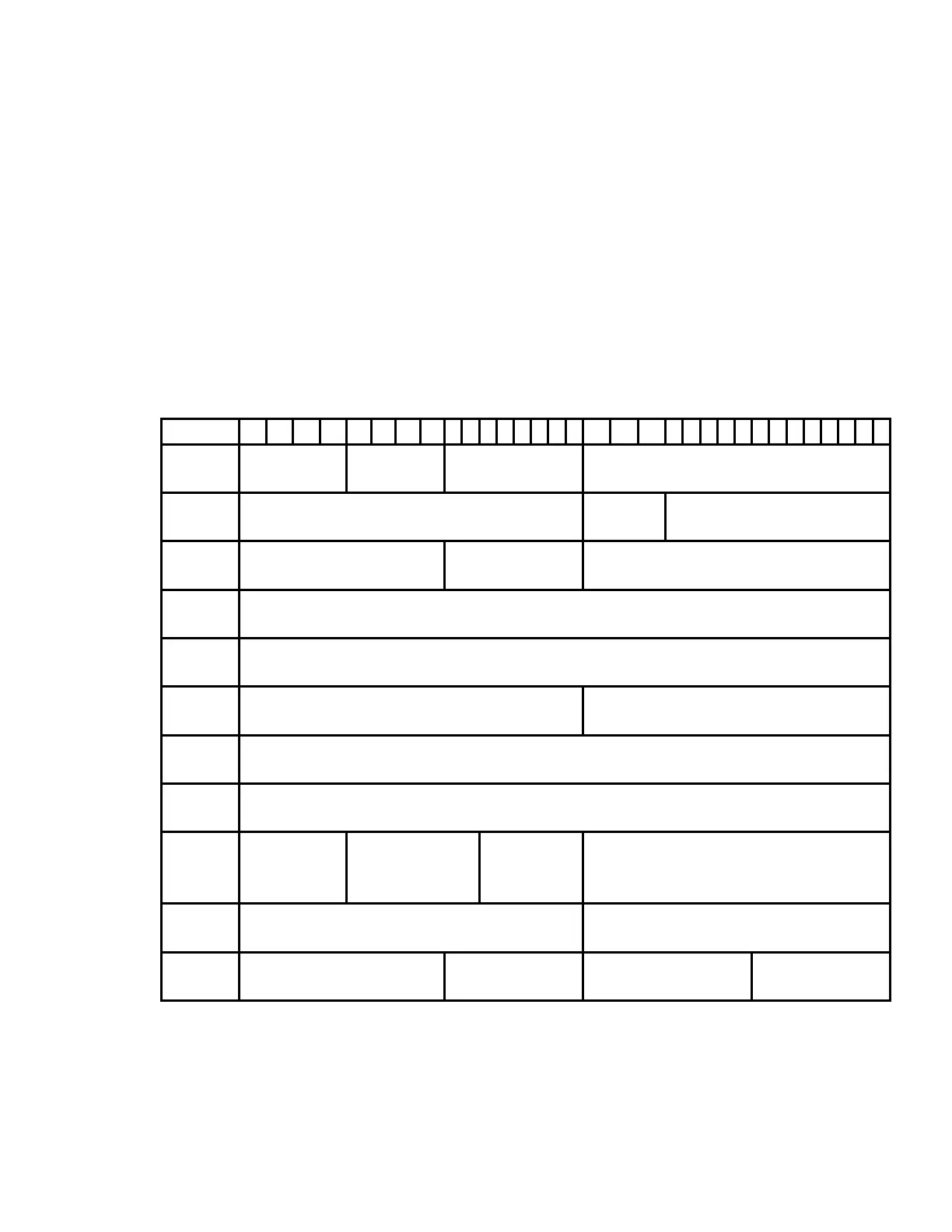
TCP/IPheaderfollowedbytherequireddatabytes.FigurebelowsummarizestheTCP/IP
headerconfiguration.Pleasenotethatthisfunctionalityisprovidedbythesoftware
implementationoftheOpenSystemsInterconnection(OSI)TCP/IPprotocolstack,
specificallytheupper4layers.
Byte
0 Protocol
Version
Header
Length
Typeof
Service
TotalLength
4 PacketID
Flags FragmentationOffset
8 TimeToLive
Protocol Headerchecksum
12 SourceAddress
16 DestinationAddress
20 SourcePort
DestinationPort
24 SequenceNumber
28 AcknowledgementNumber
32 Data
Offset
Reserved Code
Bits
Window
36 Checksum
UrgentPointer
40 DataByte1
DataByte2 DataByte3 DataByteN



 To Next Page