Installation and Maintenance Manual
Working with Voicemail
Installation and Maintenance Manual v4/0615/10 249
2 Select the Company to manage (the Company name will appear in the title bar of Manager)
3 Select Auto Attendant
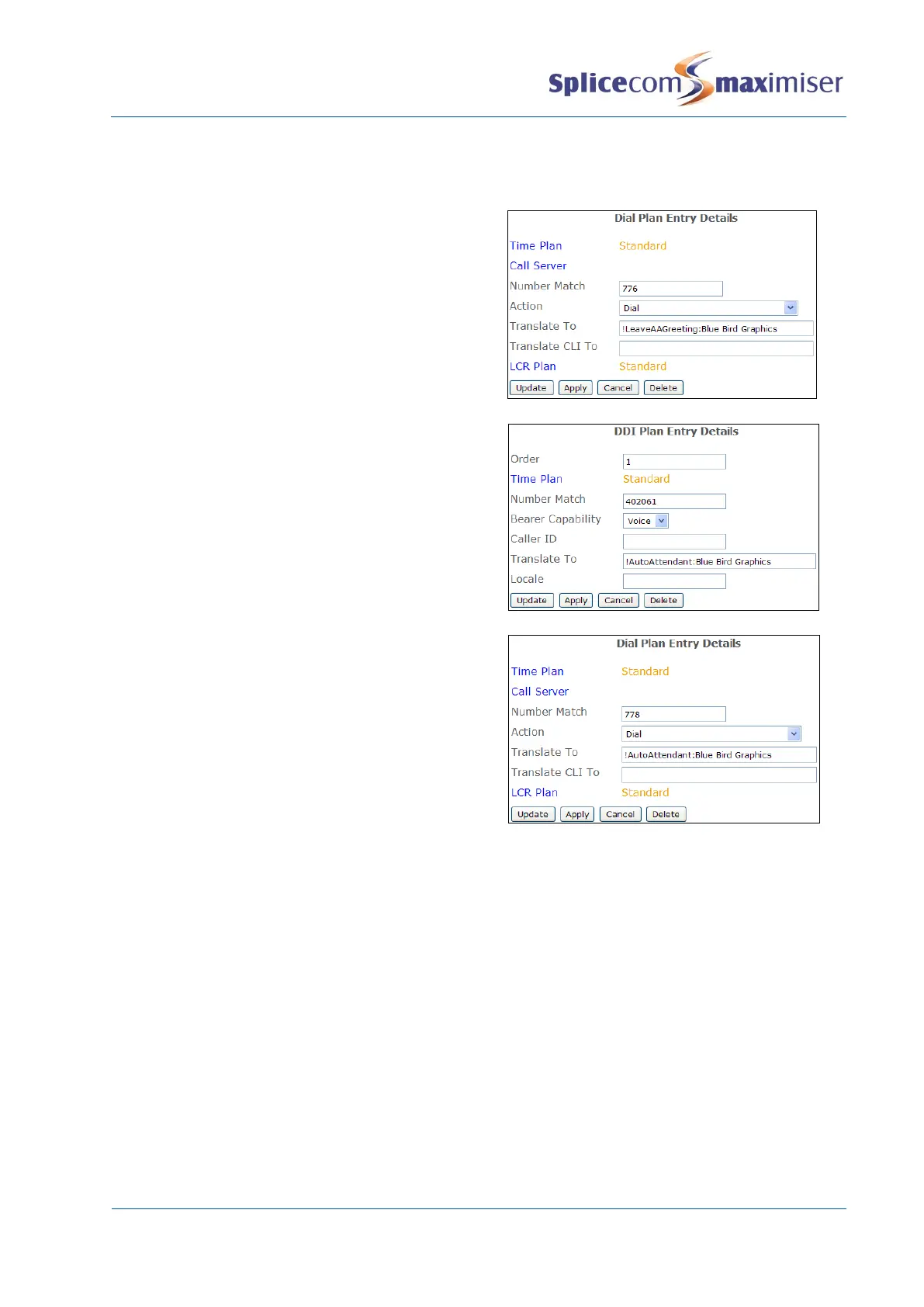
4 Create the Auto Attendant as described on page 246.
5 Record a greeting to announce the options using
a Dial Plan entry as explained on page 247,
however in the Translate To field enter
!LeaveAAGreeting:<company name>, similar to
this example.
6 Create a DDI Plan entry as explained on page 248,
however in the Translate To field enter
!AutoAttendant: <company name>, similar to this
example.
7 To test the Auto Attendant internally create a Dial
Plan entry as explained on page 247, however in
the Translate To field enter !AutoAttendant:
<company name>, similar to this example.
For further information please refer to the Working with Companies section from page 177 for further
details.
Creating VXML Scripts
Multi-level auto-attendants can be built using the VXML Scripts section in Manager incorporating features
such as availability based routing, dial by extension, out of hours routing and text-to-speech. VXML is an
open standard, once generated scripts can be edited manually to include custom features such as
database interaction.
The configuration and set up of a VXML Script is stored on the internal Web Server. For information on
accessing the Web Server please refer to page 264.



 To Next Page