Service manual MODEL 80XX Planter
page 13 of 173
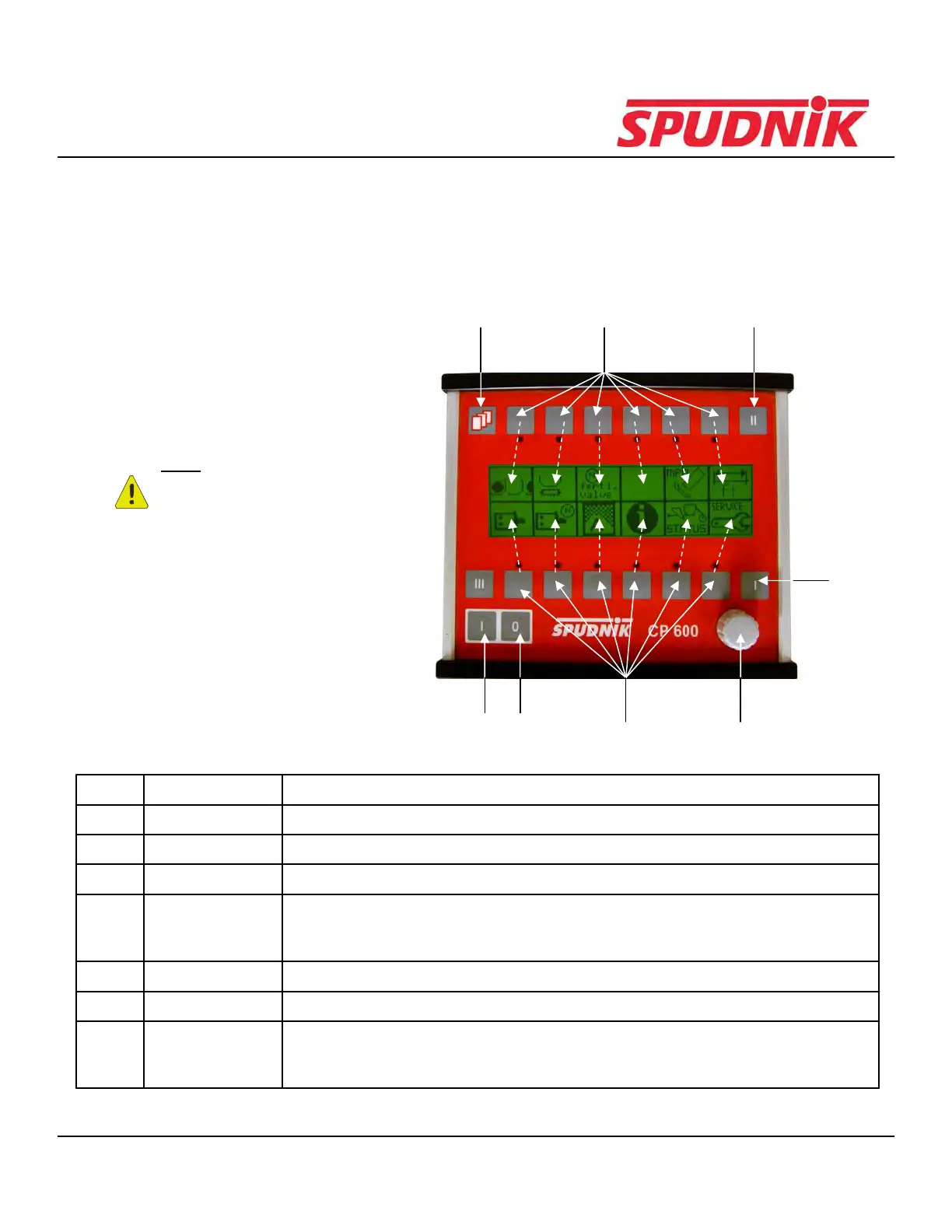
CP600 Buttons and Functions
This section will explain the buttons on the CP600 and their functions
354
6
74
21
Note: The display is not a touch
screen. The dashed arrows indicate
which icon the function buttons
correspond with.
Item # Function Description of Function
1 On Button Provides the power to the control box
2 Off Button Terminates the power to the control box
3 Menu Button Allows user to move from the previous menu to the next menu
4 Function Buttons Use these buttons to choose an icon on the display screen.
These icons, when chosen, will take you to that specific function's settings.
(the function button corresponds with the icon that is directly above/below it)
5 Scroll Up Scrolls up through options of a specific menu
6 Scroll Down Scrolls down through options of a specific menu
7 Control Dial Use this for changing settings.
(Note: Some settings may require contacting a
Spudnik technician to be changed)
CP600 CONTROL BOX



 To Next Page