© 2021 Radiodetection Ltd 18
(Tx-10B), PCs, laptops or handheld devices running a
compatible application.
Refer to Section 12 for further information about
Bluetooth wireless connections and how to pair your
devices.
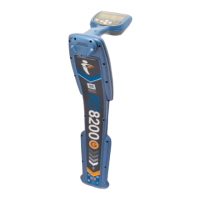
NOTE: The RD8200 locator wireless features may be
subject to national and or local regulations. Consult your
local authorities for more information.
WARNING! Do not attempt any wireless connection in
areas where such technology is considered hazardous.
This may include: petrochemical facilities, medical facilities
or around navigation equipment.
4.15 iLOC™ and SideStep™
iLOC is a standard feature of all RD8200 locators, and
lets you control a Bluetooth enabled transmitter remotely
from your locator.
With iLOC you can adjust the frequency and power
settings, and use SideStep™.
iLOC commands are sent over a Bluetooth module that
can operate at distances of up to 450m / 1400ft in direct
line of sight.
SideStep changes the selected frequency by several
Hertz and automatically sets the locator’s locate
frequency to match the transmitter’s output frequency.
This can be used to eliminate unwanted interference.
See Section 13 for a detailed explanation of iLOC.
4.16 SideStepauto
™
The transmitter can be used to recommend a general-
purpose locate frequency for the intended locate task by
measuring the impedance of the target cable or pipe.
SideStepauto helps to improve locate accuracy by
determining the best signal. SideStepauto can also help
to prolong battery life.
SideStepauto operates only in Direct Connection mode.
Using SideStepauto
To enable SideStepauto:
Connect the transmitter to the target utility, then
1 Press the key to enter the menu
2 Scroll to the OPT F menu using the or keys
3 Press the key to enter the OPT F menu
4 Scroll through using the or keys until START
is displayed
5 Press the key to start SideStepauto and exit the
OPTF Menu
6 Press the key to exit the menu
NOTE: SideStepauto has to be enabled for each Direct
Connection using the START option. At any time the
user may manually change the frequency using the
key
4.17 Transmitter power output
The transmitter supports several power output modes to
help you select the optimal settings for your
requirements whilst helping to prolong battery life.
Adjusting power output
NOTE: On iLOC enabled models, you can adjust the
transmitter’s power output remotely using the locator.
For more information, refer to Section 13.
To adjust the power output:
1 Press the or keys to increase or decrease
power output
Boost (Tx-10 & Tx-10B only)
Boost allows the Tx-10 transmitter to output its maximum
output power. Boost mode can be set to operate for a
specified period of time.
To configure boost:
1 Press the key to enter the menu
2 Scroll to the BOOST menu using the or keys
3 Press the key to enter the BOOST menu
4 Set the BOOST duration using the or keys.
You can choose 5, 10, 15 and 20 minute periods or
ON for continuous operation
5 Press the key to accept your changes and exit
the BOOST menu
6 Press the key to exit the menu
To enable boost:
1 First configure the boost duration using the
procedure above
2 Press and hold the key until BOOST appears on
the transmitter LCD
3 The transmitter will automatically exit boost mode
after the selected duration
To disable boost:
1 Press the key to disable boost


 To Next Page