Model SR555 Stand-On Scale
Operating and Service Manual - S/N 1800+
Part No. MAN555_060829 Page 10 of 18
SInstruments, Inc., 600 Young Street, Tonawanda, NY 14150
Tel: 716-693-5977 Fax: 716-693-5854 URL: www.srscales.com
email: sri@srinstruments.com Copyright 2006 SInstruments, Inc.
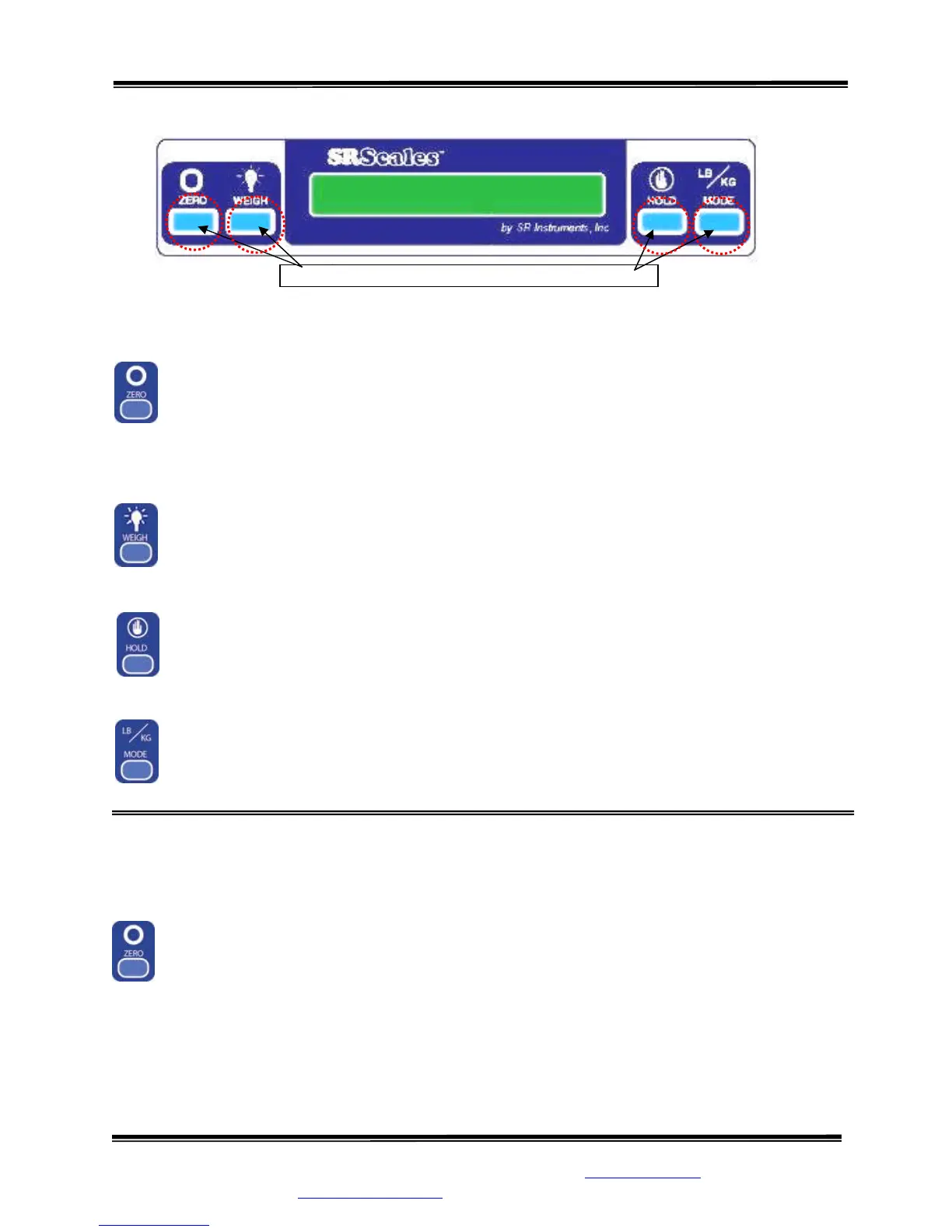
BUTTON FUNCTIONS
ZERO
The “ZERO” button is used to zero the system before placing a patient onto the scale
system. When pressed, the display message will indicate “ZEROING” “PLEASE
WAIT” “HANDS OFF” “PLEASE WAIT". Ensure that nothing is in contact with the
weighing surface during this procedure. The display will read “WEIGHT 0.0 LB” (or
KG).
WEIGH
The “WEIGH” button wakes up the display and shows the patient’s weight if it should
Auto Power Down before the weighing process is done.
HOLD
The “HOLD” button freezes the displayed weight and stores it away in memory. Press
“HOLD” to store the weight into memory. To recall last weight reading, press “HOLD”.
LB/KG MODE
Weight data may be viewed in either pounds or kilograms. Pressing the “LB/KG
MODE” button allows the operator to toggle between the two readings. Both pounds and
kilograms are displayed in a resolution of 0.1.
BASIC SYSTEM OPERATION
SETTING SYSTEM ZERO
Make sure the scale is free and clear of any obstructions and press the “ZERO” button. The
displayed message will indicate “ZEROING” “PLEASE WAIT” “HANDS OFF”
“PLEASE WAIT”. Make sure that nothing is in contact with the scale while zeroing the
system. In a few seconds, the display will read “WEIGHT 0.0 LB” (or KG). Note: If
patient will be using a cane for support on the scale, place the cane on the scale while zeroing the
system. This will ensure that the patient’s NET weight will be displayed. It is recommended that
the system be zeroed prior to each new patient.
After the scale has been set to zero, position the patient on the scale. Display will indicate the
patient’s weight in either pounds or kilograms
Figure 5: Button Display
Press box under each icon to activate command
Continued next page



 To Next Page