Model SR555 Stand-On Scale
Operating and Service Manual - S/N 1800+
Part No. MAN555_060829 Page 13 of 18
SInstruments, Inc., 600 Young Street, Tonawanda, NY 14150
Tel: 716-693-5977 Fax: 716-693-5854 URL: www.srscales.com
email: sri@srinstruments.com Copyright 2006 SInstruments, Inc.
LOW
LIMIT
LOAD
HIGH
LIMIT
199.8 200.0 200.2
299.7 300.0 300.3
399.6 400.0 400.4
499.5 500.0 500.5
599.4 600.0 600.6
699.3 700.0 700.7
799.2 800.0 800.8
899.1 900.0 900.9
999.0 1000.0 1001.0
CALIBRATION
TOLERANCE TABLE
CALIBRATION
NOTE: Ensure that nothing is in contact with the scale system during this procedure. Remove
hands from the system when noting the displayed calibration results.
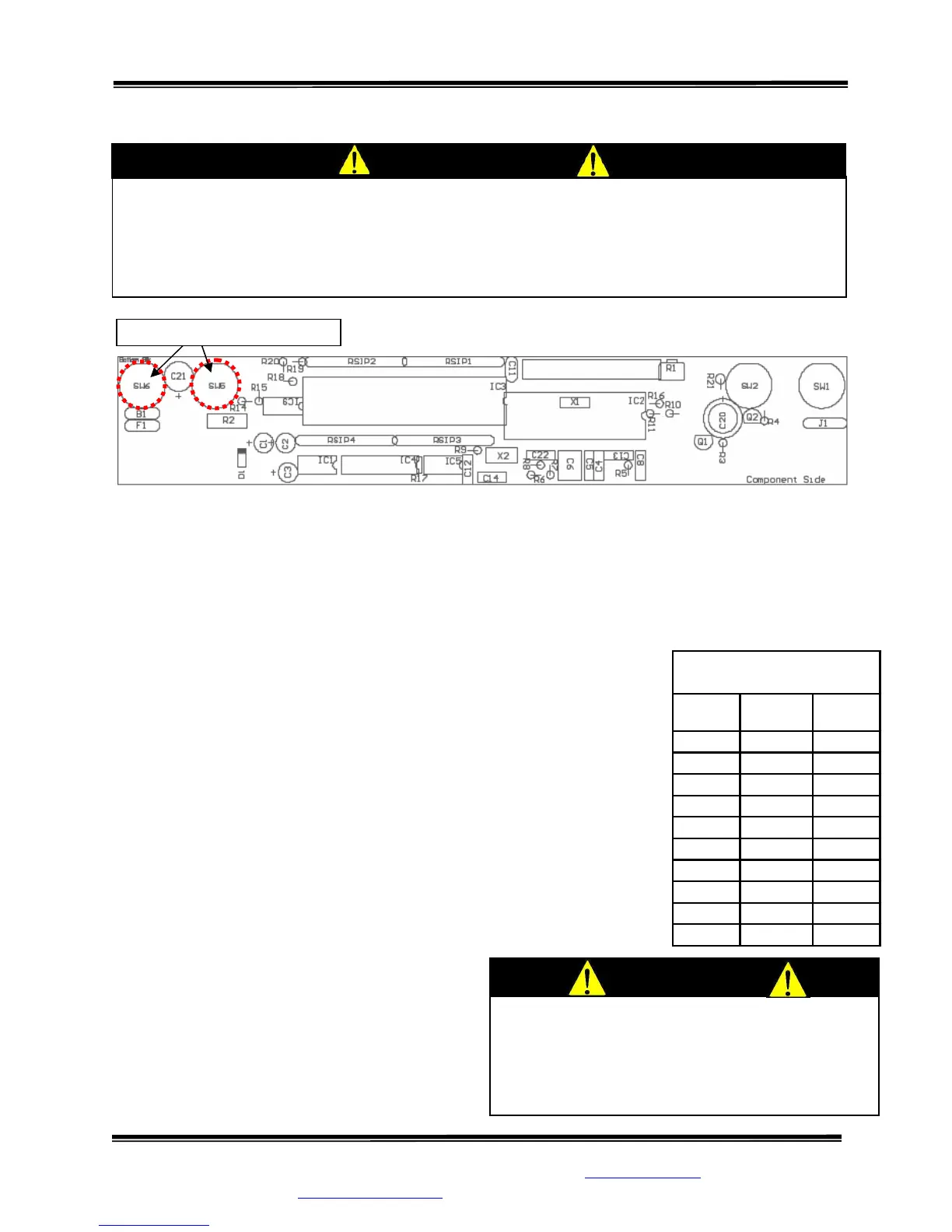
STEP 1: (Figure 7) Remove the two (2) screws on the bottom of the display housing. Lift the
display panel. The calibration buttons are located on the PC Board.
STEP 2: Press and hold both buttons simultaneously.
STEP 3: The display will read “HOLD TO CAL” as the right hand digit
counts down to enter the CAL mode.
STEP 4: When in the CAL mode, press the “ZERO” button to zero
the display.
STEP 5: Place a known calibrated weight, traceable to NIST, onto the
weighing surface and compare it to the displayed reading. Note: DO
NOT USE barbell weights or calibrate to a mechanical scale.
STEP 6: Use the “-” or “+” button to make corrections to the
displayed weight. The displayed value should be within 0.1% of the
calibrated weight, plus or minus 1 digit of reading.
STEP 7: When settings are completed: Press
the “HOLD” button to SAVE the settings or
press the “WEIGH” button to CANCEL. Both
choices will EXIT the CAL mode.
Figure 7: Calibration Button Diagram
CALIBRATION CHECK Qualified service personnel only should perform this
procedure. The SR555 load cell itself has no user serviceable components and should not
be tampered with for any reason. Re-calibration is generally not required, but should be
verified periodically to ensure accuracy. The recommendation for calibration check is at
least once every 12 months, or as individual maintenance policy requires.
CAUTION
The integrated circuits and semiconductors on
the printed circuit boards may be damaged
by electrostatic discharge (ESD). Be sure to
use proper handling precautions at all times.



 To Next Page