Model SR555 Stand-On Scale
Operating and Service Manual - S/N 1800+
Part No. MAN555_060829 Page 14 of 18
SInstruments, Inc., 600 Young Street, Tonawanda, NY 14150
Tel: 716-693-5977 Fax: 716-693-5854 URL: www.srscales.com
email: sri@srinstruments.com Copyright 2006 SInstruments, Inc.
INITIALIZATION
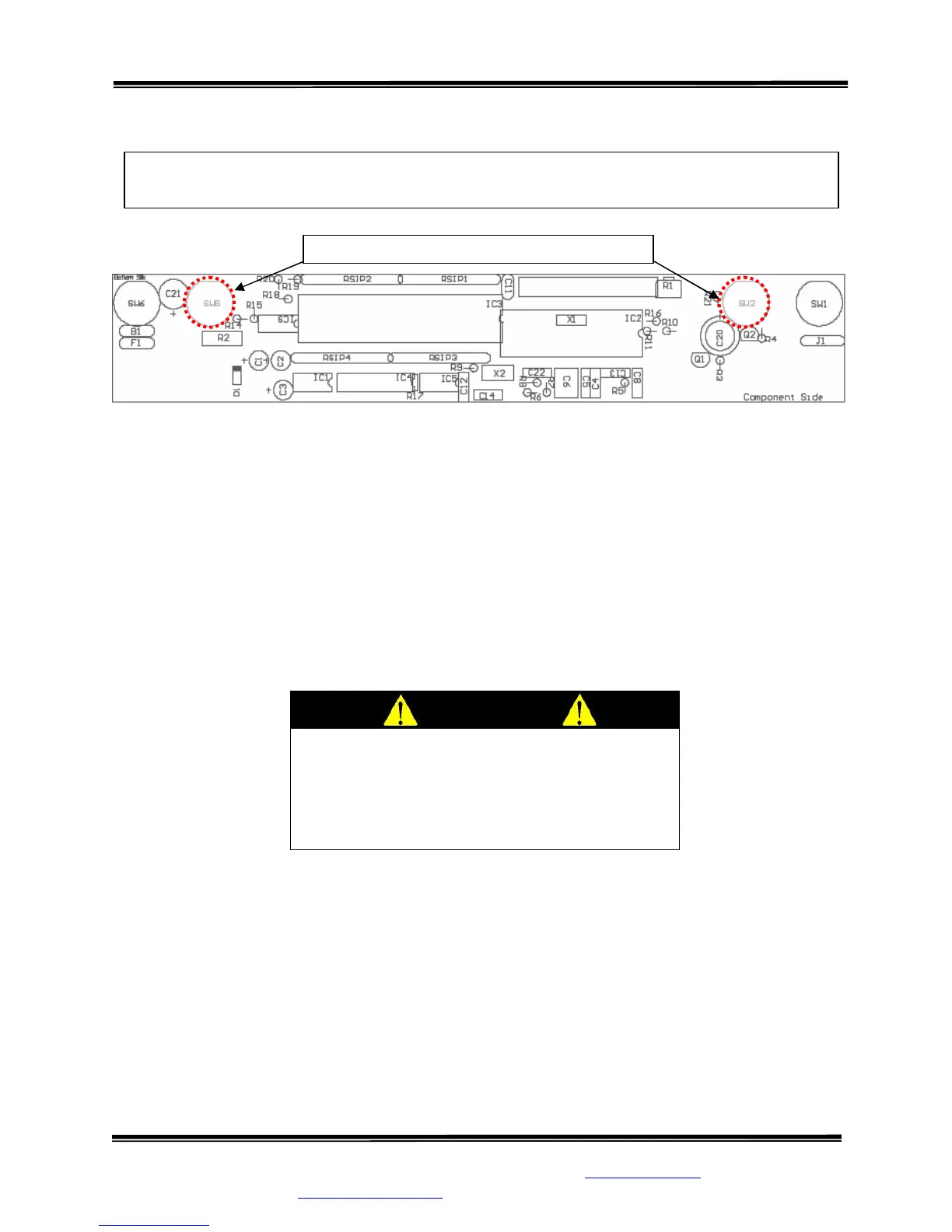
STEP 1: (Figure 8) Remove the two (2) screws on the bottom of the display housing. The
initialization buttons are located internally on the PC Board. Refer to PC BOARD LAYOUT
(SW2 and SW5).
STEP 2: Simultaneously press buttons indicated to initialize the system. The display will read,
“HOLD TO INIT”, and count down from 9 to 0. When the initializing is complete, the display
will read, “INITIALIZING” and then return to the WEIGH mode.
STEP 3: Follow the CALIBRATION procedure.
Figure 8: Location of Internal Initialization Buttons
INITIALIZATION PROCEDURE
To be used ONLY IF REPLACING IC5 or if DISPLAY READS DOUBLE
CAUTION
The integrated circuits and semiconductors
the printed circuit boards may be damaged
by electrostatic discharge (ESD). Be sure to
use proper handling precautions at all times.
Internal Initialization Buttons
SW2
SW5



 To Next Page