ELECTRONIC LOCK
Aer installing the baery, to open the
electronic lock the first me, first press any key
to acvate the keypad, then press the following
numbers/symbols on the electronic keypad in
this order: 1 - 5 - 9 - #. These numbers
are preset.
NOTE: You should change the entry code as
soon as possible aer opening the safe to
insure proper security.
Aer you have entered the factory code, you
will need to turn the handle clockwise to open
the door. You will have 5 seconds to turn the
handle before the locking mechanism
is reacvated.
Before you can enter any numbers, touch any
key on the keypad to acvate it. The keypad
will stay illuminated for approximately
10 seconds.
NOTE: The red reset buon located
on the inside of the door, is covered
with a removable red cap. When you
use the red reset buon while seng
your own combinaon, remove the cap
to access the buon.
Replace the cap securely over the reset
buon aer seng your combinaon.
Failure to do so will compromise the safety
and security of the safe.
40828-1806
2
14
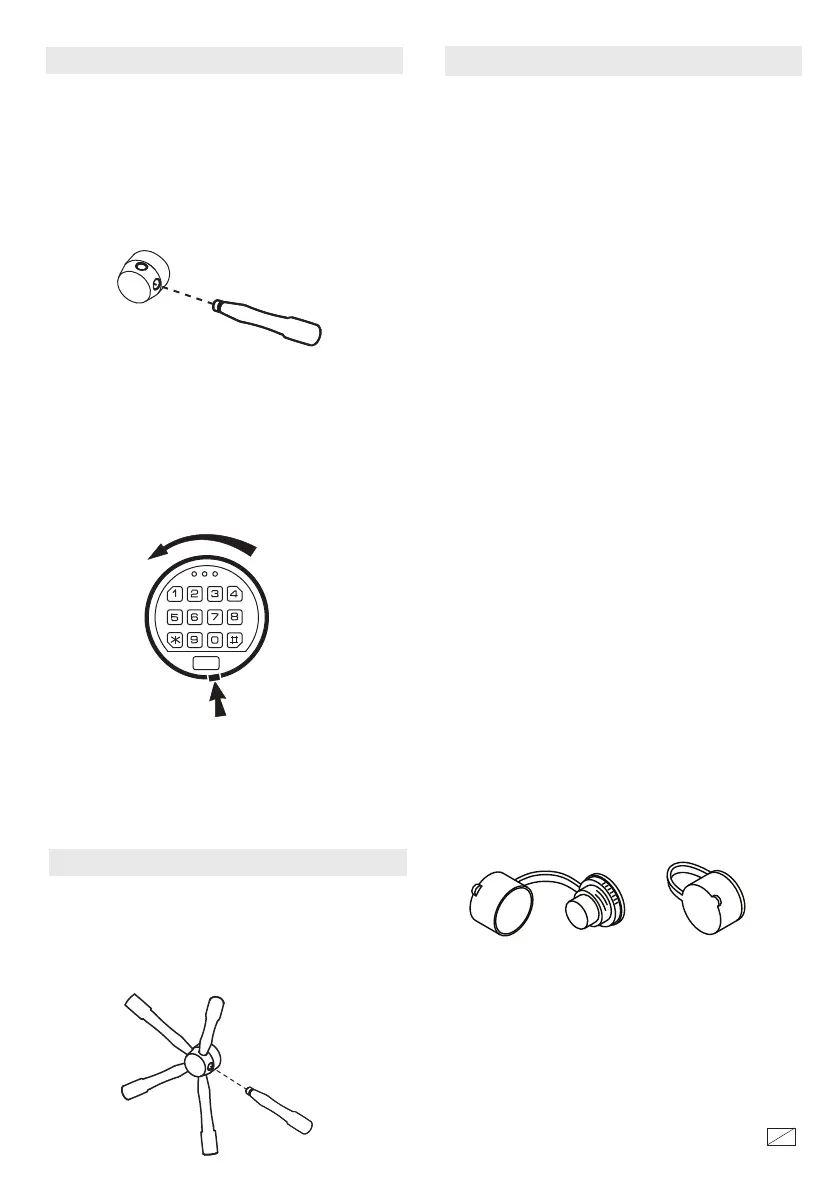
To open the safe for the first me, remove the
spoke handle that is included in the instrucon
sheet bag and screw it into the hub and
hand ghten.
NOTE: Do not use this handle to move the safe.
GETTING STARTED
Remove the key from instrucon sheet bag
and follow the steps below:
1. Remove the lock face by pressing the tab
and turning it as shown in the illustraon.
The lock can hang by the connecng cable while
unlocking the safe.
2. Insert the key in the key hole and turn
clockwise 1/4 turn (unl stopped) in order
to unlock the safe. Rotate the handle and
open the door.
TAB
Screw the 4 remaining handle spokes into the
hub and hand ghten.
NOTE: Do not use this handle to move the safe.
HANDLE ASSEMBLY




 To Next Page