Home
Stanley
Printer
MODEL 1
Page 42
Stanley MODEL 1 - Page 42
112 pages
Manual
Save Page as PDF
To Next Page
To Next Page
To Previous Page
To Previous Page
Loading...
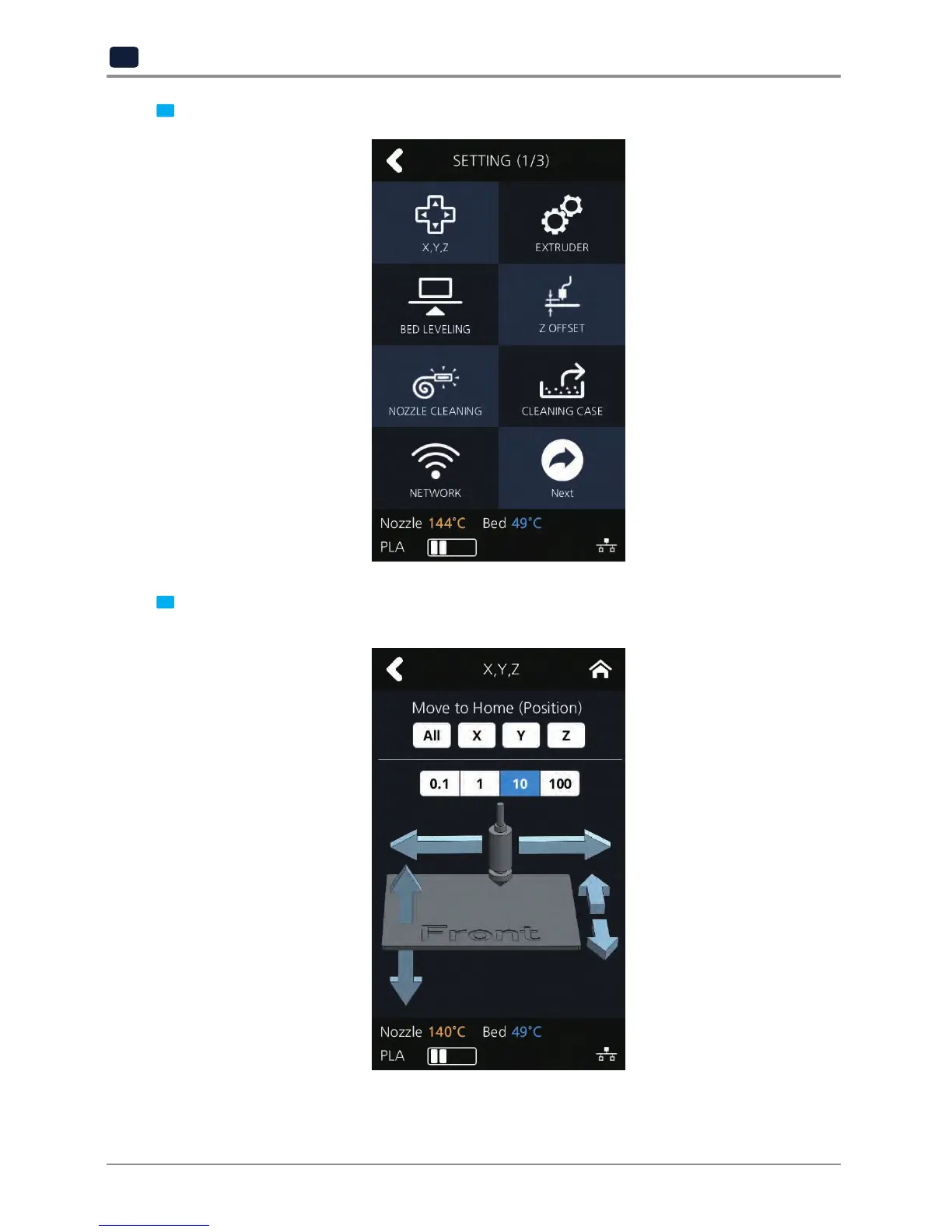
UI Menu Function description
2
-12
2
2
Press the
[X,Y
,Z]
button to enter X, Y
, Z.
3
Press
[0.1],
[1],
[10], [100]
to select the distance user to move.
T
o move to each axis' home location, press
[All],
[X],
[Y]
or
[Z]
.
41
43
Table of Contents
Main Page
Default Chapter
1
User Manual
1
Safety Instructions
2
Before Use
3
Table of Contents
4
Before Using the Machine
7
Preface
7
Conventions
8
Symbols
8
Safety Information
9
Precautions
11
Installation
11
Moving the Machine
12
Consumables Handling
13
Instructions for Use
14
Ventilation
15
Notices
16
Disposal of Used Battery
18
10. Wifi Module Disclaimer
19
11. USB Memory Disclaimer
21
Chapter 1 Preparations for Machine Operation
23
Machine Specifications
24
Printing
24
Temperature/Speed
24
Machine
24
Software/Support
24
Default Setting of Print Layer Width
24
Basic Components
25
Understanding the Device Parts
26
Installation (Product Connection, Cartridge Setup and Includes Software Installation)
28
Device Connection
28
Program Installation
28
Chapter 2 UI Menu Functions
31
UI Menu Function Description
32
Cartridge
33
Load
34
Unload
35
Unlock
37
Settings
40
X, y
40
Extruder
43
Bed Leveling
45
Z Offset
47
Nozzle Cleaning
49
Cleaning Case
51
Network
52
Lamp
56
Bed Lowering
58
Test Print
59
Power Saving Mode
61
Beep Sound
62
Nozzle Setting
64
Language
66
E-Mail
68
Unit
72
Time Setting
73
Time Zone
75
Information
78
Chapter 3 Printing
81
Printing
81
Printing from USB Flash Drive
82
Printing Via PC
86
Chapter 4 Printed Output Check
89
Printed Output Check
89
Improving Printing Quality
92
When Printer Cannot be Turned on
93
Chapter 5 Maintenance
95
Machine Cleaning
96
Cleaning Case Maintenance
96
Printer Interior Cleaning
96
Periodical Inspection
96
Oil/Grease Inspection
96
Error Message and Solutions
97
Problems and Solutions
100
If Filament Does Not Come out of the Nozzle (Fix for EC401)
100
In Cases Where Filament Is Cut between the Extruder and Nozzle
101
When Filament End Is Visible Outside the Cartridge after Unloading
101
Replenishing Consumables
102
Bed Replacement
102
Removing Aluminum Bed
102
Installing Aluminum Bed
102
Filter Replacement
102
Cartridge Replacement
104
Nozzle Replacement
104
Methods of Detaching Nozzle
104
Assembling the Nozzle
106
Chapter 6 Appendix
109
Type of Consumables (Material, Color)
110


 To Next Page