4.3 Cartridge Replacement
Replace cartridge when a cartridge is used up or a different color/material is needed.
1
Initiate Cartridge Unload.
Reference
-
For details on cartridge unload, please refer to P. 2-5 “UNLOAD”
2
Initiate Cartridge Load
Reference
-
For details on cartridge load, please refer to P. 2-4 “LOAD”
Note
-
When replaced with a different color, the previously used color may be seen in the beginning of printing.
If the color is the only difference from the previous filament, it doesn’t affect the printing quality.
Difference in material, however, may affect the printing quality.
To fix problem, after changing cartridge, please run nozzle cleaning (Refer to P. 2-19 “NOZZLE CLEANING”)
before printing.
4.4 Nozzle Replacement
Methods of Detaching Nozzle
Initiate [Cartridge] - [Unload] in the UI. Initiate detaching process ONLY after power of machine is turned OFF,
and after all power cables are disconnected.
1
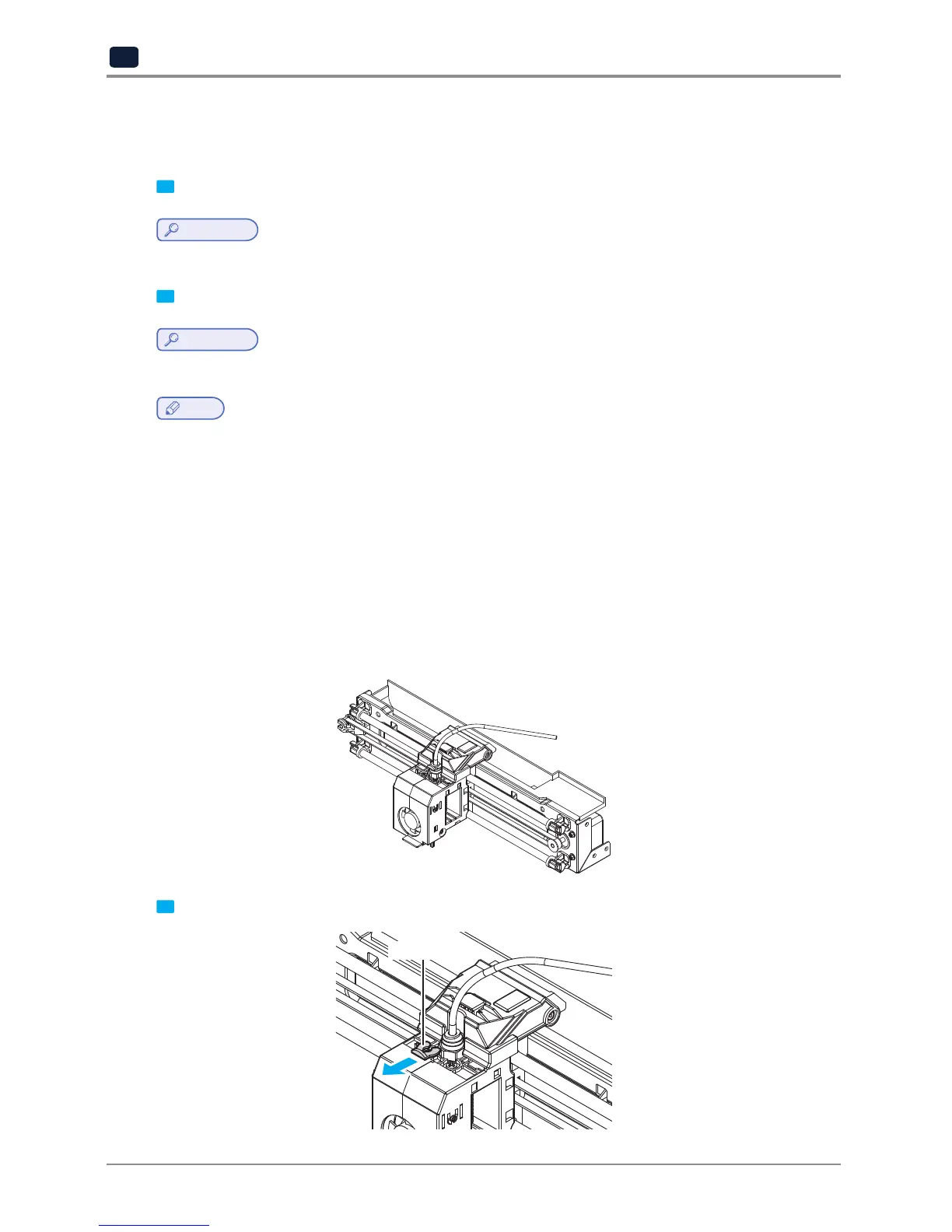
Remove Snap-Ring.
SNAP-RING


 To Next Page