1. Printed Output Check
1.1 Detaching Printed Output
To safely detach the printed model, first let the bed cool down. Bed top plates must be detached as well.
Caution
Hot Surface
-
Without sufficient cooling the bed can be very hot. Please be cautious coming into contact .
It may cause burns.
1
Cooling the Bed
After the printing, check the LCD screen and wait until temperature goes below 50 ºC or 122 ºF.
2
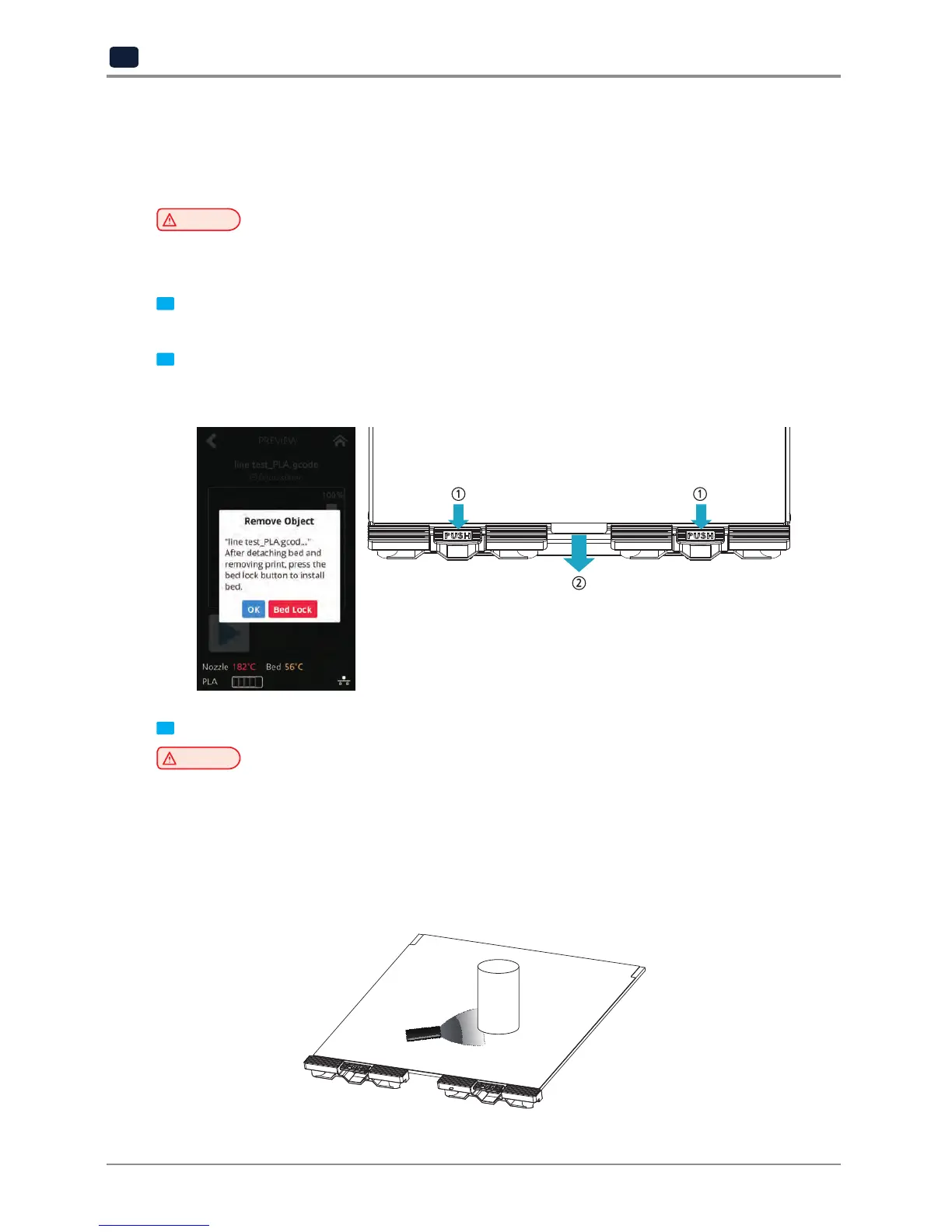
Detaching Bed
Press [Bed Lock] on the screen to fix the bed in place. Pressing and holding the [PUSH] buttons on the bed
handles, pull the bed out.
3
Detaching the printed output
Caution
Risk of Injuries
-
The scrapper is very sharp. Handle with care.
Please be cautious of inuries when removing printed objects with the scrapper.
Detach the printed output from the bed. Using the scrapper provided with the printer will be useful.
Be careful not to apply too much pressure while using the scrapper could damage the bed sheet and the
aluminum bed. Depending on the filament material the printed output may easily break or damage,
please be cautious.


 To Next Page