10
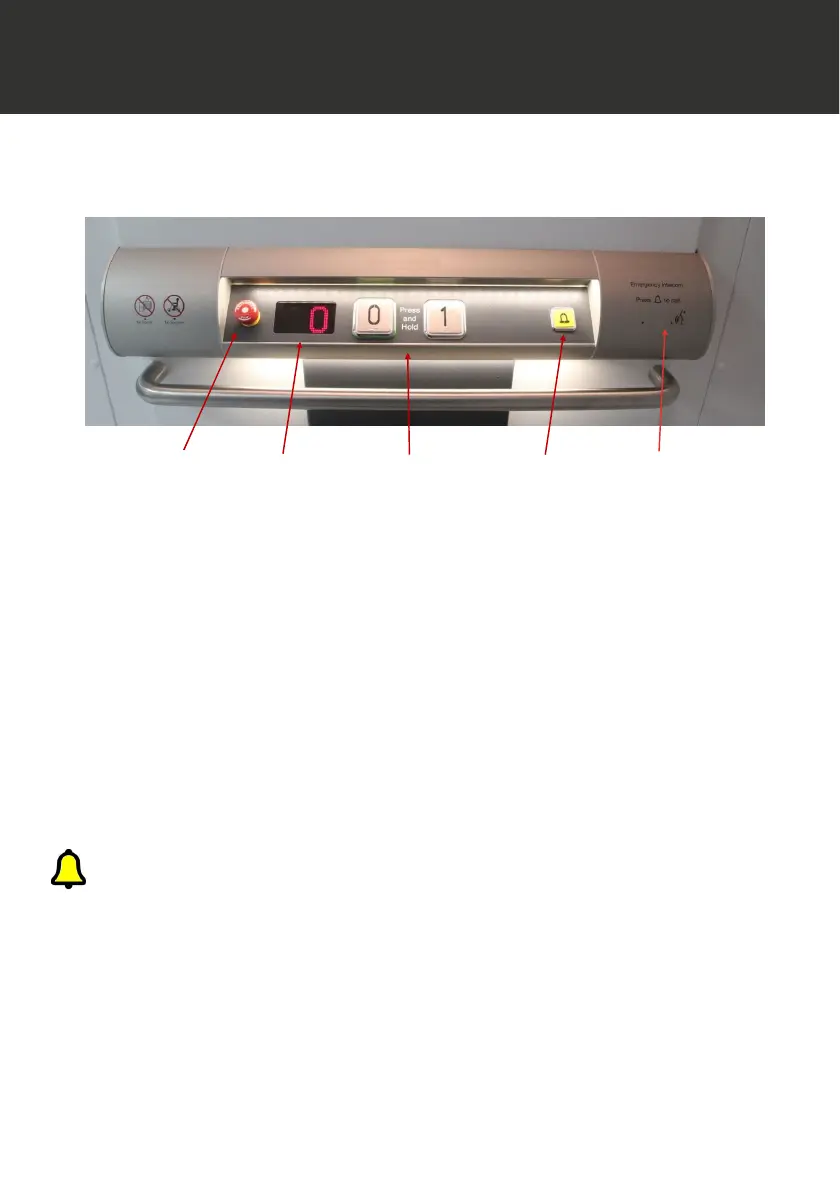
Operating Console
Intercom
microphone
Alarm button Operating
buttons
Digital
display
Stop
Button
**
Intercom is the standard communication supplied with the lift. In some situations an
automatic dialling system may be in place. If so, instructions are provided on the console
and over the speaker. The system will dial predetermined phone numbers to put you in
contact with a rescue service.
In the event of experiencing difficulty in the lift, help can be alerted by continuously
pressing the yellow alarm button. This action will ring the intercom handset elsewhere
in the building, when answered, 2 way communication is possible and the button can
be released. **
MI D I LI F T G L / S L PL AT F
MI D I LI F T G L / S L PL AT FMI D I LI F T G L / S L PL AT F
MI D I LI F T G L / S L PL AT F O RM L I F T
OR M L I F TOR M L I F T
OR M L I F T
LIFT OPERATION FROM THE PLATFORM
LIFT OPERATION FROM THE PLATFORMLIFT OPERATION FROM THE PLATFORM
LIFT OPERATION FROM THE PLATFORM
When the lift door is closed and locked, the lift is ready to move.
Operate the button of the level that you wish to travel to. Lift movement will be announced via
the voice unit and an arrow displayed on the console.
During lift travel, be aware of moving parts around you and ensure that any loose items and
passengers are away from the sides of the moving platform.
Upon reaching the floor, the door will unlock for 5 seconds giving opportunity to exit the lift.
If the door should lock again simply press the floor button relating to the floor you are at and it
will unlock again.
Operation of the stop button will stop all lift movement. To release the stop, twist it clockwise
until it has released.



 To Next Page