Multiflex Tinnitus Technology | 23 22 | Operation
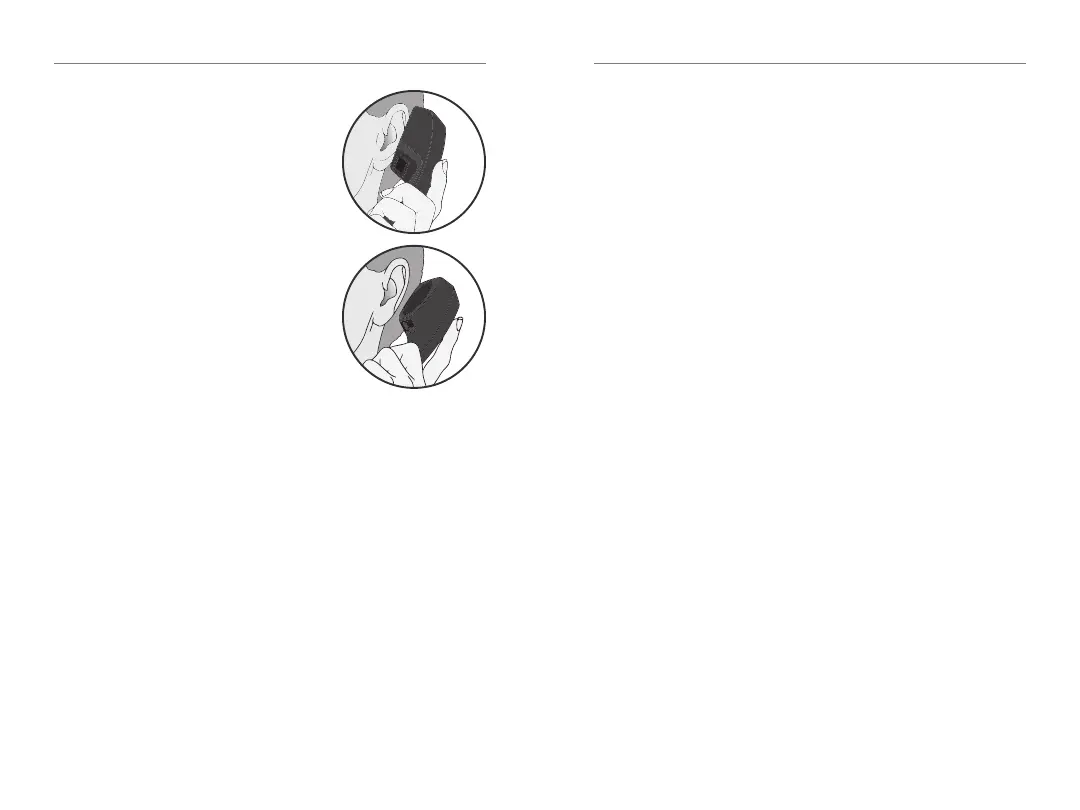
General Telephone Use
Some hearing aids work best by
holding the phone close to, but
not fully covering your ear� In
some instances, if you encounter
whistling (feedback), tilt the
receiver at an angle until the
whistling stops� Additionally, the
hearing aid in the non-phone ear
(ear opposite the phone) may
switch to a telephone setting to
reduce background sounds� Your
hearing professional can provide
instructions and techniques for
your specific needs�
Introduction
Multiflex Tinnitus Technology can be used as part
of a tinnitus treatment program� Multiflex Tinnitus
Technology plays a tinnitus stimulus through the
hearing aid� The tinnitus stimulus is programmed
according to your hearing loss, and your hearing
professional can adjust the settings of the tinnitus
stimulus to meet your needs�
Sprinkler Tinnitus Stimulus Control
If your user control is configured as a sprinkler
stimulus control, each time you activate the user
control, the stimulus level in your hearing aid changes�
Sprinkler stimulus control is configured by default
to automatically decrease in level before it increases�
To make the stimulus level louder, activate the user
control� Repeat this motion until you are at the
minimum setting� The next time you activate the
user control, the level will increase one step� Continue
to activate the user control until you
reach the desired loudness�
NOTE: If 10 minutes or more have passed since the
last stimulus level change, the level will automatically
decrease before it increases�


 To Next Page