RDCM V03-1015 13
User manual Starline RoldeckUser manual Starline Roldeck
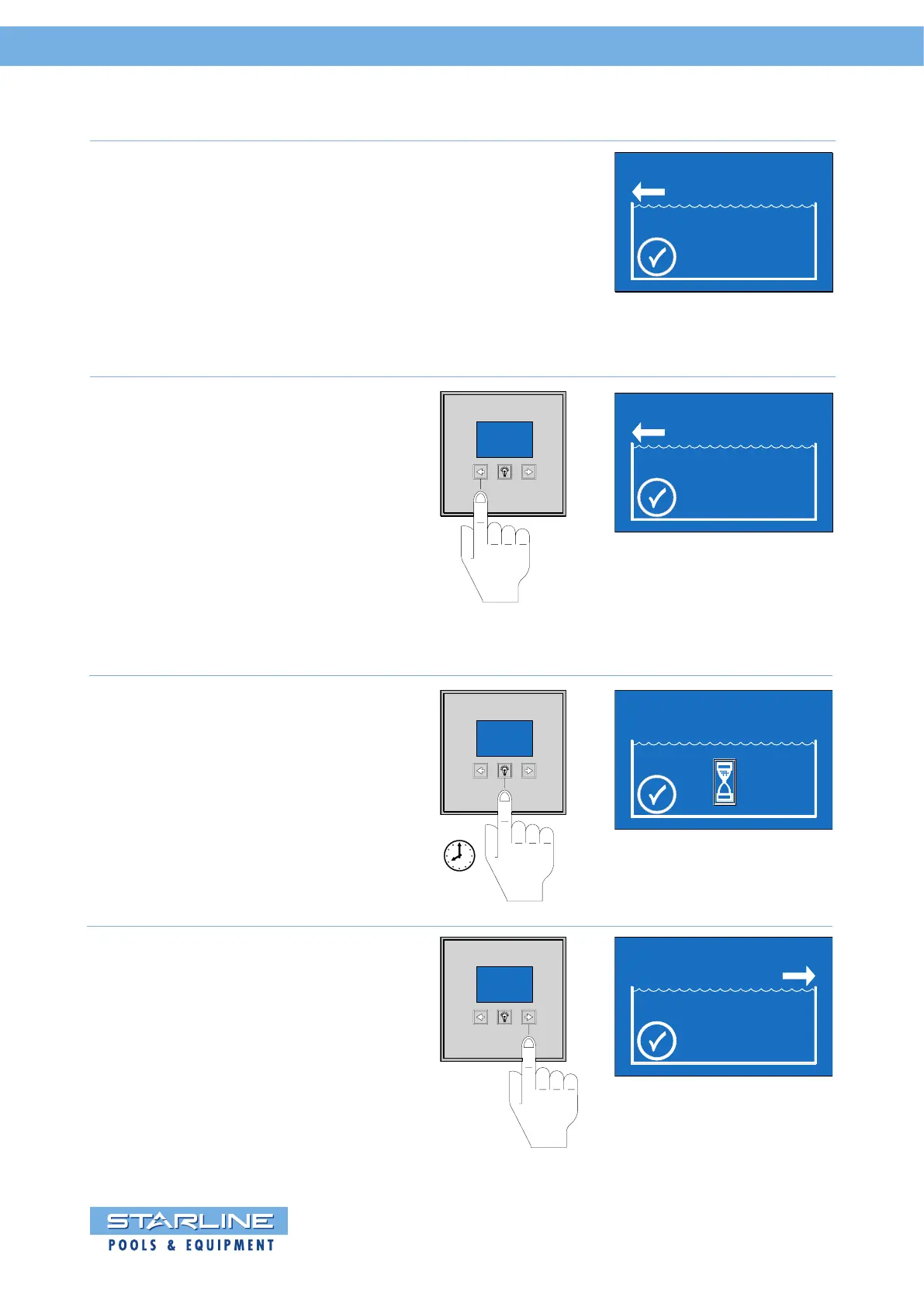
Press the middle key “light symbol“
once to save the “OPEN” position.
The hourglass “” shows a short
waiting time.
1 sec.
OPEN
CLOSE
Subsequently, the “CLOSE” position
should be programmed. The display
will asks you automatically.
Press and hold the arrow key until
the Roldeck is completely closed.
OPEN
CLOSE
OPEN
CLOSE
The “OPEN” position is programmed by
pressing the arrow key . Press the arrow
key until the Roldeck fully opened.
The arrow above the position “open”
position flashes.
The type of drive motor is automatically
recognized.
This is shown with the “” symbol.
The display shows the following picture
Now there can be started with
programming the “OPEN” position of
the Roldeck.
The running direction of the Roldeck
is indicated by the arrow .
The “” indicates that the engine is not
recognized.
By pressing the arrow key the motor
will be detected.
OPEN
CLOSE


 To Next Page