EasyManua.ls Logo

Starr Instruments FDG Series - Menu Navigation and Settings

Starr Instruments FDG Series
31 pages
Print Icon
To Next Page IconTo Next Page
To Previous Page IconTo Previous Page
Loading...
8
3. Menus
3.1 Structure
The Force Gauge has multi-level menu interface(Table 3-1).
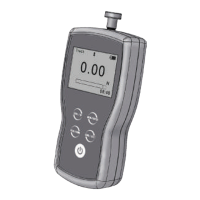
From the home screen, touch “ ” to enter the Menu.
(Fig. 3-1Fig. 3-2)
Touch or can move selection. Then touch
can enter the next layer of menu.
Touch can cancel the setting or exit.
In number input, touch can increase the number, and
touch can change to another digit or item.
Menu
Measurement

Unit
Group
Tolerance
Test Mode
Peak Time
Alarm
Memory
Storage Mode
Browse All
Browse Selected
Delete Selected
Delete All
Printing
Print Recent
Print Selected
Print All
System
Display Mode
Power Off
Backlight
Key Tone
Date/Time
Password
Key Setting
Default Setting
Language
Calibration
Information
Table 3-1
Fig. 3-1
Fig. 3-2

Related product manuals