- 12 -
STC8H Series Manual
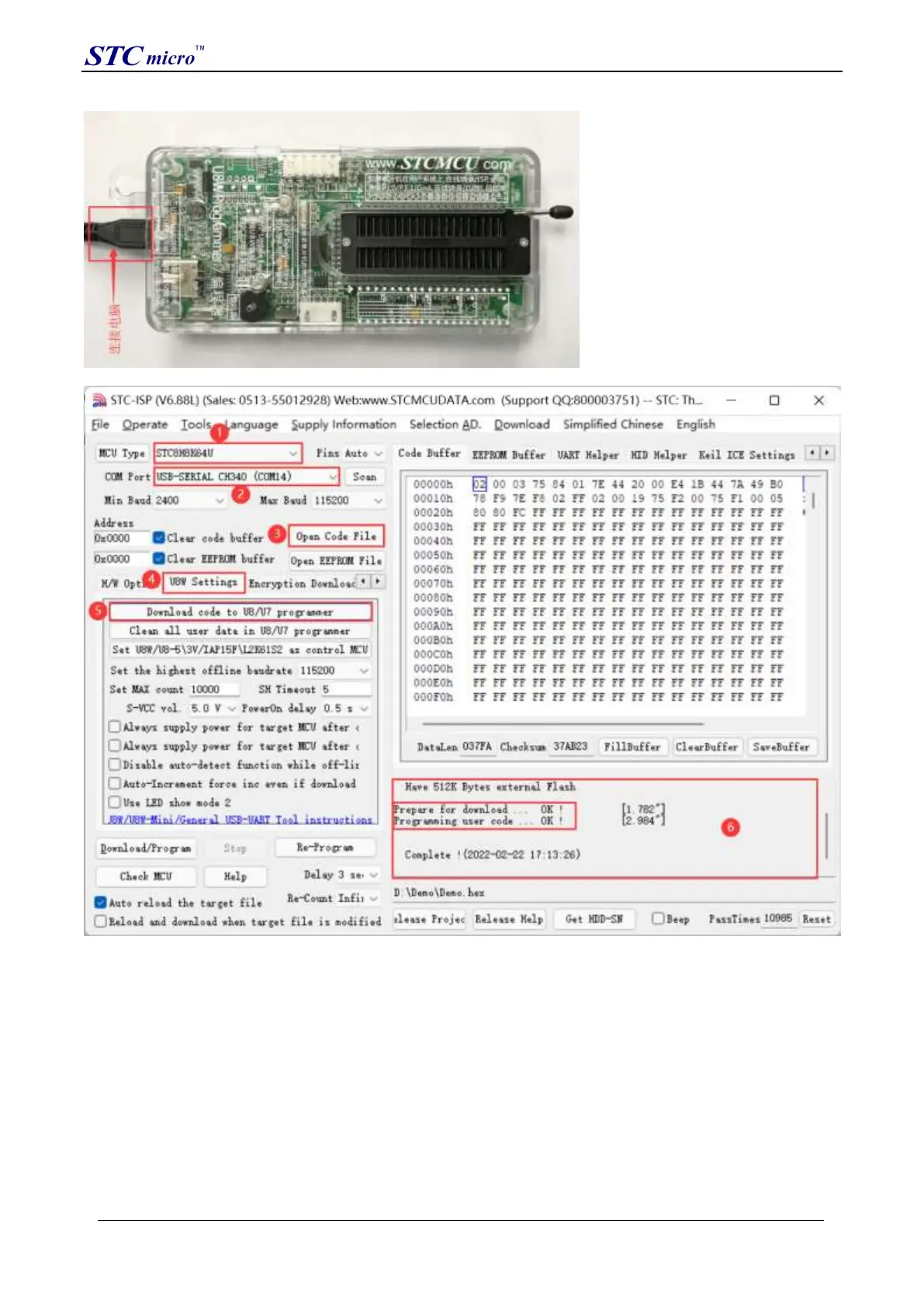
(2) Set up in the STC-ISP download software according to the steps shown in the figure below:
1. Select the MCU model;
2. Select the serial port number corresponding to U8W;
3. Open the target file (HEX format or BIN format);
4. Set the hardware options;
5. Select the "U8W Offline/Online" tab, set the offline programming options, pay attention to the S-VCC output
voltage matches the target chip working voltage; click the "Download user program to U8/U7 programmer for offline
download" button ;
6. The step information of the setting process is displayed, and the prompt "Completed!" is displayed after the setting
is completed.
According to the steps in the above figure, after the operation is completed, if the download is successful, it means
that the user code and related setting options have been downloaded to the U8W download tool.
It is recommended that users use the latest version of STC-ISP to download the software (please always pay attention
to the updates of the STC-ISP download software on the STC official website http://www.STCMCUDATA.com. It is
STC Tool Instruction Manual



 To Next Page