CI2 Operation Manual 15
The Controls and Connectors
English
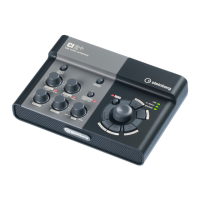
AI KNOB section
The functions of the 8 AI KNOB, 9 [LOCK]
button, and ) [Action Pad] button differ ac-
cording to the mode, Normal or Browse. Normal
mode is the conventional mode. In Browse
mode, you can use the button 8 AI KNOB, 9
[LOCK] button and ) [Action Pad] button to
navigate through Cubase windows, e.g. the
Browse Sounds dialog. Below are explanations
of the function in Normal mode. Refer to “The
functions of AI KNOB section in the Normal
mode and the Browse mode” on page 16 for
explanations of the function in the Browse
mode.
8 AI KNOB
Turning the AI KNOB
This multi-function knob can control a desired
parameter within the principal window and plug-
in software in Cubase, specified via the mouse
pointer.
Pressing the AI KNOB
Opens certain windows in Cubase, such as the
Browse Sounds window (while entering Browse
mode in this case). For details, refer to the fol-
lowing table.
9 [LOCK] button/Indicator
You can “lock” the parameter to be edited via
the AI KNOB by turning this button on. When
you locate the mouse pointer to the desired pa-
rameter then turn the [LOCK] button on, the AI
KNOB will control the “locked” parameter re-
gardless of the mouse pointer’s position. The
[LOCK] indicator lights while the parameter is
locked. By turning the [LOCK] button off, you
can unlock the parameter to be edited and the
AI KNOB can then be used to edit another pa-
rameter to which the mouse pointer is located.
) [Action Pad] button
This button is used for an Interactive Recording
function on Cubase. When this button is
pressed, the Interactive Recording panel is
shown. If the display is already shown, pressing
the button performs the registered functions in
order. Two to six functions can be registered on
the Interactive Recording panel.
! USB Indicator
This indicator shows the communication state of
CI2 and computer. The indicator lights when the
CI2 is connected to the computer via a USB ca-
ble and communication with the computer is en-
abled.
@ AI READY Indicator
This indicator shows the communication state of
CI2 and Cubase. The indicator lights when the
Link functions are available.
To use the Link function between the CI2 and
Cubase, you will need to install Cubase/Cubase AI
version 5.1 or higher. For details, refer to the following
website.
http://service.steinberg.de/goto.nsf/show/
supportupdates_ci2_gb
# BROWSE Indicator
This indicator lights when a window in Cubase
is opened, such as the Browse Sounds. The in-
dicator lights in the Browse mode. It does not
light in the Normal mode.
The status of Cubase Window to be opened
Project has not been opened
yet
Project Assistant
Project is opened Browse Sounds window
Opening an active VST/VSTi
plug-in window
Search & Viewer
Opening an Interactive Re-
cording panel
Preset pop-up list



 To Next Page