Connecting to an External Device
20 Getting Started
Connecting to an External Device
Cautions when connecting to external devices
When connecting the MR816 CSX/MR816 X to external audio devices and a computer, follow the instructions below.
WARNING
• Before you connect external devices to the MR816 CSX/MR816 X, turn off the power to all devices after setting all volume levels to
minimum (0). Otherwise, electrical shock or damage to the components may occur.
1 Connect the instrument or microphone to
MR816 CSX/MR816 X then connect the
MR816 CSX/MR816 X to the computer using an
IEEE1394 cable.
2 Start the computer.
3 Turn on the power to all the devices in the follow-
ing order: connected instruments and micro-
phones ➝ MR816 CSX/MR816 X ➝ monitor
speakers.
When you turn off the power, first turn down the vol-
ume of each audio device, then turn off in the
reverse order: monitor speakers ➝ MR816 CSX/
MR816 X ➝ instruments and microphones).
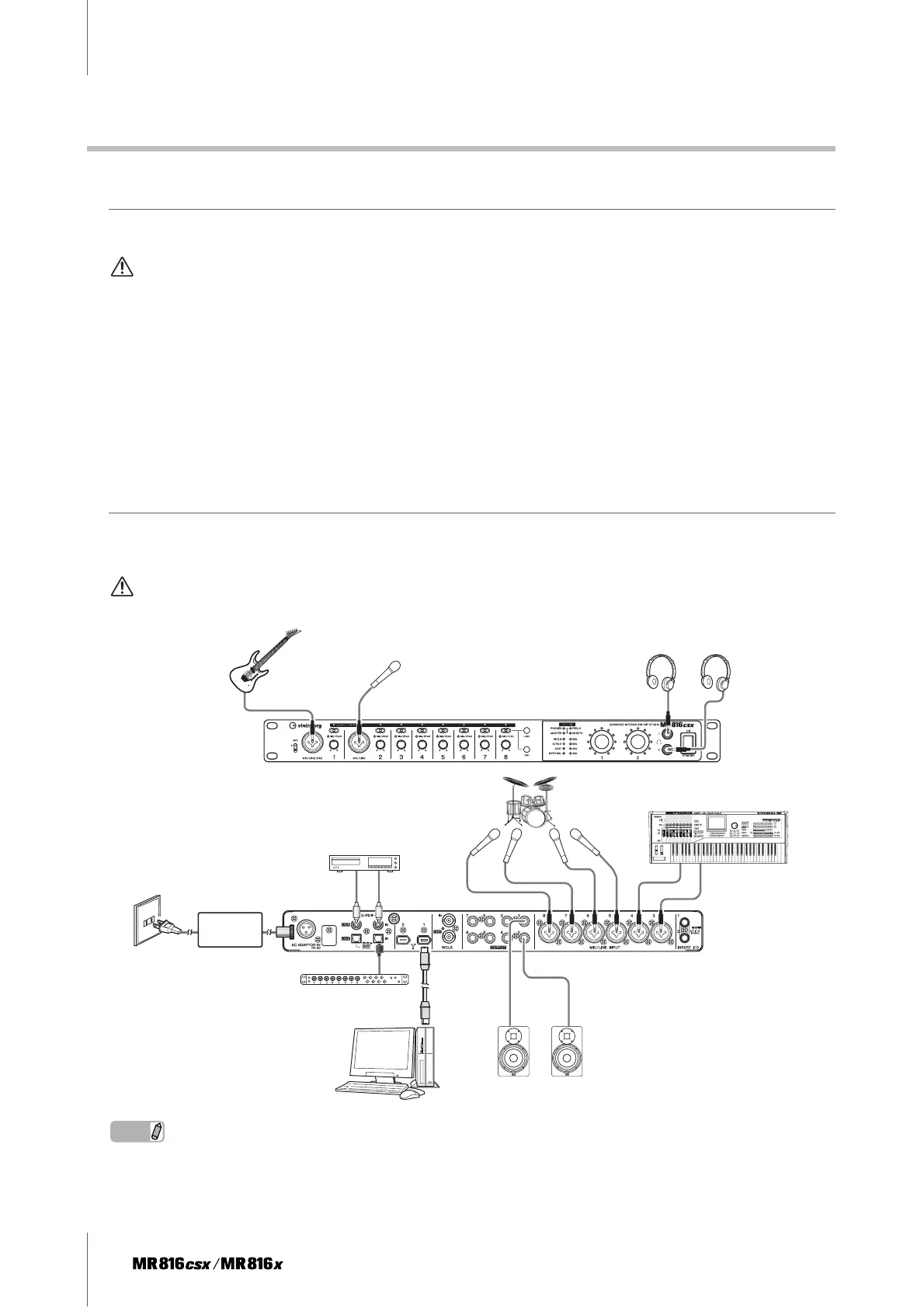
Connecting a single MR816 CSX/MR816 X to a computer (DAW)
The MR816 CSX/MR816 X has a comprehensive set of I/O terminals allowing you to connect digital devices such as a mas-
ter recorder and mic preamp (having digital input/output) as well as analog devices such as microphone, guitar and bass.
WARNING
•Make sure to set all volume levels to minimum (0) before disconnecting the external device.
NOTE
· The MR816 CSX/MR816 X can handle up to 16 channels of audio signal (Analog 8 channels, Digital 8 channels). Regarding the digital
input/output channels, you can select which format is used: S/PDIF (coaxial/optical) or ADAT or both according to the connected audio
devices. You can set this from the control panel in Cubase or Yamaha Steinberg FW Driver, and the setup screen of MR Editor. Please refer
to the Operation Manual for more details.
1
2
Guitar
Microphone
Headphone 1 Headphone 2
Front panel
Synthesizer/Tone generator
Microphone
MD/CD/DAT
Mic preamplifier
AC
adaptor
Computer
Powered speaker
Rear panel



 To Next Page