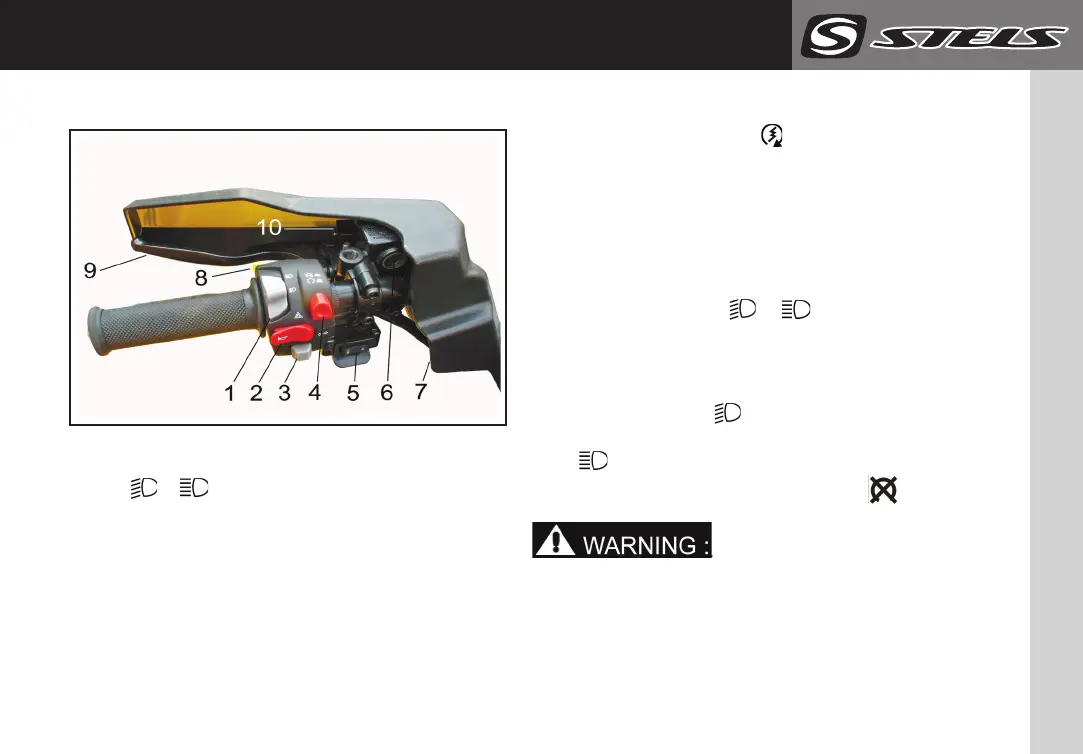
LEFT UNIT
650/800/850 GUEPARD
23
Left switch unit
1. Head light switch
« / » (low / high).
2. Horn button / Alarm signal.
3. Turn indicator switch.
4. Engine emergency stop button.
5. Winch control switch.
6. Brake master cylinder.
7. Hand protection.
8. Engine start button.
9. Left brake lever (rear wheels).
10. Left brake lever lock.
Engine start button « ».
You will start the engine with a starter by pushing
the button.
NOTE:_________________________________
For engine start instructions see page 42.
¯¯¯¯¯¯¯¯¯¯¯¯¯¯¯¯¯¯¯¯¯¯¯¯¯¯¯¯¯¯¯¯¯¯
Head light switch « / ».
Set the ignition key in the ignition switch in the
IGNITION position.
To switch on the low beam and rear position lights,
set this switch into position. To switch on the
high beam and rear position lights, set this switch
into position. To switch off the lights, set the
ignition key in the ignition switch in position.
___________________________
It is not recommended to turn the high beam
on for a long time with the engine off.
Otherwise, the accumulator battery will
discharge, making the next engine run difficult.
In this case remove the accumulator battery
and charge it.
¯¯¯¯¯¯¯¯¯¯¯¯¯¯¯¯¯¯¯¯¯¯¯¯¯¯¯¯¯¯¯¯¯¯¯¯¯¯¯¯
manufacture website : stelsoffroad.com



 To Next Page