ASTOTHERM PLUS Instructions for Use
18
6.4 Control panel
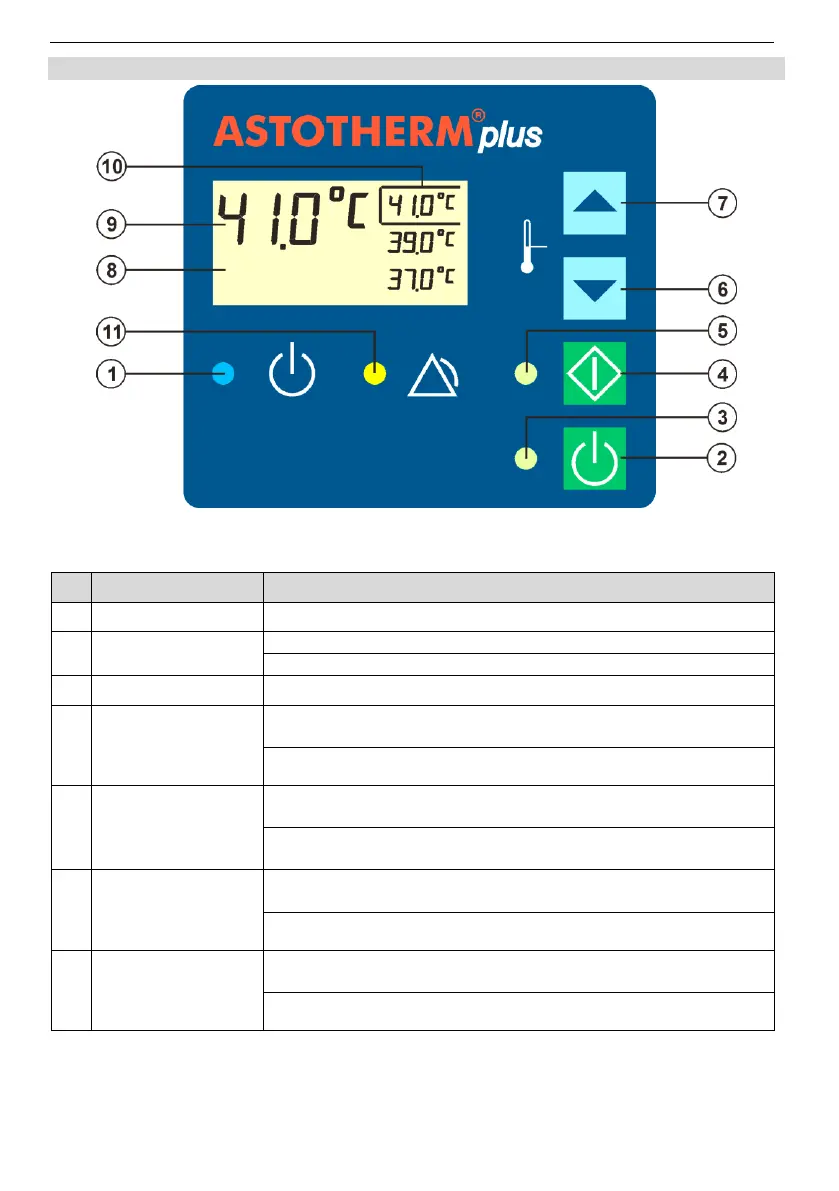
Fig. 3: Control panel
Illuminates blue when the warmer is in Standby Mode.
Turns the warmer from Standby Mode to On Mode.
Turns the warmer from any Mode to the Standby Mode.
Illuminates green when the warmer is in On Mode.
Starts the heating process while the device is in On Mode or
Alarm Mode.
Starts test 6 (see chapter 12.1 Recurrent tests), when the warmer is
operated with the middle setpoint temperature.
Flashes green when the device is in On Mode (heating is not
yet started).
Illuminates green when the device is in Heating Mode (“Start”
button has been pressed).
Selection of the next lower setpoint temperature. The frame
indicates the selected temperature.
Starts test 8 (see chapter 12.1 Recurrent tests), when the warmer is
operated with the lowest setpoint temperature.
Selection of the next higher setpoint temperature. The frame
indicates the selected temperature.
Starts test 7 (see chapter 12.1 Recurrent tests), when the warmer is
operated with the highest setpoint temperature.


 To Next Page