EasyManua.ls Logo

STIHLER ELECTRONIC ASTOTHERM plus - Standby Mode Failure

STIHLER ELECTRONIC ASTOTHERM plus
51 pages
Print Icon
To Next Page IconTo Next Page
To Previous Page IconTo Previous Page
Loading...
10 Alarms and troubleshooting
35
10.5 Standby mode - failure
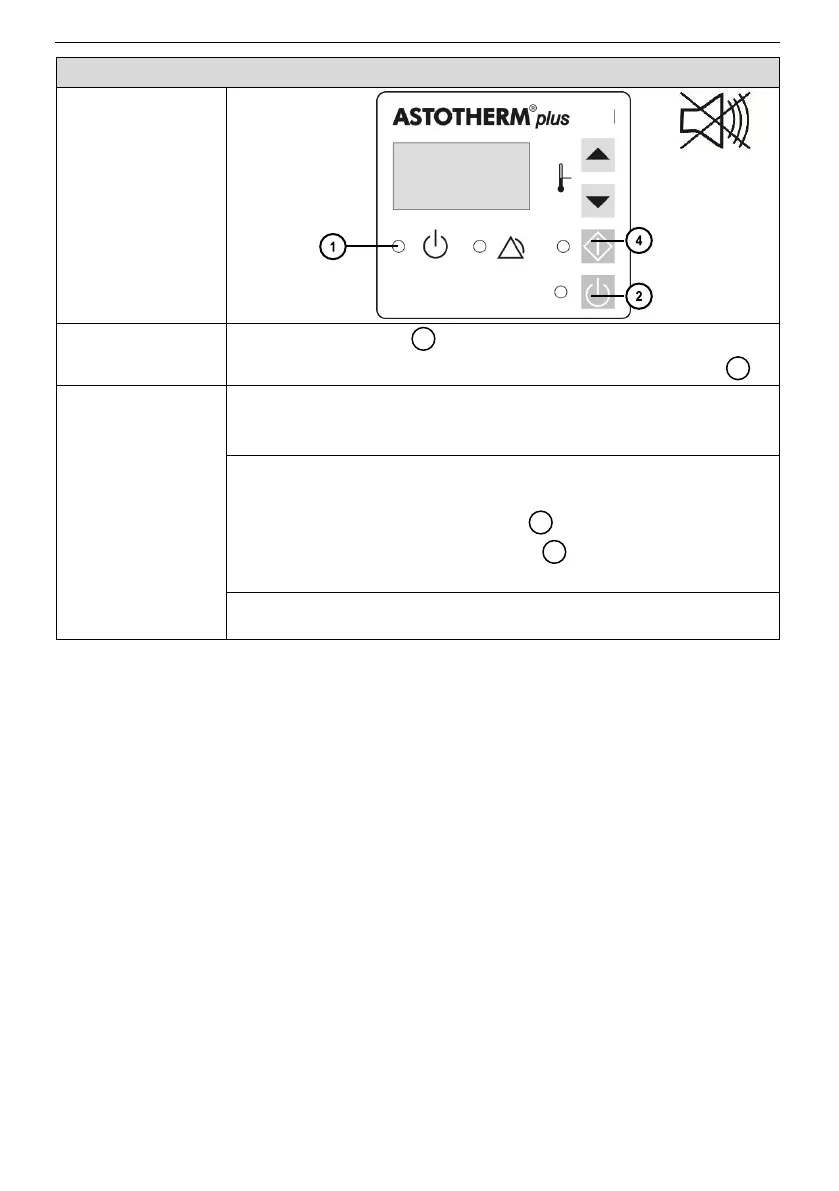
Control panel
Device response
The “Standby” LED is off and the device cannot be
switched to On Mode by pressing the “Standby” button .
Possible
reason(s)
►Required
action(s)
Power supply problem or no power.
►Check plugs and fuses compare mains voltage with rating
plate.
Warmer not plugged in.
►
1. Plug the warmer into functioning socket.
2. Press the “Standby” button .
3. Press then the “Start” button to switch the device
to Heating Mode.
Warmer is defective.
►Return ASTOTHERM PLUS to local sales office.
1
2
2
4

Other manuals for STIHLER ELECTRONIC ASTOTHERM plus