ASTOTHERM PLUS Instructions for Use
22
7.4 Increasing/Decreasing the setpoint temperature
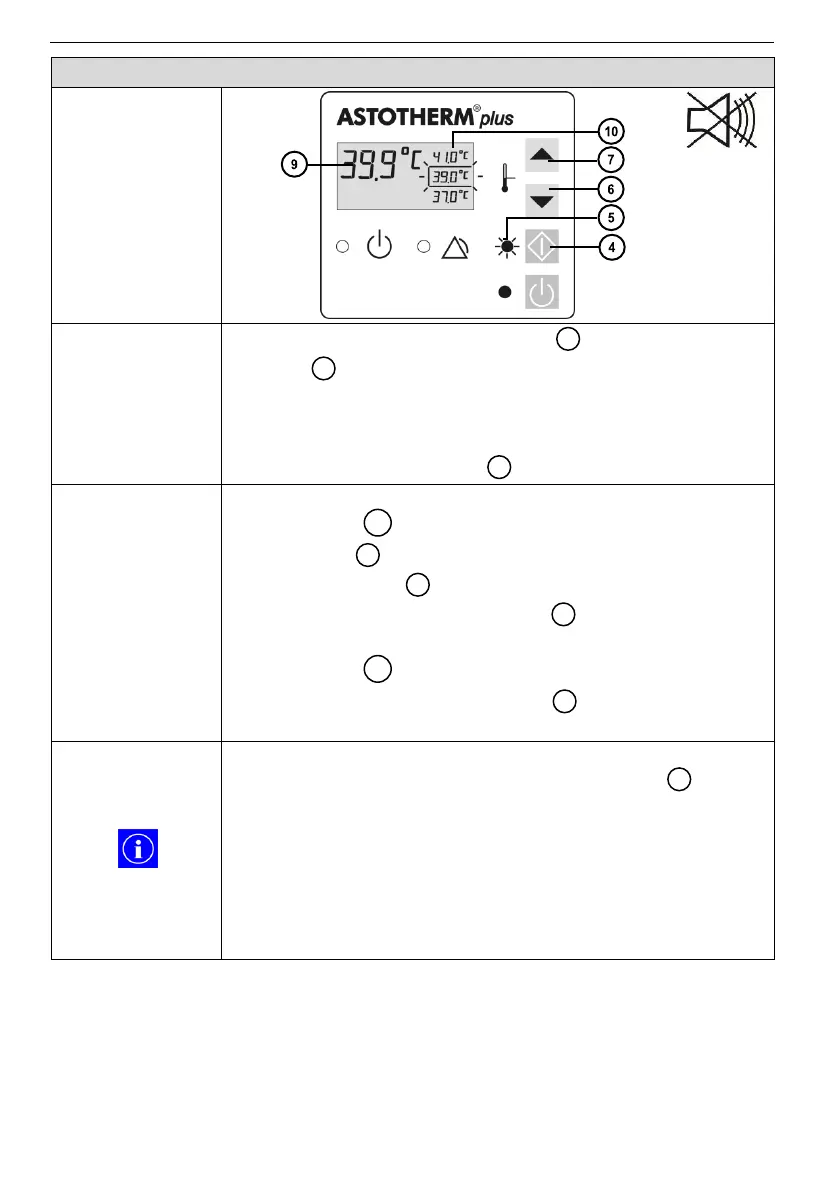
1. Briefly press the “Increase” button or “Decrease”
button , while the device is turned on (On Mode) or
started (Heating Mode) to change the setpoint
temperature within the three indicated temperatures.
2. Confirm the new setpoint temperature within 5 seconds by
pressing the “Start” button .
The flashing frame indicates the selected setpoint
temperature .
“Start” LED flashes green until to the confirmation with
the “Start” button .
After confirmation the “Start” LED lights green and the
frame marks the currently selected setpoint
temperature .
The displayed actual temperature rises or falls
according to the selection.
If the newly selected setpoint temperature is not confirmed
within 5 seconds by pressing the “Start” button , the
temperature regulation continues working with the initial
setpoint temperature.
During operation, the mean temperature of the heat
exchanger is displayed; this is not equal to the temp-
erature of the medium to be warmed. ASTOTHERM PLUS
neither regulates nor monitors/displays the current
temperature of the medium to be warmed.


 To Next Page