Tortoise speed
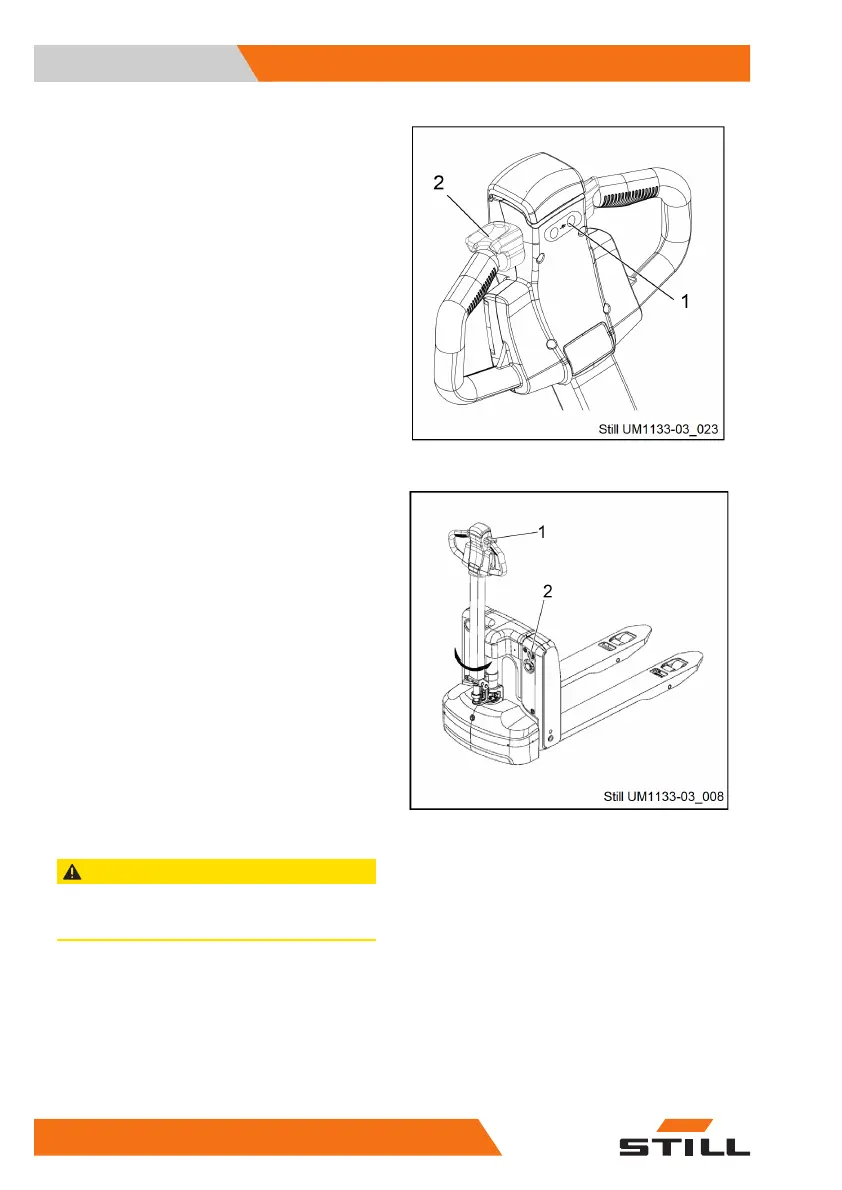
Switch on the slow travel function
Procedure:
●
Press and hold down the "slow travel" but-
ton (1).
●
Rotate the drive switch (2) in the required
travel direction.
The brake is released. The truck travels at
slow speed.
Steering
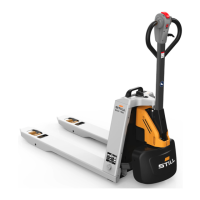
Turn the operating handle (1) left or right ac-
cording to the desired direction.
Braking
Emergency stop
When the emergency off switch (2) is pressed,
all motor functions will be interrupted.
Forced braking
Releasing the operating handle will force the
brakes. The operating handle will automatical-
ly move to the upper braking position (B). Al-
ternatively, the brake can be forced by press-
ing the operating handle down to the lower
braking position (B).
CAUTION
If the operating handle moves into the braking posi-
tion slowly, identify the cause and rectify the fault.
Regenerative braking
Release the drive switch, which will automati-
cally return to the initial position (speed is 0).
The vehicle will enter the regenerative braking
state and slow down. When it decelerates to
less than 1 km/h, the brake will bring the vehi-
cle to a standstill.
Operation
4
Driving the truck
52 5001 801 1555 EN - 12/2020


 To Next Page