®
®
stingersolutions.com
stingersolutions.com
16
17
SRK-JW18HX
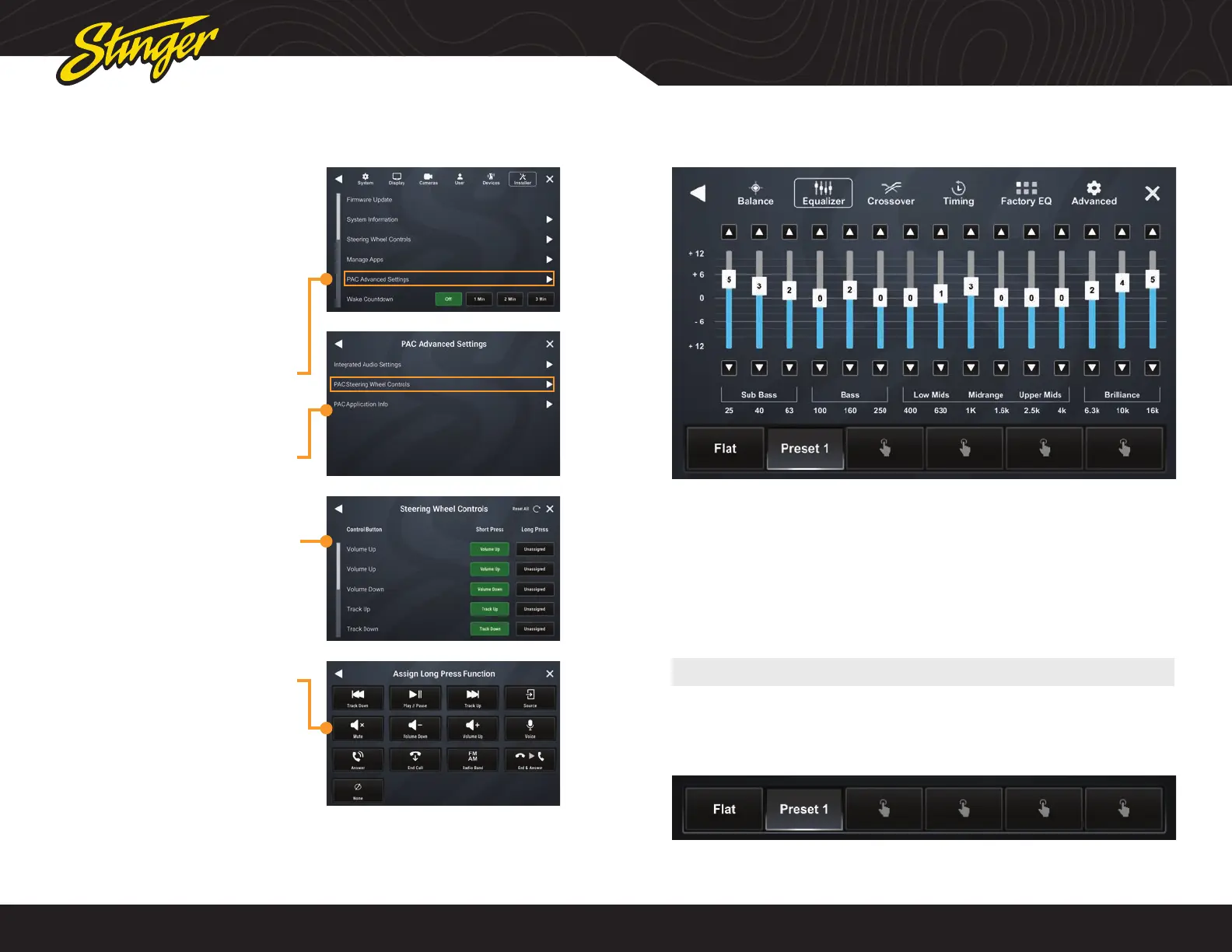
PAC STEERING WHEEL CONTROLS
The PAC interface allows retention and
customization of the factory steering
wheel control buttons.
By default they will be programmed
according to the factory functions. You
may change the function or add Long
Press functionality to any button. For
example you can assign Long Press on
Volume Down to activate Mute.
1. Access Installer Settings (Code
0052) and select PAC Advanced
Settings
2. Select PAC Steering Wheel
Controls
3. To change or add a SWC
function, touch the corresponding
short or long press assignment
4. A function menu will be
displayed with the current
function highlighted.
Select any of the functions to
assign that function to that
button.
Stinger is happy to provide a suggested equalizer curve for your Jeep’s
audio system.
SUGGESTED EQUALIZER SETTINGS
1. Press the HOME BUTTON > Audio Settings > Equalizer to access the
Equalizer Audio Settings.
3. Press and hold one of the available preset buttons at the bottom of the
screen until it saves your preset.
25
Hz
40
Hz
63
Hz
100
Hz
160
Hz
250
Hz
400
Hz
630
Hz
1000
Hz
1600
Hz
2500
Hz
4000
Hz
6300
Hz
10000
Hz
16000
Hz
+5 +3 +2 0 +2 0 0 +1 +3 0 0 0 +2 +4 +5
2. Set your equalizer settings to match the below table:












 To Next Page