Instructions Cont.
1. You should use the remote control within 10 metres (radio
signal scope), or you may fail to control the vacuum.
2. The vacuum may fail to find the docking station due to an
obstacle, decreased battery power or other conditions.
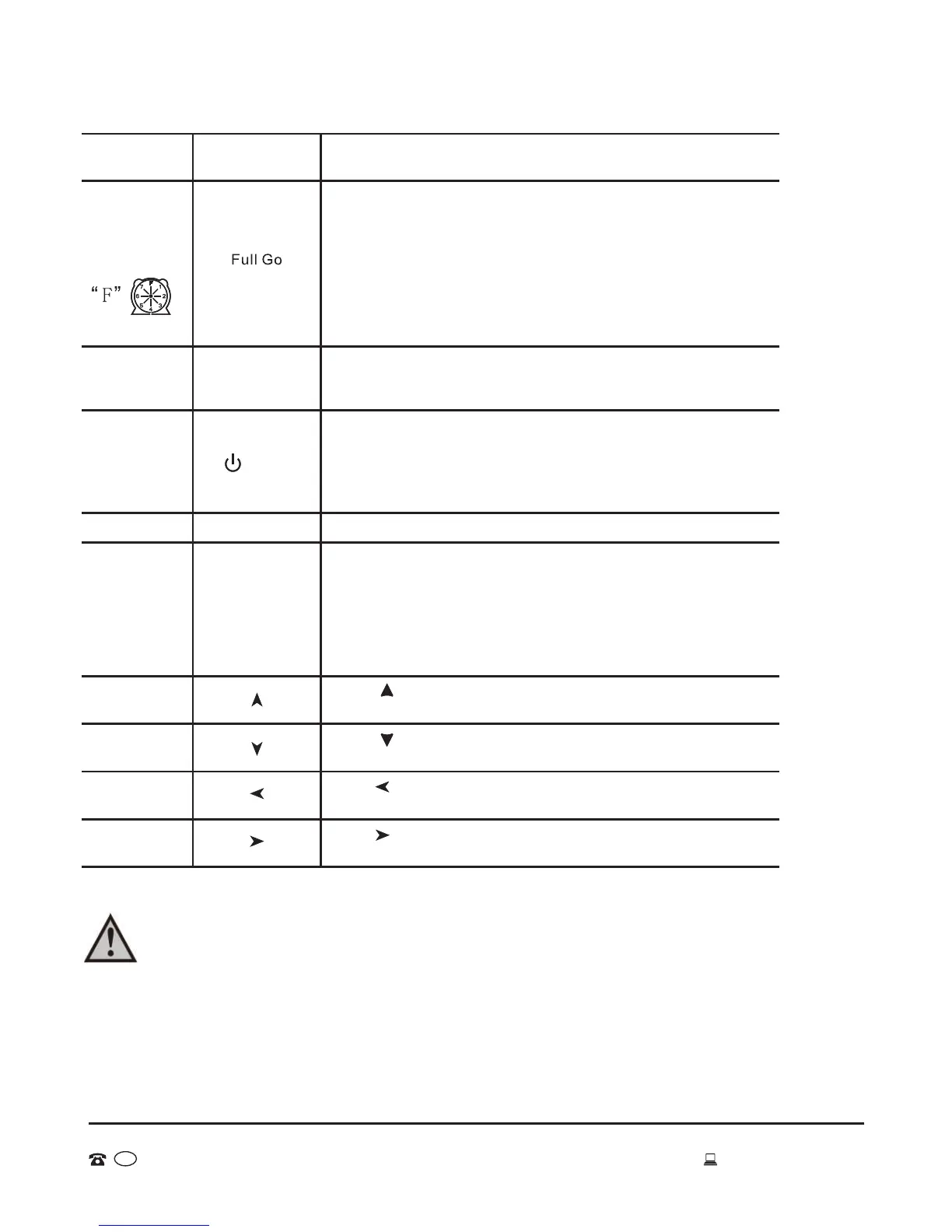
Press the Speed 7 key repeatedly. To choose fast speed select 1
and to choose slow speed slelect 2. Once you have made your
selection the vacuum will store this information until you change it.
Speed selection
Press “ ”, the vacuum will run forward and it will stop after
you release the key.
1. Press this key to turn on/off the vacuum.
2. You can stop the running mode by pressing this key.
3. You can delete and return to the original setting.
4. Press the key for more than 5 seconds to delete all settings and
memory and return to the initial status.
You must press “ENTER” to save any setting.
Engineering Malfunction Key
The “EM 4” key is used to provide error codes during use. If you
suspect there may be a problem, turn off machine and turn it on again.
When the LCD display flickers press EM and Spot buttons
simultaneously. Then the LCD display will show an error code, eg:
E***. Turn off after the code displays. Please provide this code to
After Sales Support; they will deal with your problem.
Turn off/
cancel/
stop
ENTER key
EM key
Press and release till the vacuum turns left to the direction you
want. It will stop automatically in obstacles.
Forward key
Backward key
Turn left key
Turn right key
Press “ ”, the vacuum will run backward and it will stop after
you release the key.
Press and release till the vacuum turns right to the direction you
want. It will stop automatically in obstacles.
Function
Button on
remote control
Instructions
16
AFTER SALES SUPPORT
MODEL: EE-9248 PRODUCT CODE: 49631 06/2015
1800 898 750
AUS
service@wkfe.com.hk
ENTER
EM 4
Speed 7
Standy
1. Press the “schedule 2” button on the remote control, then press
“Full Go”.
2. “F” in the icon “ ” on the LCD screen will flicker, the vacuum will
start cleaning automatically when the battery is charged (4-5 hours
charging). After finishing Full Go setting, press “ENTER” to save it.
This function is suitable for a large house where one full charging can
not clean all the rooms.
Remark:
You can set timing cleaning and full go function at the same time!
Full Go
Function
Setting


 To Next Page