Instructions Cont.
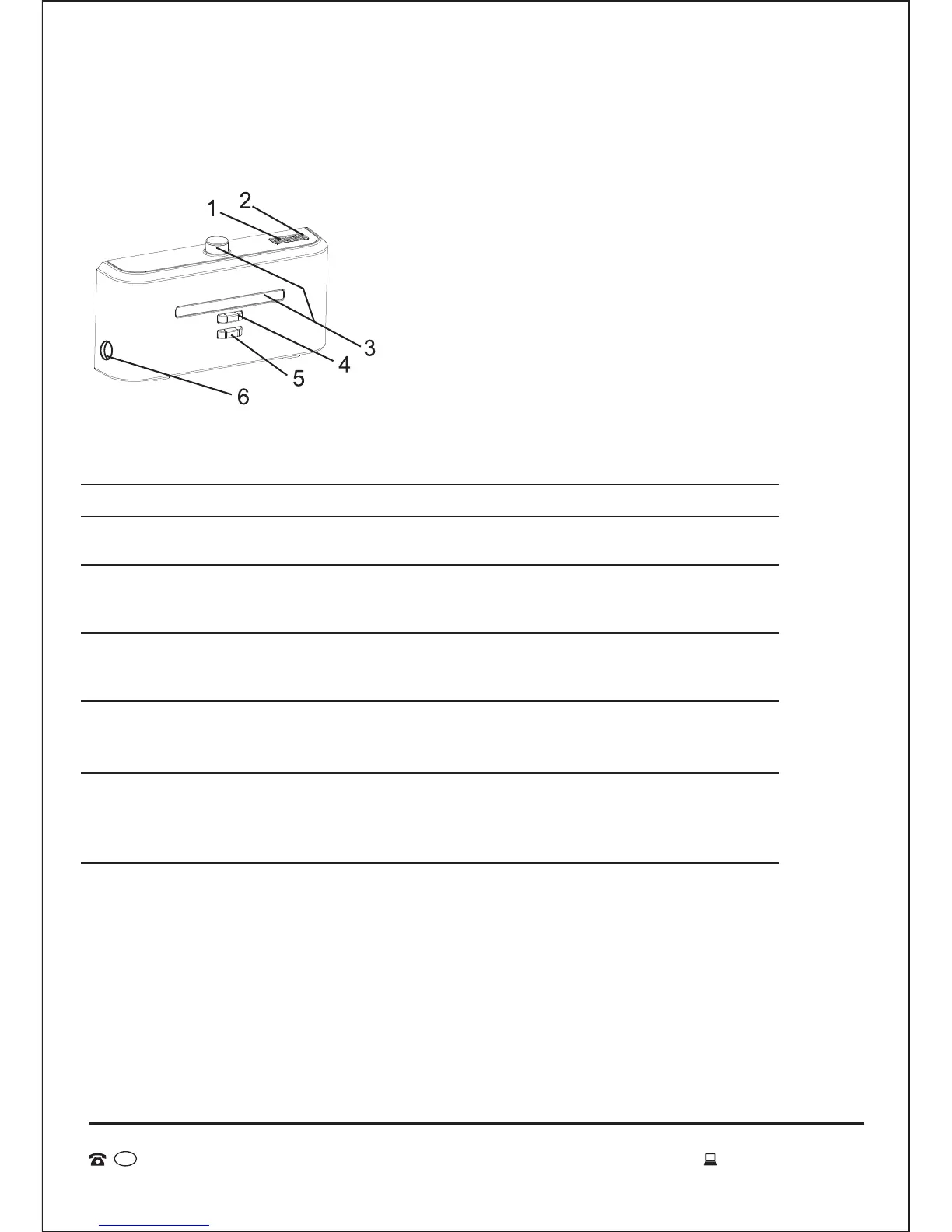
Docking Station Overview
The LED indicator will signal red when connected to
power.
The indicator will flicker blue while recharging or
connected to the dock. It will continue to flicker blue even
after charging is complete.
The transmitting signal is the only way to lead the vacuum
to return to the docking station for charging, so the signal
transmitter position should be clear of any obstacles.
The positive & negative electrodes on the docking station
connect to those of the vacuum. Ensure there are no
obstacles to impact charging.
The power DC socket is used to connect the output
terminal DC24V adaptor. The docking station should be
placed against the wall firmly and the adaptor cable
should be placed out of the vacuums cleaning space.
1 Power indicator
2 Charging indicator
3 Signal transmitter
4-5
Charging positive &
negative electrode
6
Charging power DC
socket
No. Function Guide Function Information
1. Power indicator
2. Charging indicator
3. Signal transmitter
4. Charging positive electrode
5. Charging negative electrode
6. Charging power DC socket
17
AFTER SALES SUPPORT
MODEL: EE-9248 PRODUCT CODE: 49631 06/2015
1800 898 750
AUS
service@wkfe.com.hk


 To Next Page