Need help?
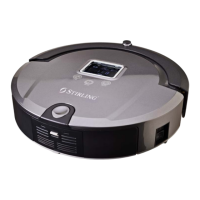
Do you have a question about the Stirling EE-9248 and is the answer not in the manual?
Guidelines for the correct and intended domestic use of the robot vacuum cleaner.
Instructions on safely connecting the robot vacuum to a power socket.
Diagram and explanation of the robot vacuum cleaner's top components.
Diagram and explanation of the robot vacuum cleaner's bottom components.
List and images of all included accessories for the robot vacuum cleaner.
Instructions for pairing the remote control with the robot vacuum cleaner.
Guidance on how to charge the robot vacuum cleaner for the first time.
Explanation of how to operate the robot vacuum cleaner for cleaning.
Details on the 'Full Go' cleaning mode for extended operation.
Instructions for using the 'Spot Cleaning' mode for concentrated cleaning.
Explanation of the different speed settings available for the vacuum cleaner.
Description of how the brushes and HEPA filter clean the floor.
Explanation of the various sensors and their functions on the robot vacuum.
Instructions on how to use and attach the mop pad and base.
Detailed description and functions of the remote control buttons.
Detailed explanations of each button on the remote control.
How to activate and operate the auto cleaning mode.
How to activate and operate the spot cleaning mode.
Step-by-step guide to setting the current time and day on the vacuum.
Guide to programming cleaning schedules for different days of the week.
How to set up and use the 'Full Go' cleaning function.
How to select between fast and slow cleaning speeds.
Instructions for turning off, cancelling, or stopping the vacuum cleaner.
Explanation of the function of the ENTER key for saving settings.
Information on using the EM key for error code diagnosis.
How to use the remote control to move the vacuum forward.
How to use the remote control to move the vacuum backward.
How to use the remote control to turn the vacuum left.
How to use the remote control to turn the vacuum right.
Diagram and explanation of the docking station's components and indicators.
Instructions for setting up the docking station and connecting the power adaptor.
Steps for charging the vacuum directly or via the docking station.
How the vacuum automatically returns to the docking station to charge.
Explanation of the Space Isolator accessory and its function.
Steps for installing and setting up the Space Isolator.
Recommendations on how often to clean the robot vacuum's parts.
Step-by-step guide to cleaning the dustbin and HEPA filter.
Instructions on how to replace the HEPA dust filter.
Guide on how to wash and reattach the mop pad.
Instructions for cleaning the main and rubber brushes.
Guide on cleaning or replacing the side brush.
Instructions for cleaning the left and right wheels of the vacuum.
How to clean the sensors and infra-red transparent window.
Steps for safely removing and replacing the robot vacuum's battery.
Common problems and solutions for the robot vacuum cleaner.
List of failure codes, their causes, and how to solve them.
Detailed technical specifications for the robot vacuum cleaner.
Technical specifications for the remote control.
Technical specifications for the docking station.
Technical specifications for the space isolator accessory.
Answers to common questions about the robot vacuum cleaner's operation.
 General
| Brand | Stirling |
|---|---|
| Model | EE-9248 |
| Category | Vacuum Cleaner |
| Language | English |

 To Next Page