Other Useful Information (Cont.)
Removing the door’s glass panels
The oven door features a four layer glass panel for superior heat retention
inside the oven. Should the inside of those panels require cleaning, proceed
as follows.
• First remove the oven door, as described on the opposite page, and lay it
at on a secure, padded surface with the handle facing down.
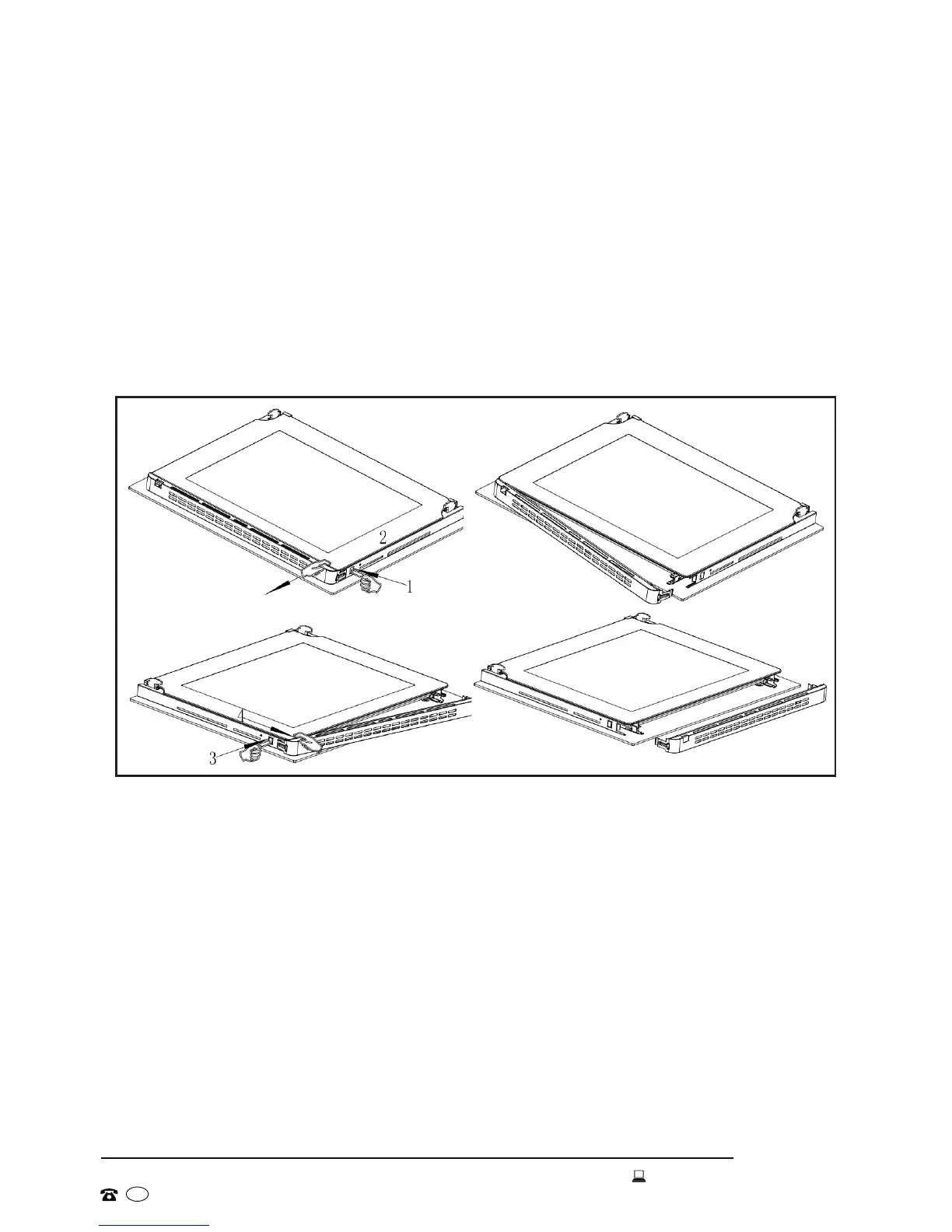
• As illustrated in Fig. 12, rst press the button at the right hand side and
gently pull out the bracket at that side. Then press the button on the left
hand side and pull out the whole bracket.
• Next take out the glass panel and lay it on a soft, padded surface. Clean
the panel and wipe it dry with a clean, soft cloth.
• To remove the other two glass panels, unscrew the bracket using a Phillips
head screwdriver, then take out the glass panels and clean them.
• The fourth panel is built into the metal door. Its interior surface can be
cleaned once you have removed the other three panels.
• After cleaning, carefully slide the glass panels back into position. To
reattach the brackets, press the buttons on the left hand side, push in the
bracket and release the button, then push in the other end of the bracket
while pressing the buttons on the right hand side.
Fig.12


 To Next Page