EasyManua.ls Logo

Storage Options IP Night/Day Camera - Motion Detection Alarms

Storage Options IP Night/Day Camera
45 pages
Print Icon
To Next Page IconTo Next Page
To Previous Page IconTo Previous Page
Loading...
IP Camera User Manual
IP Camera SON-IPC1
Version 1.0
Page 21
3.14 Creating Motion Detection Alarms
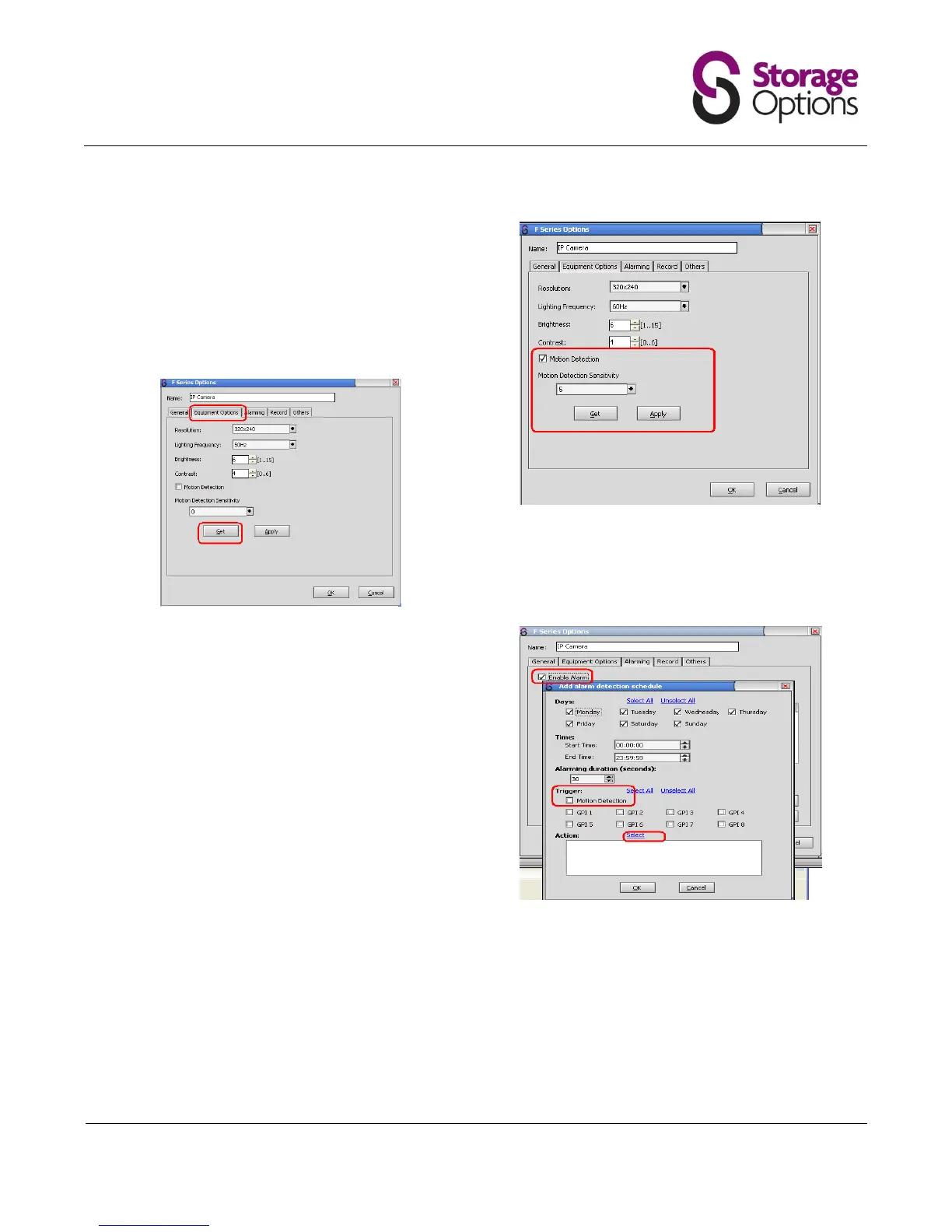
Before setting recordings you need to turn on the
motion detection option through the Equipment
Options tab.
Click “Get” to show the current settings. You can
adjust the Motion Detection Sensitivity. The higher
the value the greater sensitivity.
Now setup the action to trigger in the event of motion
being detected. Click the “Alarming” tab, “Motion
Detection” and “Select”.
For video alerts, the duration of the saved video file
will be based on the “Alarming duration” time.

Related product manuals