EasyManua.ls Logo

Storage Options IP Night/Day Camera - 1 Initial Installation

Storage Options IP Night/Day Camera
45 pages
Print Icon
To Next Page IconTo Next Page
To Previous Page IconTo Previous Page
Loading...
IP Camera User Manual
IP Camera SON-IPC1
Version 1.0
Page 4
1. INITIAL INSTALLATION
This IP Camera and its software are designed for Windows XP / Vista / 7. Please follow these instructions to install
and use your new device.
1.1
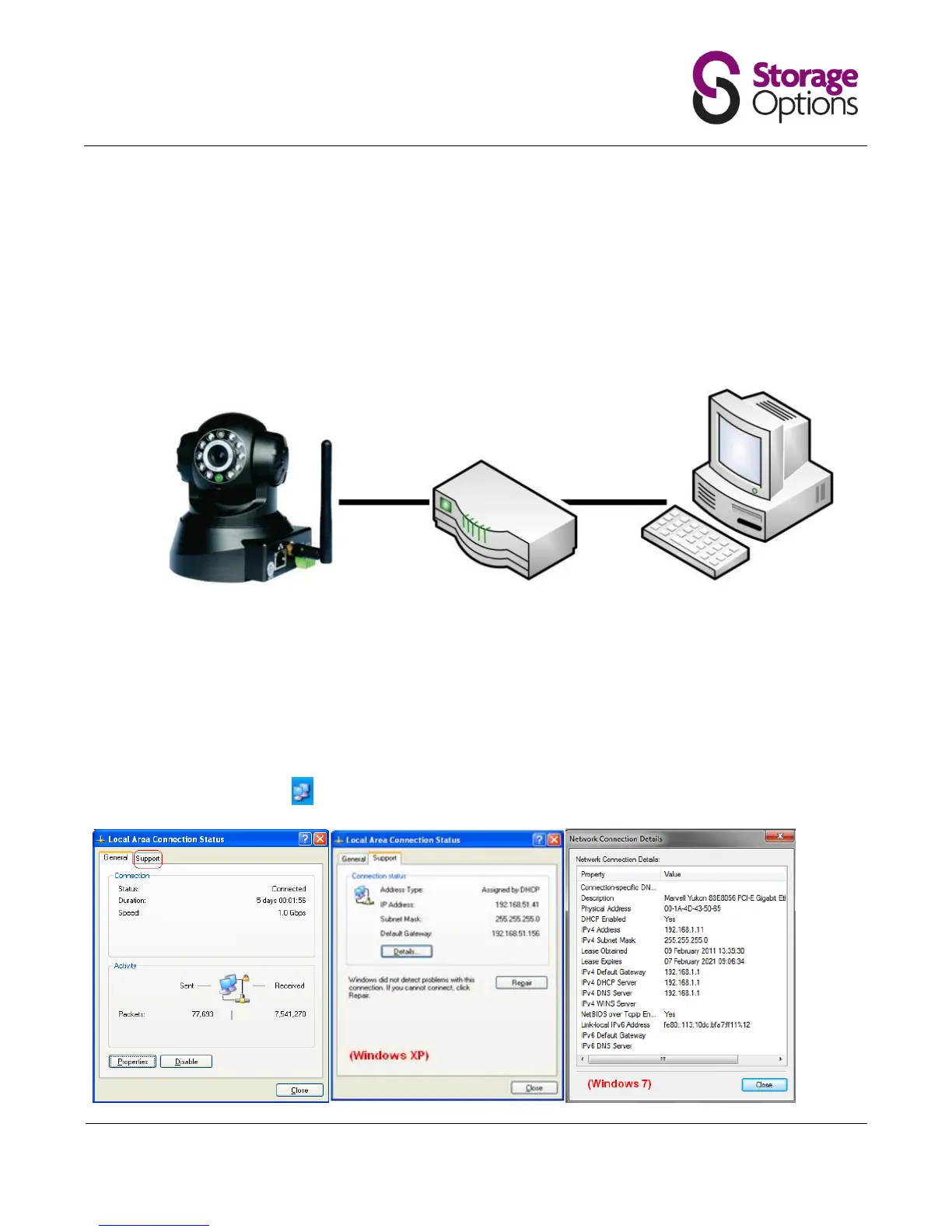
IMPORTANT: Before starting, connect the IP camera to your router via standard RJ45
network cable, and plug it into the mains supply. Your computer should already be
connected to the router (cable connection recommended).
IMPORTANT:
Before continuing, check the IP address of the PC or laptop that you are using. You can then use this information to
help you set the IP address of the camera, the Gateway and DNS Server.
There are two ways of doing this:
1. In XP click the network icon on your Windows Taskbar and choose the “Support” tab.

Related product manuals