22
7. 6. 2 Lokale Einstellungen
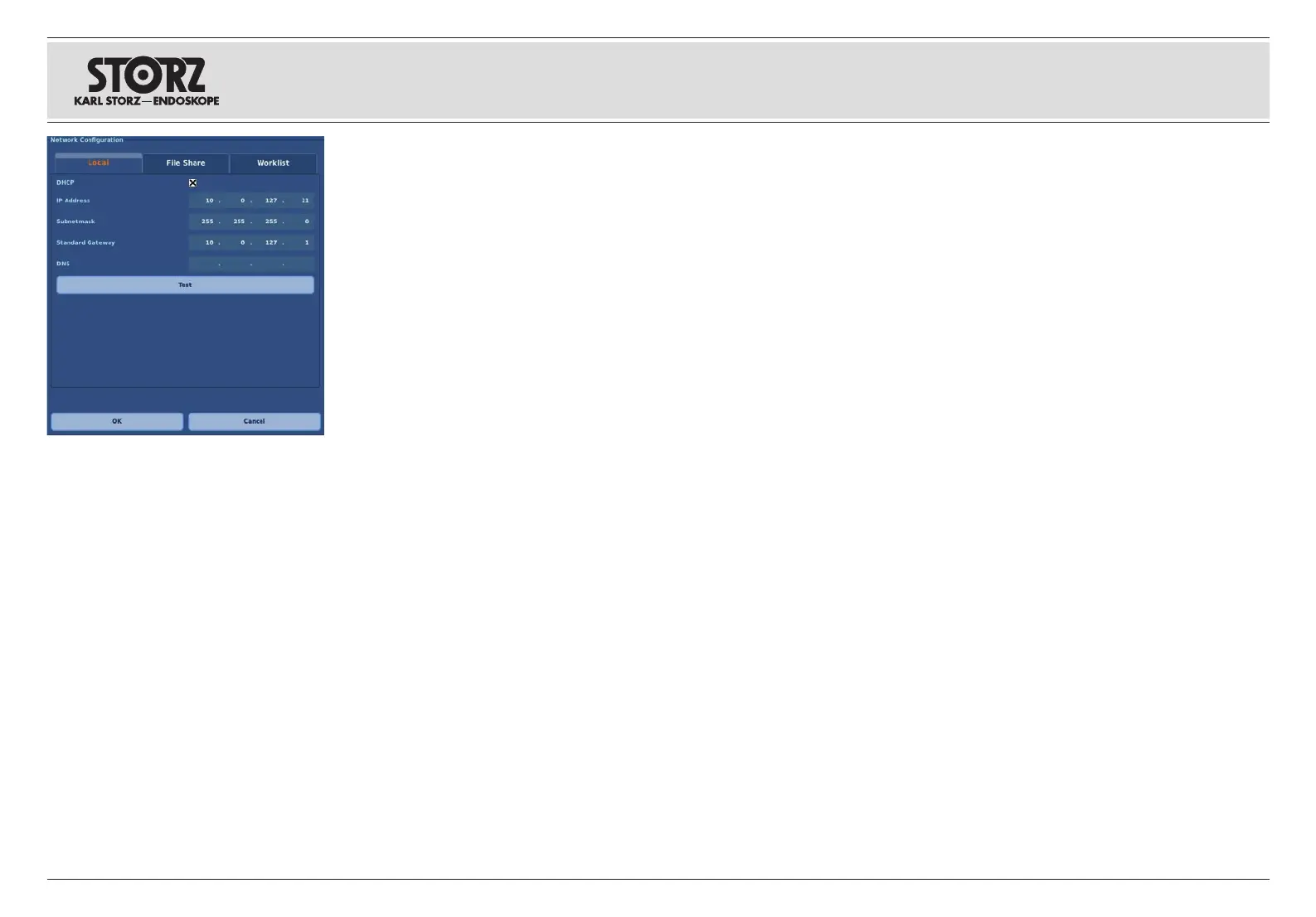
Im Tab „Lokal“ legen sie die Netzwerkkonfiguration
des TELE PACK X LED fest. Dies geschieht
entweder automatisch per DHCP oder manuell.
Wenn Sie die automatische Adressvergabe nutzen
möchten, müssen Sie die DHCP-Checkbox
aktivieren.
Möchten sie das TELE PACK X LED nicht
automatisch konfigurieren, müssen sie die
notwendigen Daten manuell eintragen.
Anschließend muss die eingestellte Konfiguration
durch Betätigen der „Test“-Taste getestet
werden. Das dargestellte Test-Protokoll bestätigt
die erfolgreiche Konfiguration. Nun ist die
Netzwerkfunktion verfügbar.
1
HINWEIS: Das TELE PACK X LED
unterstützt nur IP Version 4.
Erstinbetriebnahme
7. 6. 2 Ajustes Local
La pestaña “Local” le permite definir la
comunicación en red del TELE PACK X LED. Ello
se efectúa de forma automática mediante DHCP
o manualmente. Si desea utilizar la asignación
automática de la dirección, ha de activar la casilla
de verificación DHCP.
Si no desea configurar el TELE PACK X LED de
forma automática, ha de introducir manualmente
los datos requeridos.
A continuación, es necesario probar la
configuración ajustada presionando para ello la
tecla “Test”. Ahora se muestra un protocolo de
la prueba para confirmar que la configuración es
correcta. La función en red ya está disponible.
1
NOTA: El TELE PACK X LED solamente
es compatible con el protocolo de Internet
versión 4.
Primera puesta en servicio
7. 6. 2 Local settings
The ‘Local’ tab allows you to define the network
configuration of the TELE PACK X LED. This
is performed either automatically via DHCP or
manually. If you would like to use the automatic
address assignment, you will need to activate the
DHCP checkbox.
If you do not want to automatically configure the
TELE PACK X LED, you will need to enter the
necessary data manually.
The configuration set will then need to be tested
by pressing the ‘Test’ button. The displayed test
report confirms successful configuration. The
network function is now available.
1
NOTE: The TELE PACK X LED only supports
IP version 4.
Initial commissioning






 To Next Page