Lisa Compact 18
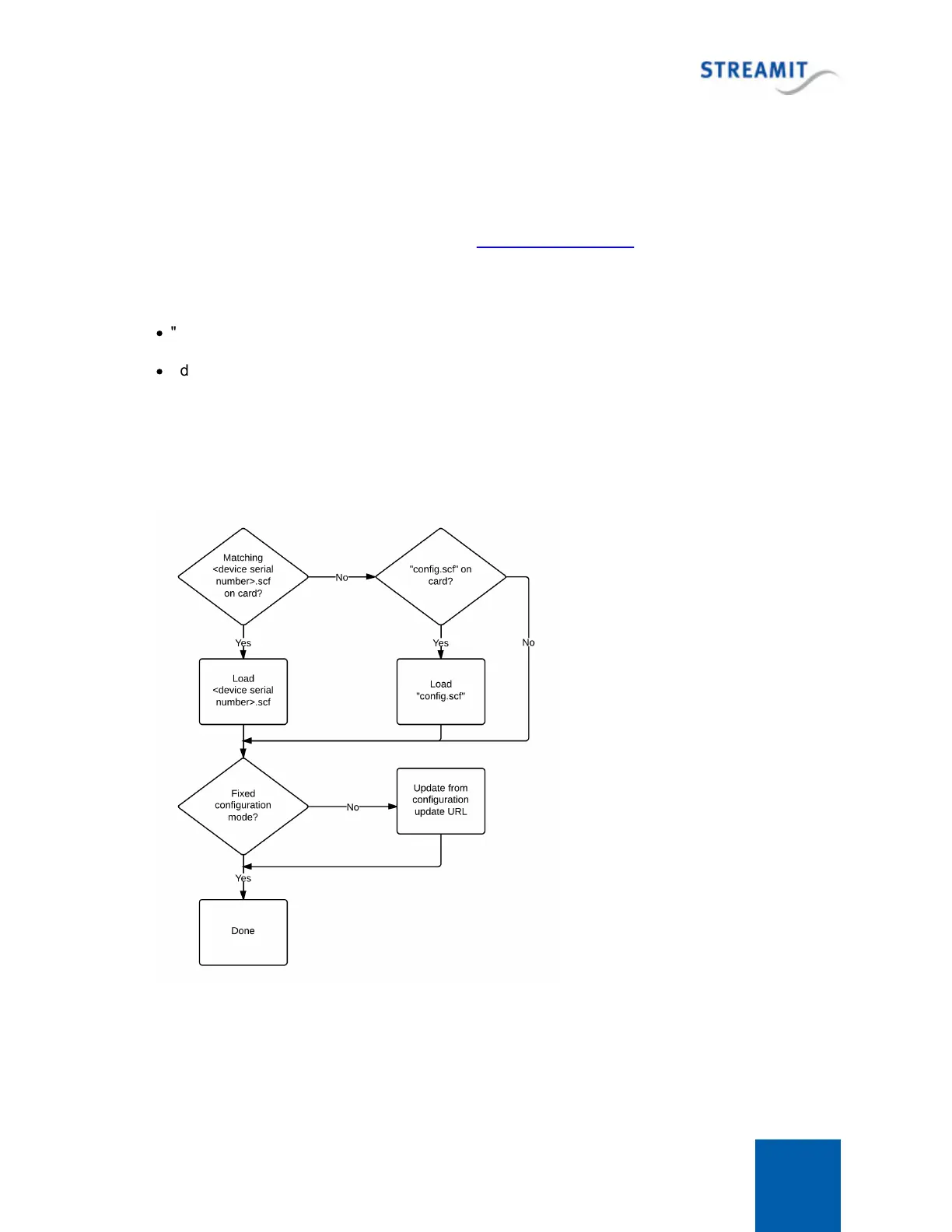
After configuration from card is finished (or skipped, when there is no card or there is no configuration
file on the card) the device will perform the configuration update using the configuration update URL,
just like it normally does. This configuration update is skipped when the device is configured in fixed
configuration mode.
The configuration file can be created using the Lisa Configuration Tool.
The configuration file should be placed in the root folder of the SD card. The name of the configuration
file can be either
·
"config.scf"
·
<device serial number>.scf
The latter option includes the serial number of a device. This means that only the Lisa that has this serial
number, will load this configuration file from the SD card. Other Lisa devices will ignore this
configuration file. This makes it possible to create a single SD card image that contains several
configurations for specific devices. The image can be copied and used for many devices, each device
will load the configuration file that has its serial number as file name.


 To Next Page