Testing the Paddle Switch Contacts
Note: Replacement parts for the Paddle Switch versions are no longer available. If
adjusting the switch contacts does not fix the problem, the entire Body/PCB
assembly must be replaced.
A. Reconnect the negative (black) battery lead.
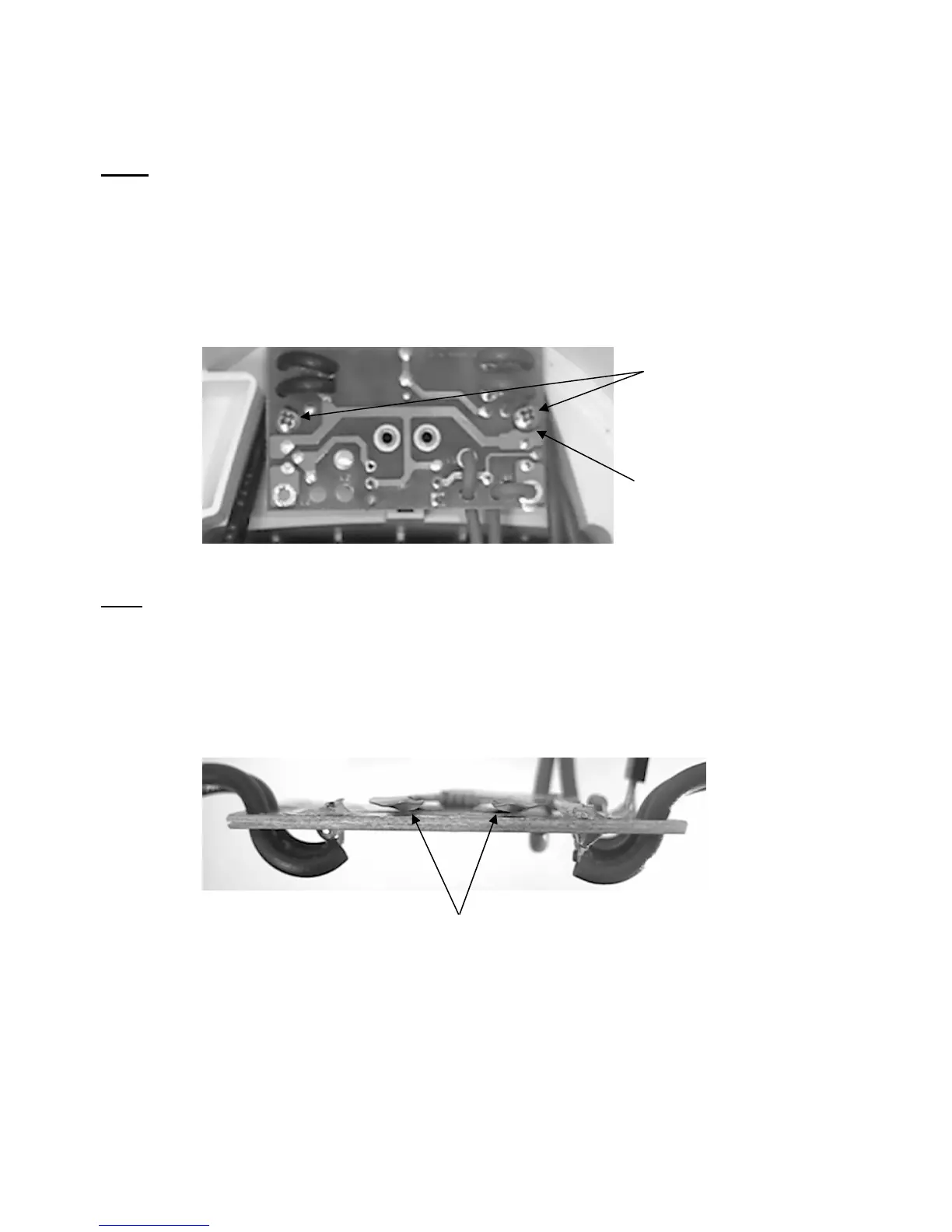
B. Remove the two mounting screws which hold the switch/PCB assembly in-place.
Insulating Washer
(Under Screw Head)
Remove mounting screws.
Note: There is a washer on the mounting screw located below the positive leads. This
screw and insulating washer combination is critical and must be retained for reassembly.
C. Carefully lift the switch/PCB from the mounting posts and tilt it towards you.
D. At the front of the switch/PCB is a “U” shaped contact. Press the raised left end of the
contact against the pad of the PCB. The lamp should light.
Raised ends of the contact.
E. Repeat the process using the raised right end of the contact. The lamp should light.
F. If the lamp does not light, the switch/PCB must be replaced.
G. If the lamp does light, the “U” shaped contact on the PCB may need to be adjusted.
H. Remove the switch/PCB from the Vulcan and follow the procedures on page 18.
- 17 -


 To Next Page