15
Operation (continued)
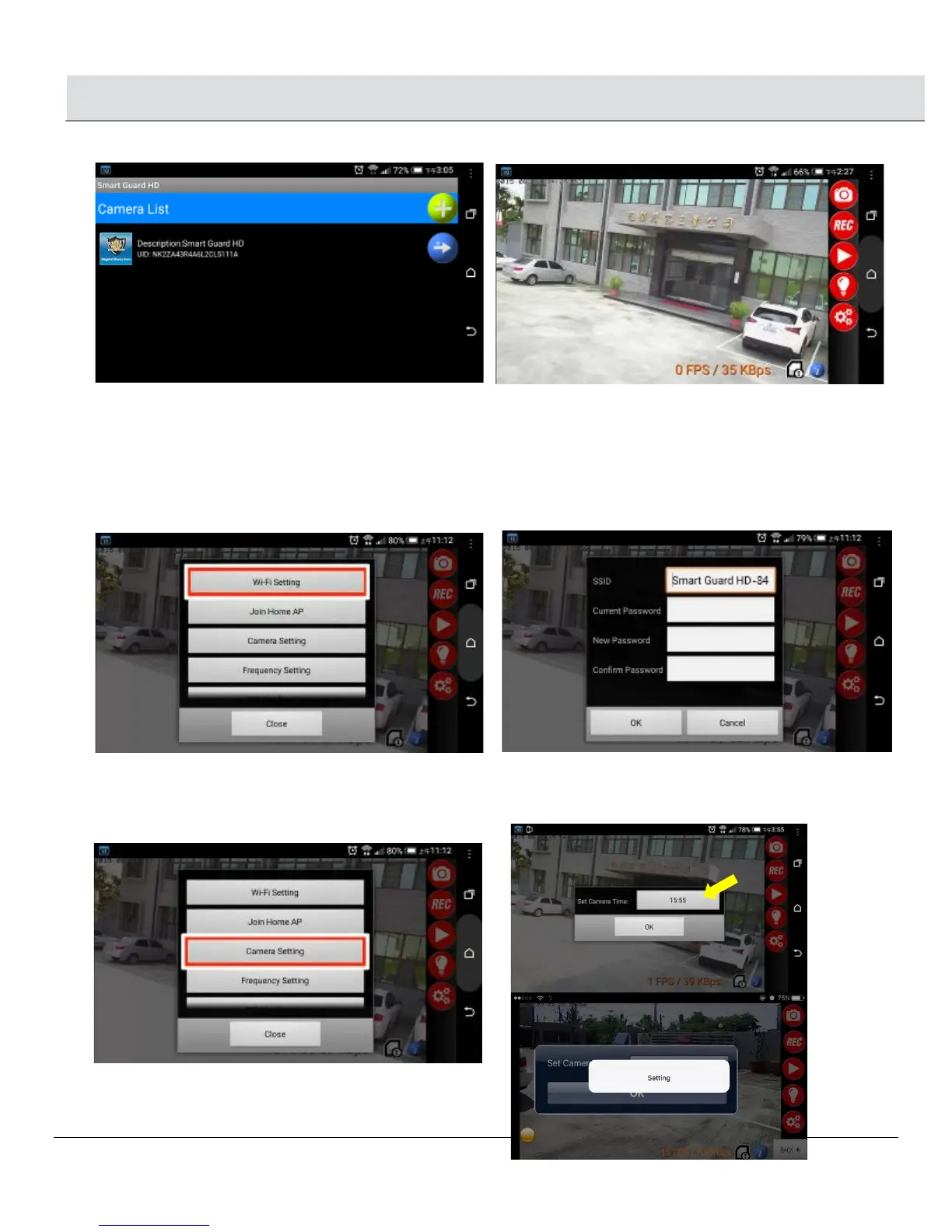
Launch “Streetwise NightWatcher” APP again and you will see video streaming from Smart Guard HD.
Note: You may access your camera from anywhere as long as there is internet access.
1.3 Set Camera name and password
□ Select Wi-Fi Setting. You can change SSID name and password, the password should be 8 digital numbers or English letters. After
the change, it will return to AP mode, go to smart phone’s Wi-Fi setting and site survey UID to find the name you have changed.
Follow up the steps in “1.2 Link camera with home AP” to reset Join home AP router.
NOTE: Your “Push Notification” name will be same as this new SSID name.
1.4 Camera Setting
□ Set Camera Time: Change this APP time to the same time on your smartphone.
□ Select Camera Setting, click on the time to do the setting, once you see “Setting”, the time is updated successfully,
click OK.


 To Next Page