19
Operation (continued)
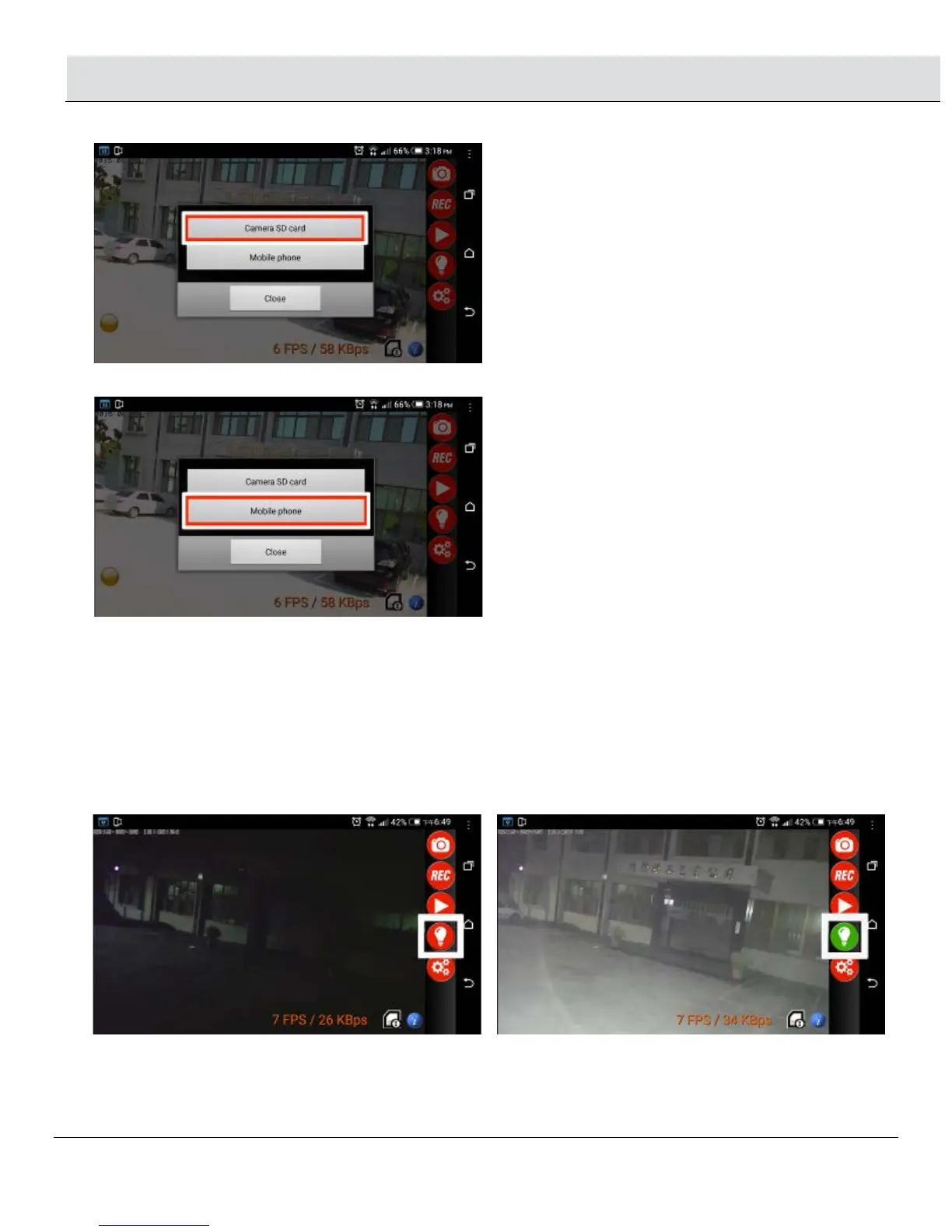
2.3.1 Camera micro card: View the recorded files from the NightWatcher’s micro card
2.3.2 Mobile Phone: View the recorded files from your smartphone
2.4 Light control:
□ The user can click this Bulb Icon to change the light from AUTO to Manual control.
□ If the bulb icon is RED: the light is AUTO control. Only when the PIR (motion) sensor is detecting movement the light will turn on
automatically.
□ If the bulb icon is GREEN: the light is MANUAL control. The light will stay on whether there is movement detected or not. If one user
clicks the bulb icon to GREEN (MANUAL control), the other users will also see this bulb icon in GREEN. When all the users close the
Streetwise NightWatcher APP, this icon will return to RED (AUTO control) and the NightWatcher’s LED light will also turn off.
NOTE:If the last user does not change the bulb icon to RED color and close APP software or turn off the smartphone,
NightWatcher’s LED light will turn off in 5 minutes and return to auto control.
2.5 SETTING: review section 1.1~1.7


 To Next Page