10
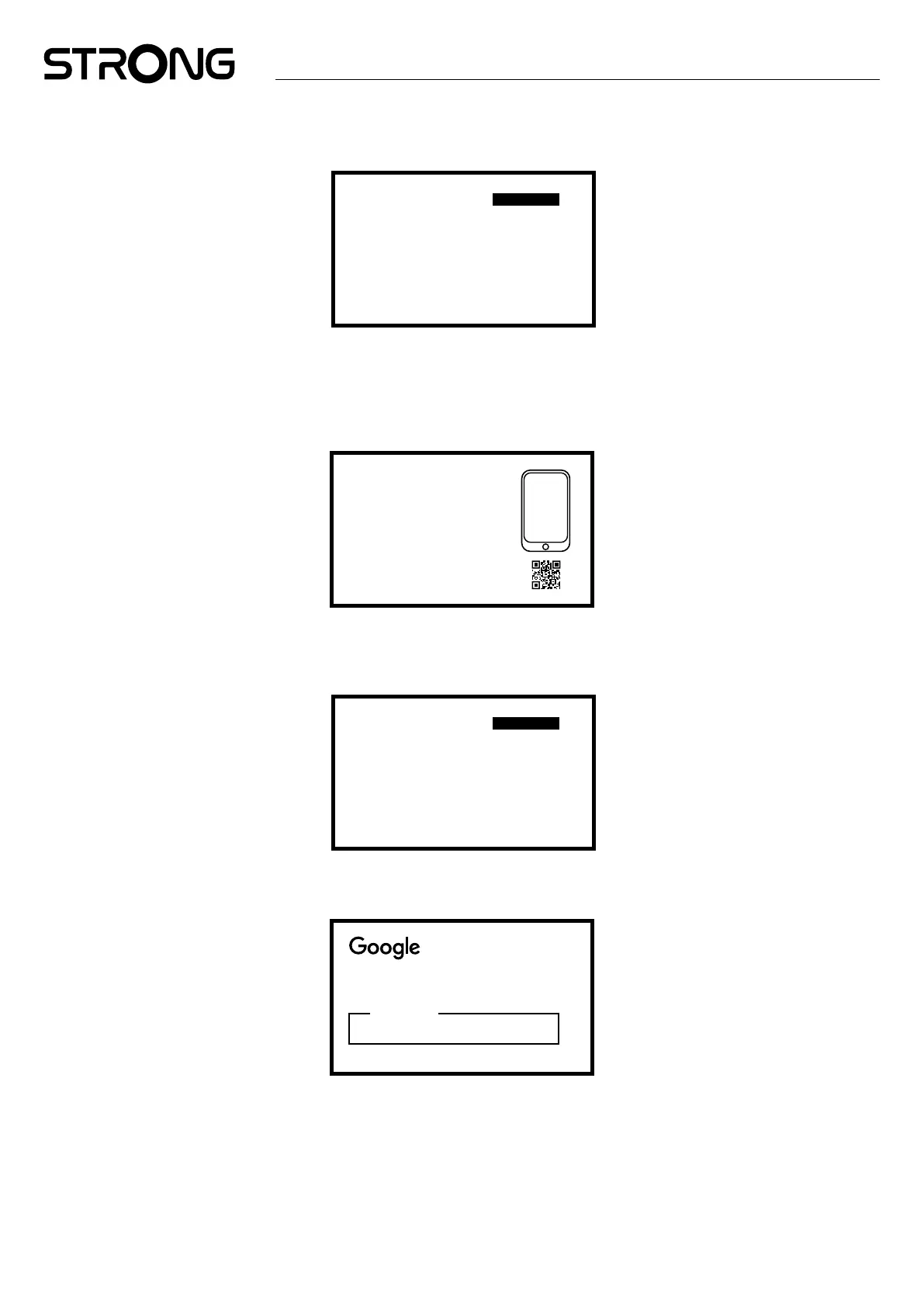
Step 2: Location Settings
Select the region or country where you are using this LEAP-S3 PRO Box.
Armenia
Argentina
Australia
Autria
Azerbaijan
Bahrain
...
Select
your country
Step 3: Set up with the Google Home App
Set up the LEAP-S3 PRO Box by downloading / opening the Google Home app on your phone.
Please, scan the QR code on your phone and follow the instructions to start this Google home.
Alternative, Start the set up on TV screen to type manually way by pressing down button to start with.
Please, follow the instructions on your TV screen.
Set up with
the Google Home
App
Download and open the Google Home App
on your phone to get strated. Scan the QR code.
Set up on TV instead
Step 4: Wi-Fi
If you are not connected to the internet via an RJ45 cable, the Wi-Fi setup will appear.
Select here to connect to your Wi-Fi Network.
1600_2.4G
1600_5G
Super_2.4Ghz
Kapsalon
Other network
...
Select your
Wi-Fi network
Step 5: Google Account
Sign in with your Google Account and Password.
Sign in
use your google account
Email or phone
Forgot your email?



 To Next Page