6
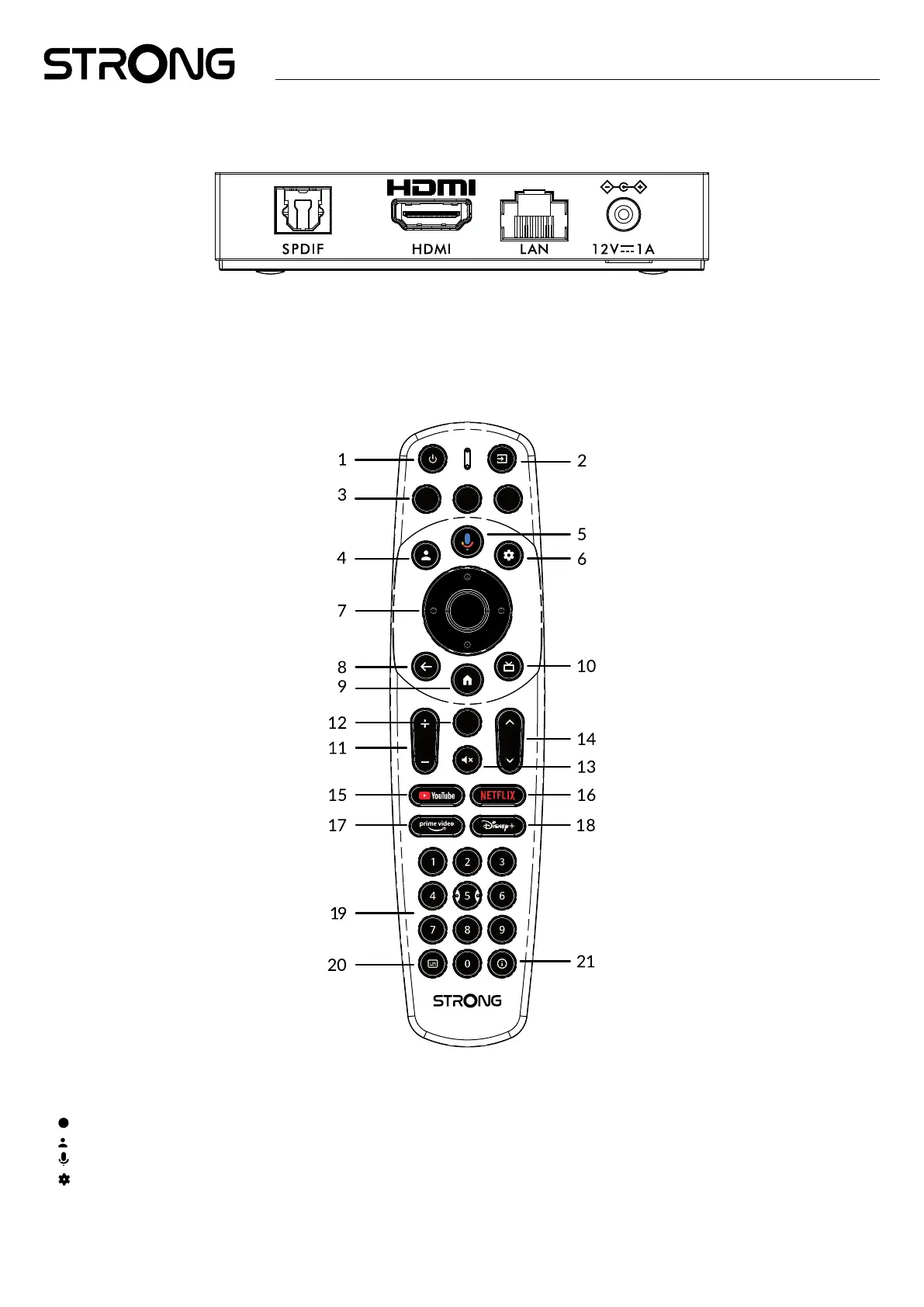
2.3 Rear Panel
Fig. 3
1. S/PDIF (optical) To connect to a digital or home cinema audio amplier.
2. HDMI To connect your receiver with your TV set or Dolby Digital amplier using a HDMI cable.
3. LAN / ETHERNET RJ45 Connect to your Internet router to access the internet/apps.
4. 12 V Adapter entree To connect the original included 12Volt power adaptor of 1 Ampere.
2.4 Remote control
Fig. 4
1. q Press to turn the TV/ Box to On, Standby or deep Standby.
2.
Select TV inputs after setup remote button conguration
3.
No function
4.
Call account menu to select between accounts
5.
Press to activate the voice control function*.
6. Direct access to settings menu.
7. pq tu OK Navigate the menu. Conrm the selection.
8. Press to Exit. In menu: step back to previous menu.



 To Next Page