EasyManua.ls Logo

Strong SRT 2121 - User Manual

Strong SRT 2121
28 pages
Print Icon
To Next Page IconTo Next Page
Loading...
Version 4.4.2
User Manual
Bedienungsanleitung
Manuel d'ulisaon
Manuale d'uso
Manual del Usuario
Manual do Ulizador
Bruksanvisning
Instrukcja obsługi
Návod k obsluze
Használa útmutató
Посібник користувача
Ръководство за употреба
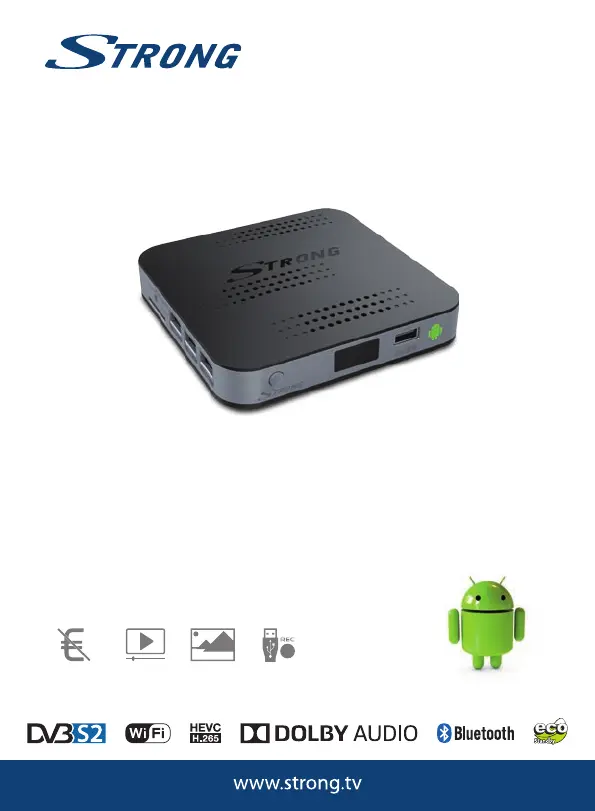
Hybrid HD Satellite Android Receiver
SRT 2121
Picture similar
Free-
To-Air
channels
video
streaming
USB
recording
Picture
slideshow

Questions and Answers

  • A
    Ashley MezaAug 17, 2025
    What to do if the Strong SRT 2121 shows no signal or weak signal?
    • H
      Hannah ButlerAug 17, 2025
      If your Strong Receiver is showing no signal, a weak signal, or intermittent reception, here are a few things you can check: * Cables might have loosened or moisture might have entered into cables or connectors. Check the cable connections, LNB and other equipment connected between the LNB and the receiver, or adjust the dish. * If there is heavy rain or a storm, wait for it to subside. * The satellite dish is not pointing at the (correct) satellite(s). Adjust the dish or ask a local satellite specialist for advice. * The satellite dish is too small Trees or buildings are blocking the path. Change to a larger dish or change the position of the dish.
  • J
    Joseph MercadoAug 20, 2025
    Why is my Strong SRT 2121 Receiver remote control not working?
    • E
      Eric MckeeAug 20, 2025
      There are several reasons why your Strong Receiver remote control might not be working: * The batteries may be exhausted, so try changing them. * The remote control may be incorrectly aimed. Ensure you are aiming the remote control at the receiver and that nothing is blocking the path to the receiver front. * The USB adapter of the remote control might have been removed. In this case, insert the USB adapter belonging to the remote control.
  • O
    ojohnsonAug 22, 2025
    What to do if there is no menu or signal from my Strong Android satellite receiver on the TV?
    • T
      Terry HawkinsAug 22, 2025
      If you're not seeing a menu or signal from your Strong Android satellite receiver on the TV, consider these possibilities: * The wrong input may be selected on the TV. Check whether the correct HDMI input on your HDTV is selected. * The connections may not be properly done. Ensure that the connections are done correctly and are fitting well to the connected input/output. Check that the quality of all cables is good. Reconnect all cables between the receiver and the TV set. * The quality of the connected cables may be insufficient. Ensure that the connections are done correctly and are fitting well to the connected input/output. Check that the quality of all cables is good. Reconnect all cables between the receiver and the TV set.
  • A
    Adam JonesAug 25, 2025
    Why does my Strong Receiver switch off after 3 hours?
    • M
      mckeemichaelAug 26, 2025
      The power saving Auto standby function is activated. Switch the Auto standby function off, if you don’t like it.
  • M
    melissareynoldsAug 27, 2025
    How to fix Strong SRT 2121 Receiver when some remote control buttons aren't working?
    • A
      Ariana SmithAug 27, 2025
      If some buttons on your Strong Receiver remote control aren't working, it might be because the Air mouse function is activated. Press the corresponding button to switch this function OFF.
  • S
    Stephanie WilliamsAug 30, 2025
    What to do if Strong SRT 2121 cannot turn on?
    • J
      James SkinnerAug 30, 2025
      If your Strong Receiver won't turn on, check whether the power connector is completely plugged into the DC socket of the receiver or that the power adapter is connected to the 230 V outlet or 12 V plug into receiver.
  • J
    Jessica KellySep 1, 2025
    What to do if my Strong SRT 2121 Receiver has no internet connection?
    • E
      Eric NashSep 1, 2025
      Make sure the wireless network is connected and the security key for the encrypted network is correct.
  • E
    erikaphamSep 4, 2025
    Why is my Strong DTV showing a scrambled service message?
    • J
      julieedwardsSep 4, 2025
      If you're seeing a 'Scrambled service' message on your Strong DTV, it means the channel is scrambled. Select an alternative channel.
  • C
    collinssuzanneSep 6, 2025
    What to do if my Strong external USB HDD does not start?
    • R
      Ryan JordanSep 6, 2025
      If your external USB HDD isn't starting, it could be due to high power consumption. Connect an extra power supply adapter to your USB HDD device.
  • M
    Mr. Timothy VargasSep 8, 2025
    How to fix intermittent playback on Strong SRT 2121 Timeshift?
    • A
      Adrienne AndersonSep 9, 2025
      If you're experiencing intermittent playback with Timeshift on your Strong Receiver, it might be because too many USB devices are connected. Try disconnecting some, such as the USB camera.

Summary

Introduction to STRONG Hybrid HD Satellite Android Receiver

Safety Instructions for STRONG Receiver

Essential safety precautions and warnings for using the STRONG receiver and its accessories.

Proper Storage of STRONG Receiver

Guidelines for storing the STRONG receiver and its accessories to prevent damage.

Setting Up Your STRONG Receiver

Included Accessories with STRONG Receiver

List of accessories provided with the STRONG Hybrid HD Satellite Android Receiver.

Using External USB Devices with STRONG Receiver

Recommendations and compatibility information for using USB storage devices.

Understanding Your STRONG Receiver

Default PIN for STRONG Receiver

The default PIN code required for accessing certain features or settings.

STRONG Receiver Component Overview

Description of the front, rear, and side panels of the receiver.

STRONG Receiver Remote Control Guide

Explanation of the buttons and functions of the remote control.

Installing Batteries in STRONG Remote Control

Using STRONG Remote Control and USB Adapter

How to pair and use the remote control with its USB adapter for full functionality.

Connecting Your STRONG Receiver

Basic Satellite Dish Connection

How to connect the satellite dish to the receiver using a coaxial cable.

Connecting Multiple LNBs with DiSEqC Switch

Connecting STRONG Receiver to the Internet

Instructions for connecting the receiver to the internet via wired or wireless networks.

Connecting to Digital Audio Amplifier

How to connect the receiver to a digital audio amplifier using S/PDIF or HDMI.

Connecting Wireless Mouse and Keyboard

Connecting wireless mouse or keyboard for improved Android navigation.

Initial Setup Wizard for STRONG Receiver

First Installation Setup Steps

Guide through the initial setup wizard for language, resolution, network, and date/time.

DTV First Installation Setup

DTV Picture and Subtitle Settings

Configure picture size, zap mode, and subtitle display for DTV.

DTV Channel Search and Loading

Perform satellite search or load channel lists from USB or Internet.

Using the Android Platform on STRONG Receiver

Connecting to Wireless Networks

Steps to connect the receiver to Wi-Fi networks and manage connections.

Using the Web Browser

Accessing the internet using the built-in web browser.

Viewing Pictures with Gallery

Playing Videos with Video Player

How to play video files from storage devices or web sources.

Accessing Music Library

Organize and play music files stored on SD card or USB devices.

Streaming from Other Devices via S Link

Connect mobile devices to stream content to your TV.

Using The Store for Apps

Application Management Tasks

Browse, search, download, install apps, and manage Google Wallet.

System Settings Configuration

Configuring Network Settings

Setup and manage internet connections via Wi-Fi or LAN.

Bluetooth Settings

Enable, disable, and manage Bluetooth connections.

Display Settings

Adjust HDMI output resolution and screen display settings.

Audio Output Settings

General System Settings

Change receiver name, auto standby, and system password.

Receiver Information and Upgrade

View system details, software version, and check for upgrades.

Performing Factory Reset

Using DTV Service for Satellite TV

Access digital FTA TV and radio programmes from satellites.

Managing TV Channels

Setting Timers for Recording;Wakeup

Set timers for recording programs or waking up the receiver.

DTV AV Settings

Adjust aspect ratio, zap mode, and audio track settings.

DTV Language Settings

Select preferred audio track and subtitle languages.

DTV OSD Settings

DTV Parental Control

Set age ratings for channels and protect channel manager.

DTV Database Management

Backup or load channel lists to a USB device.

DTV Recording Settings

Configure storage, recording duration, and timeshift settings.

DTV System Information and Reset

View DTV software version and restore factory defaults.

Using DTV Recording Functions

DTV Satellite and Channel Installation

Install satellites, search for channels, and optimize signal settings.

Using the Electronic Programme Guide (EPG)

Troubleshooting COMMON STRONG Receiver Issues

Diagnose and resolve common operational problems with the receiver.

Remote Control Not Working

Receiver Not Turning On

Steps to resolve issues when the receiver does not power on.

No or Weak Signal Reception

Troubleshooting signal reception problems, including dish and cable checks.

No Menu or Signal on TV

Troubleshooting no menu or signal displayed on the TV.

No Internet Connection

Resolving problems with internet connectivity and online activities.

HDTV Picture Display Issues

Receiver Auto Standby Issues

Resolving unexpected receiver power-off due to auto standby.

Forgotten STRONG Receiver PIN Code

Steps to recover or reset a forgotten PIN code.

External USB HDD Not Starting

Troubleshooting why an external USB HDD is not recognized or starting.

Recording Function Not Starting

Troubleshooting why recordings fail to start.

Technical Specifications of STRONG Receiver

Receiver Tuner Specifications

Details about the tuner's demodulator mode, frequency range, and DiSEqC versions.

Video Decoder Specifications

Specifications for video decoding, aspect ratio, resolution, and file formats.

Audio Decoder Specifications

Details on audio decoding standards and audio modes.

System and Memory Specifications

Receiver Connector Types

List of all available input and output connectors on the receiver.

General Data and Power Specifications

Details on Wi-Fi, Bluetooth, power adapter, consumption, and operating conditions.

Strong SRT 2121 Specifications

General IconGeneral
BrandStrong
ModelSRT 2121
CategoryReceiver
LanguageEnglish

Related product manuals