card 11A
Quick start guide for
Altrix Precision Temperature Management System
8. Press andholdtheStand-bybutton.
9. Tap theManualmodeicon.
10. TapConrm.
11. Setthewatertargettemperatureto25.0°C(77.0°F).
12. TapConrm.
13. Runthecontrollerfor20minutes.
14. After20minutes,turnthecontrolleroffbypressingandholdingthe
Stand-bybuttonfortwoseconds.
15. Unplugthepowercordfromthewalloutlet.
16. Placethecontrolleroveraoordrain.
17. Removethereservoir.Pullforwardatanangle,andliftoutthe
reservoir.
18. Removethebottomhoseendfromthehydraulicconnectoradapterin
thereservoirlidbypushingdownonthecollar.
19. Emptywaterfromthereservoir,disposeofthewater
perhospitalprotocol.
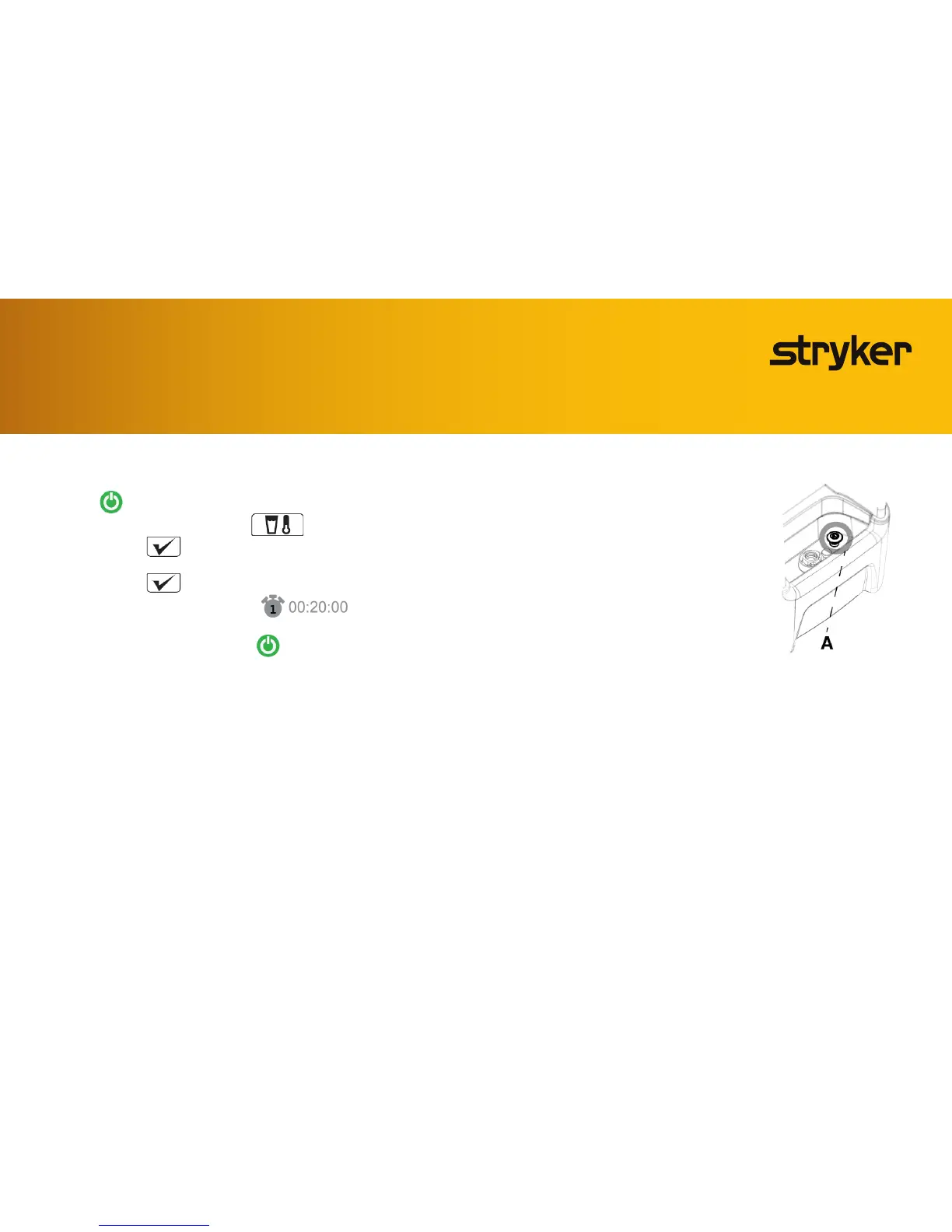
20. Pulluponthecontrollerdrainplug(Figure31)
toopenthedrain.
21. Makesurethatall3hosesremainraisedabovetheconnectionports
fordraining.
22. Allow the controller and hoses to drain for a minimum of two minutes.
23. Pushdownonthecontrollerdrainplugtoclosethedrain.
24. Whenthecontrollerandhosesaredrained,continuetoRinsingthe
internal water circuit and hoses.
Disinfecting the internal water circuit and hoses (cont.)
Figure 31




 To Next Page