card 5A
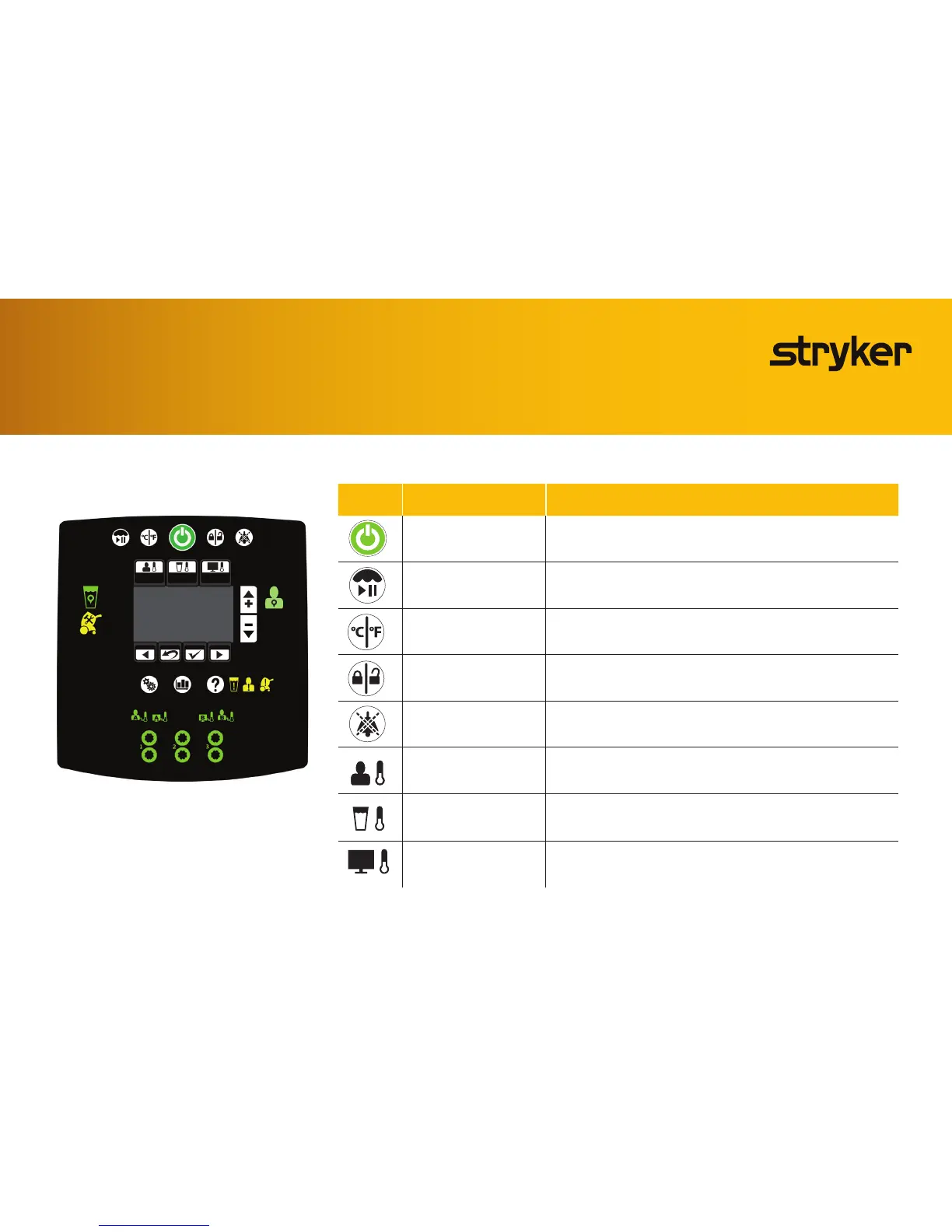
Product functions
Icon Name Function
Stand-by Pressandholdthebuttonfortwosecondstostoptherapyorpoweroff
Therapypaused Pressandholdthebuttonfortwosecondstopauseorresumetherapy
Viewtemperature SelecttemperaturedegreeinCelsiusorFahrenheit
Lock / unlock screen Pressandholdthebuttonfortwosecondstolockorunlockthegraphical
user interface
Audiopaused Pauseorresumetheaudibleindicatorwhenanalarmisactive.Silenceseach
alarmforveortenminutesdependingonthealarmcondition.Thisbutton
breathes¹toindicatethatitisinapausedstate.
Automatictherapymode Coolsorwarmsthepatienttoaselectedpatienttargettemperature
Manualtherapymode Coolsorwarmsthewatertoaselectedwatertargettemperature
Monitoronlymode Displaysthecurrentpatienttemperature(notherapy)
Thegraphicaluserinterfaceshownisforreference
only.Theimageshowswhereyouwillseetheiconsand
buttons illuminate when they are active. At no time
will you see all of these icons at the same time.
Quick start guide for
Altrix Precision Temperature Management System









 To Next Page