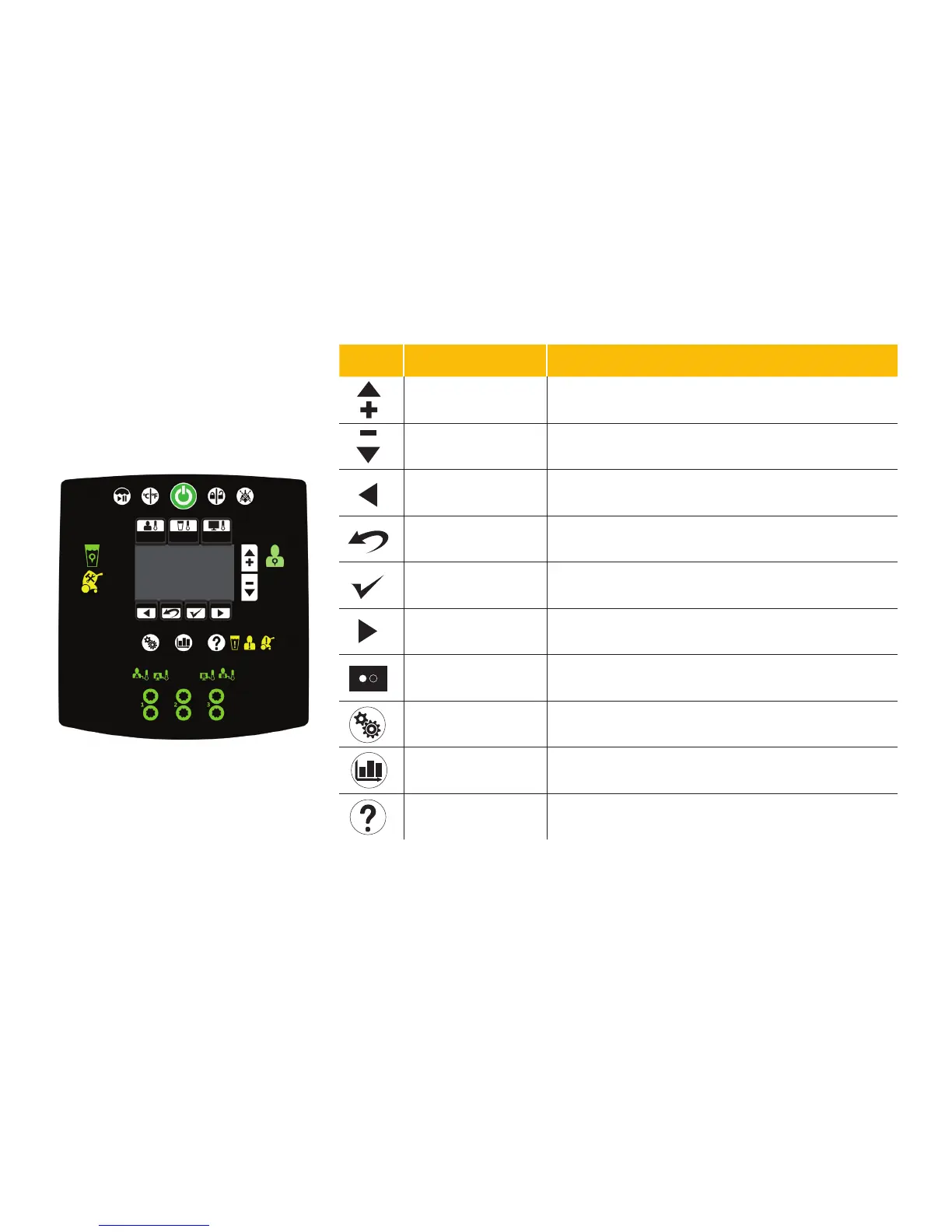
card 6A
Icon Name Function
Increase Increasesthewaterorpatienttemperatureby0.1°forcoolingorwarming
temperature
Note:Pressandholdtheincreasebuttontomovethetemperatureupfaster.
Decrease Decreasesthewaterorpatienttemperatureby0.1°forcoolingorwarming
temperature
Note:Pressandholdthedecreasebuttontomovethetemperaturedown
Back Returnstothepreviousscreenorcancelanoperation
Editsettings,Exit,orCancel Editcurrentsettings,exit,orcancel.
Conrmselection Acceptstheselectedsettings
NextorMore Changestothenextscreen,option,orsetting
Pageindicators(mayalso
appearvertical)
Indicatesthatthereismorethanonepageassociatedwiththescreentopic
forthepagethatiscurrentlydisplayed
Settings Displaysthesummaryofthecurrent,visual/audible,language,orprimary
probesettings
Graph Graphicaldisplayoftheselecteditemssuchaspatienttemperature,target
temperature,watertemperature,andpowerlevel
Help Displayscontextualhelpscreensfortherapies,navigation,buttons,
and alarm screens
¹Breathe:Thebrightnessofthebuttonoriconwillgotoalowlightandthenincreasetoabrightlight.Thiscyclerepeats.
Product functions
(continued)









 To Next Page