EENN
1-56 2971-109-001 REV B www.stryker.com
Service
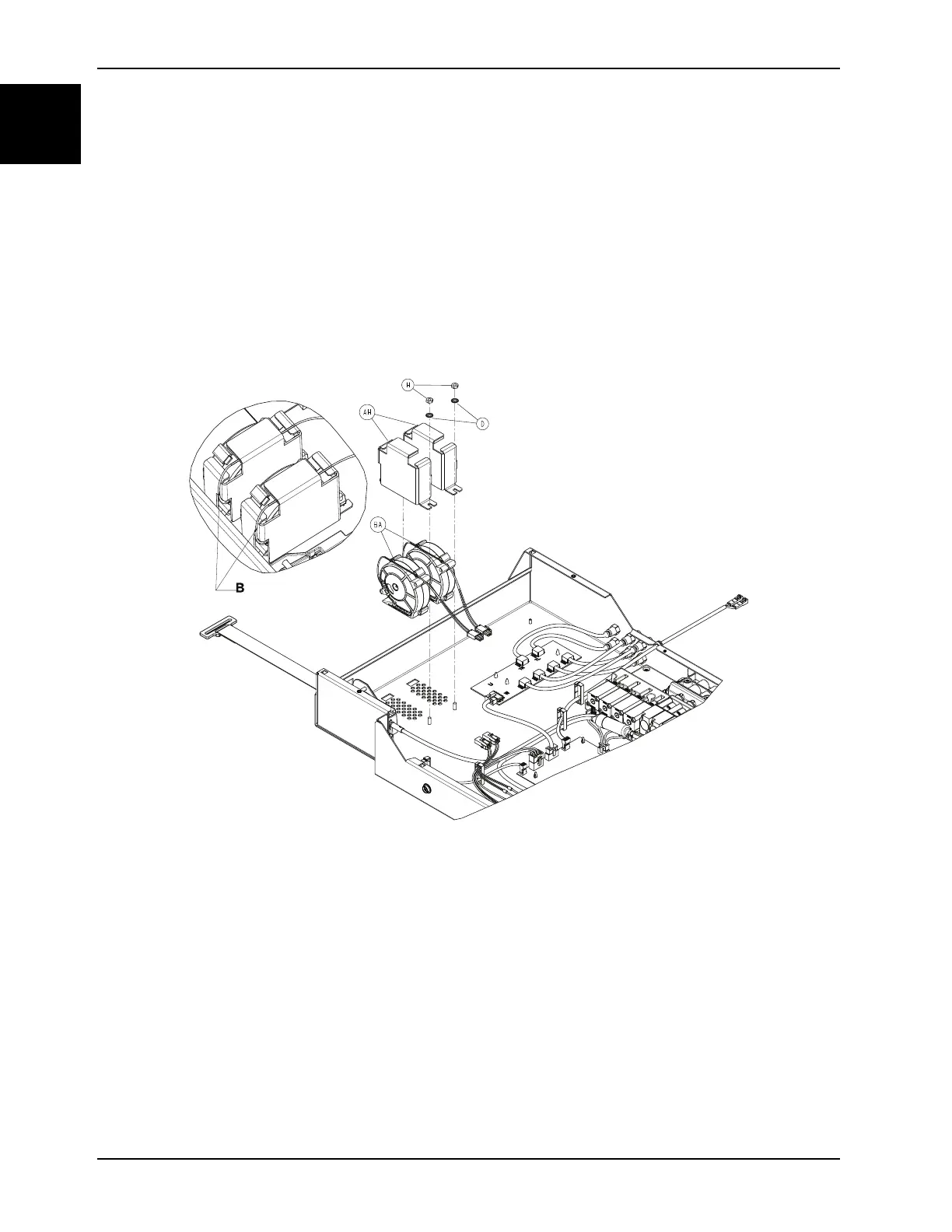
Foot box cooling fan replacement
Tools required:
• Zipper pull tool or equivalent
• 5/16” Nut driver
Procedure:
1. See Foot box cover access on page 1-40.
2. Disconnect the cooling fan from the quick connection.
3. Using a 5/16” nut driver, remove the nut (H) that secures the fan cage to the foot box. Save the nut (H) and the
washer (D) (Figure 1-29 on page 1-56).
Note: During reinstall, torque (H) to 22 ± 4 in-lb.
Figure 1-29: Cooling fan and cage
4. Remove the cooling fan (BA) (Figure 1-29 on page 1-56) from the fan cage (AH) and discard the cooling fan.
Note: During reinstall, route the fan power cables (BA) over the top of the supplied fan (B) and under the foam tape
(Figure 1-29 on page 1-56).
5. Reverse steps to reinstall.
Notes
• During reinstall, make sure to align the Velcro® patches.
• After installation, remove the zipper pull tool or equivalent from the zipper.
• Make sure that the watershed covers the zipper.
6. Verify proper operation before returning the product to service.














 To Next Page