/11.2015/G17D
45
EN
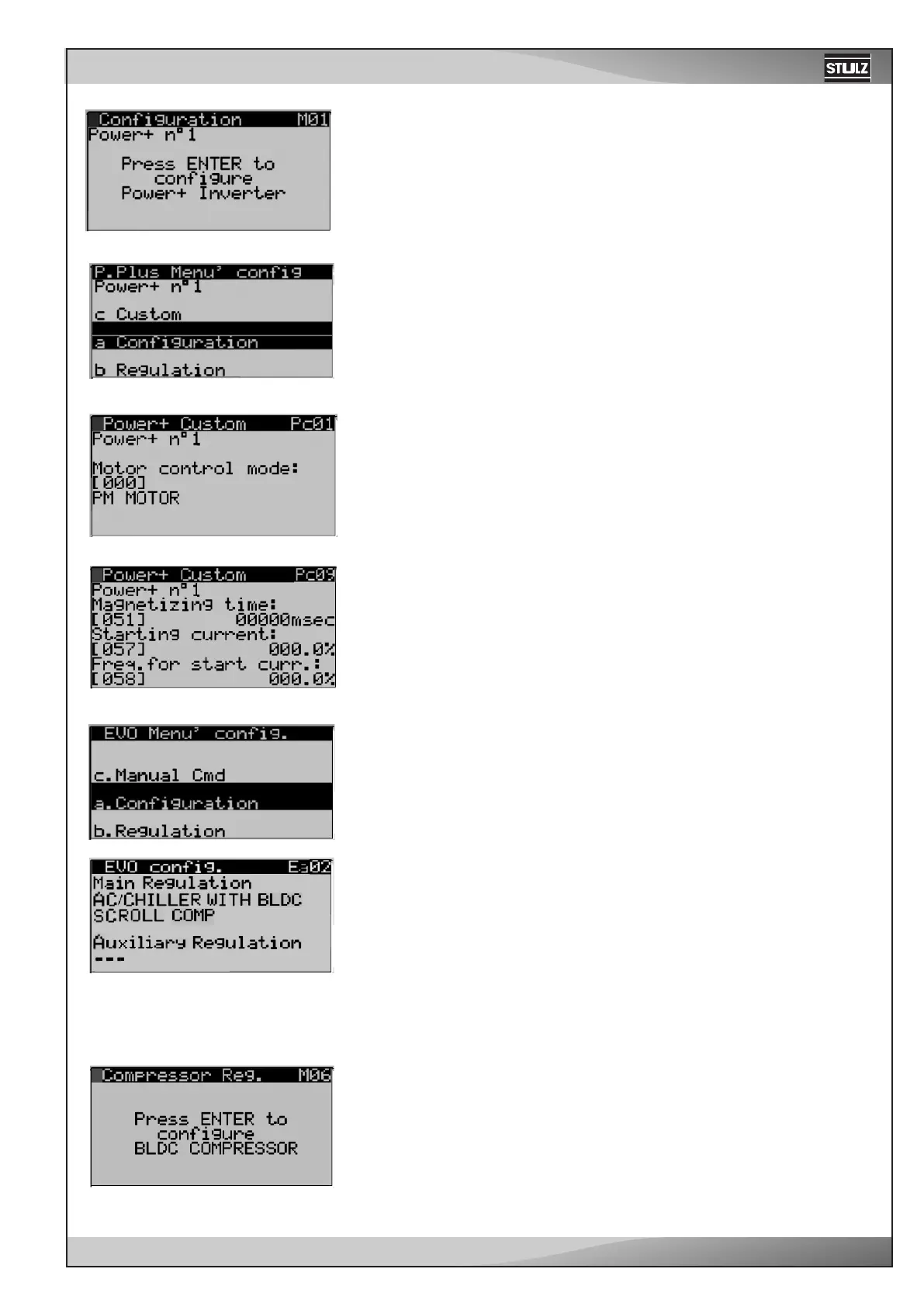
The selection a. Configuration gives you again the possibility to set the
compressor type, (as in Wz04) and it leads you to further three menus in
which special settings can be made.
Select now c. Custom.
Pc01 appears. Scroll down to Pc09.
Adjust the starting current depending on the installed compressor.
SIAM ANB33-400V 55,0%
SIAM ANB42-400V 55,0%
SIAM ANB52-400V 75,0%
Go back to M01, using ESC or faster with Prg.
By the PRG-key you come to view M01, the first window in the main menu
branch. With the Enter key you procede to the next menu.
Now select M06.
BLDC means "Brushless direct current"
Now you must modify two settings for the expansion valve. By the win-
dows M02, EVO Menu' config. and selecting the menu item "a. Configu-
ration" you first get to Ea01 and then to view Ea02.
Here the main regulation must be set on "AC/CHILLER WITH BLDC
SCROLL COMP".
By the menu EVO Menu' config. and selecting the menu item "b. Regu-
lation" you first get to Eb01 and then to view Eb02 (no picture).
In Eb02 set the valve opening at start-up on 75%.



 To Next Page