FORESTER (NA) A8050BE–A (ENG.)
5
Audio
5-39
– CONTINUED –
CD changer control (If optional in dash CD changer is
connected)
An optional CD changer can be connected to this audio unit. See your
SUBARU dealer for more information. For procedures for loading and un-
loading CDs, refer to “In-dash 6 CD auto changer” in this chapter.
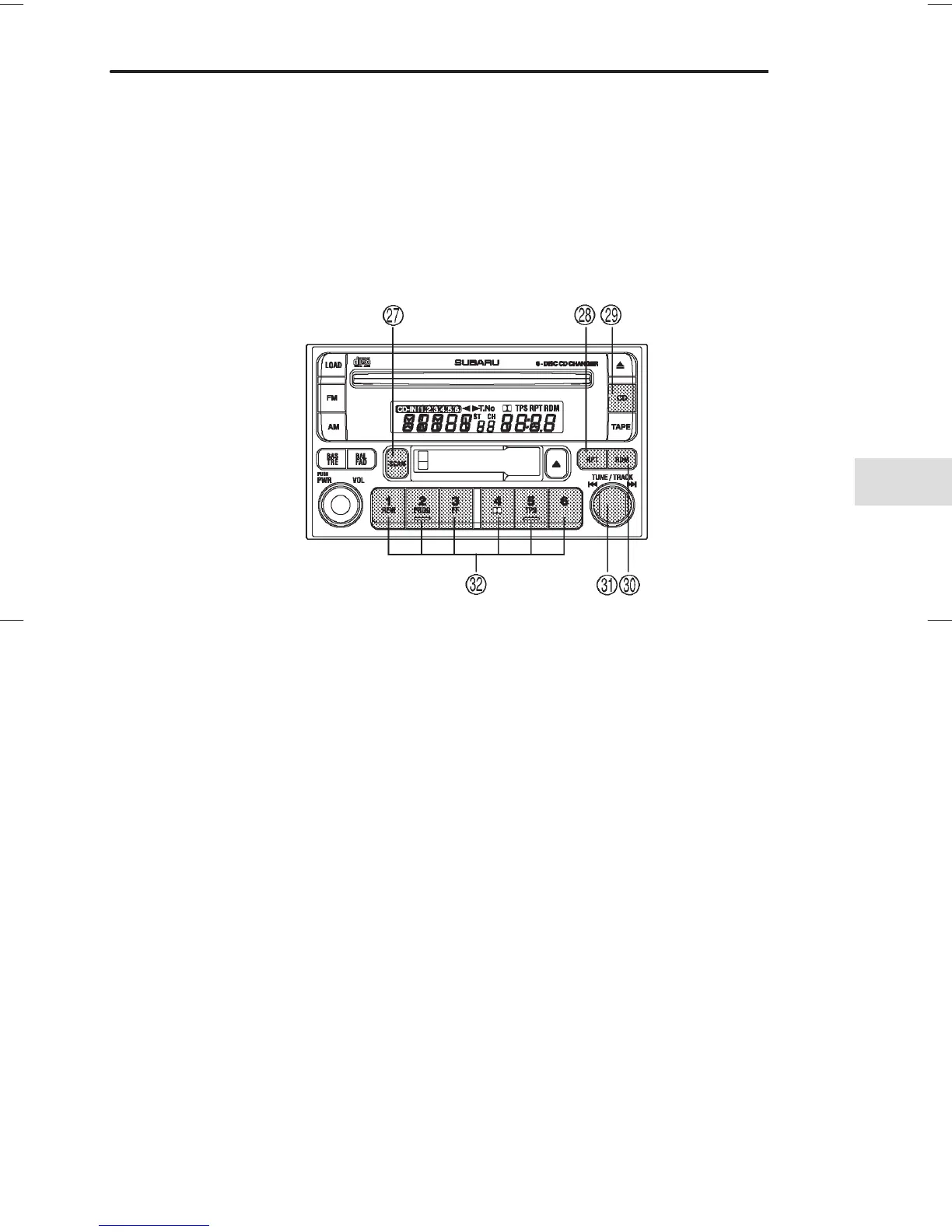
HS5004EB
K SCAN button
L RPT (Repeat) button
Z CD button
X RAND (Random) button
C Fast forward/Fast reverse
and track UP/DOWN knob
V Disc select buttons
B To start playback
Press the “CD” button
Z two times. The “CD” indicator will come on
and the disc number will appear on the display and the CD changer
will start playback.
NOTE
D If the “CD” button is pressed during a radio broadcast, the CD
changer will interrupt the broadcast.
D At the end of the disc, playback automatically continues with
the next disc.
D After playback on the last disc finishes, the player will auto-
matically return to the first disc.













 To Next Page