FORESTER (NA) A8050BE–A (ENG.)
5-40
D If you have loaded fewer than 6 discs, any missing disc is
automatically skipped.
B Selection of a desired disc
Press the desired “Disc select” buttons
V (numbered from 1 to 6) and
the disc will begin to play.
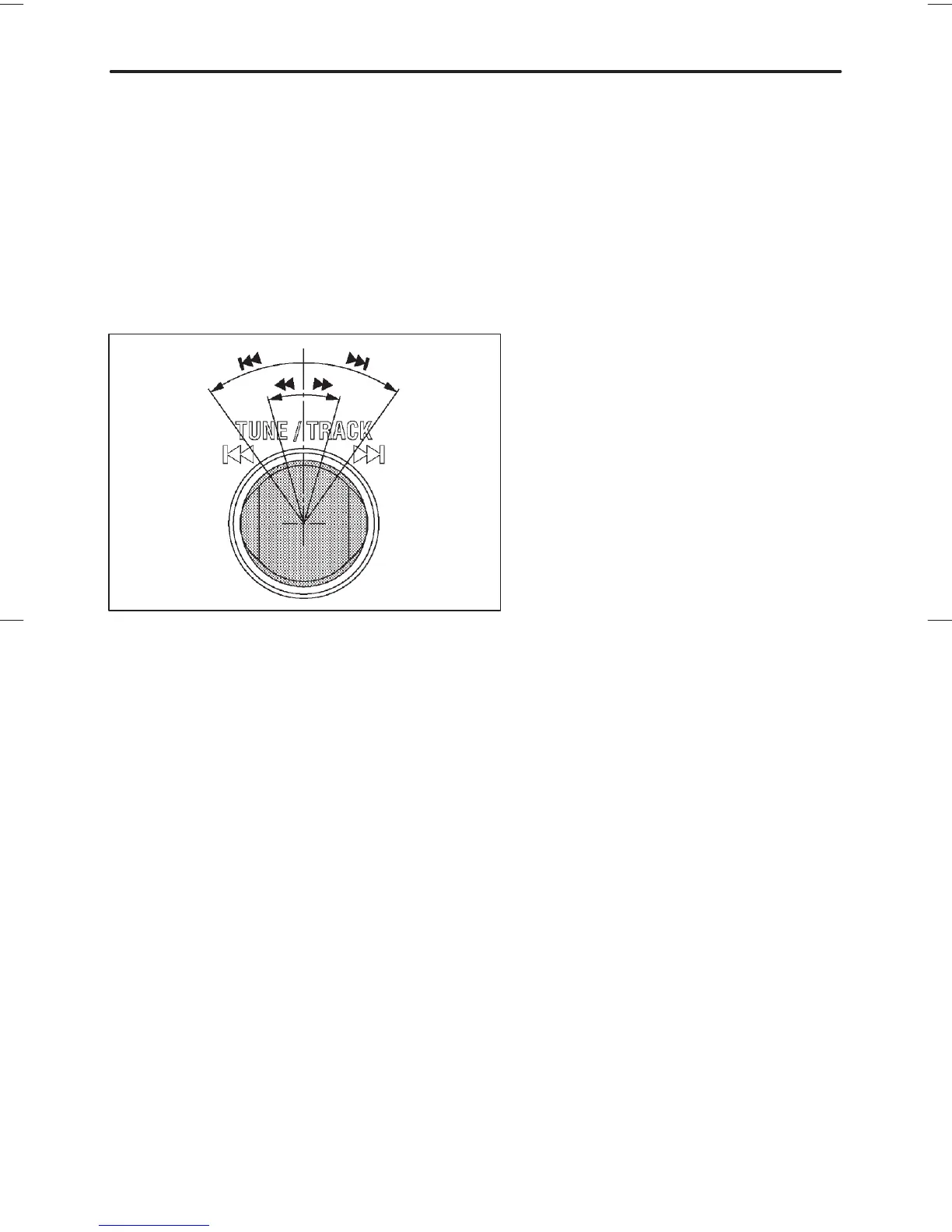
B Selecting a desired track (TRACK)
HS5005BA
n Skipping forward
Turn the “TRACK” knob
C clockwise and release it immediately to
skip to the beginning of the next track. Each time the knob is turned
and released, the indicated track number will increase.
n Skipping backward
Turn the “TRACK” knob
C counterclockwise and release it immedi-
ately to skip to the beginning of the current track. If you continue to
turn and release the knob, the indicated truck number will decrease.
n Fast forwarding
Turn the “TRACK” knob
C clockwise and hold it continuously for
more than 2 seconds to fast forward the disc.
Release the knob to stop fast forwarding.
If you continue fast forwarding to the end of the disc, the CD changer
will automatically stop fast forwarding and change to the next disc.
""❚ :Skipping forward
❚AA :Skipping backward
"" : Fast forwarding
AA : Fast reversing













 To Next Page