8
FX Link (External Control)
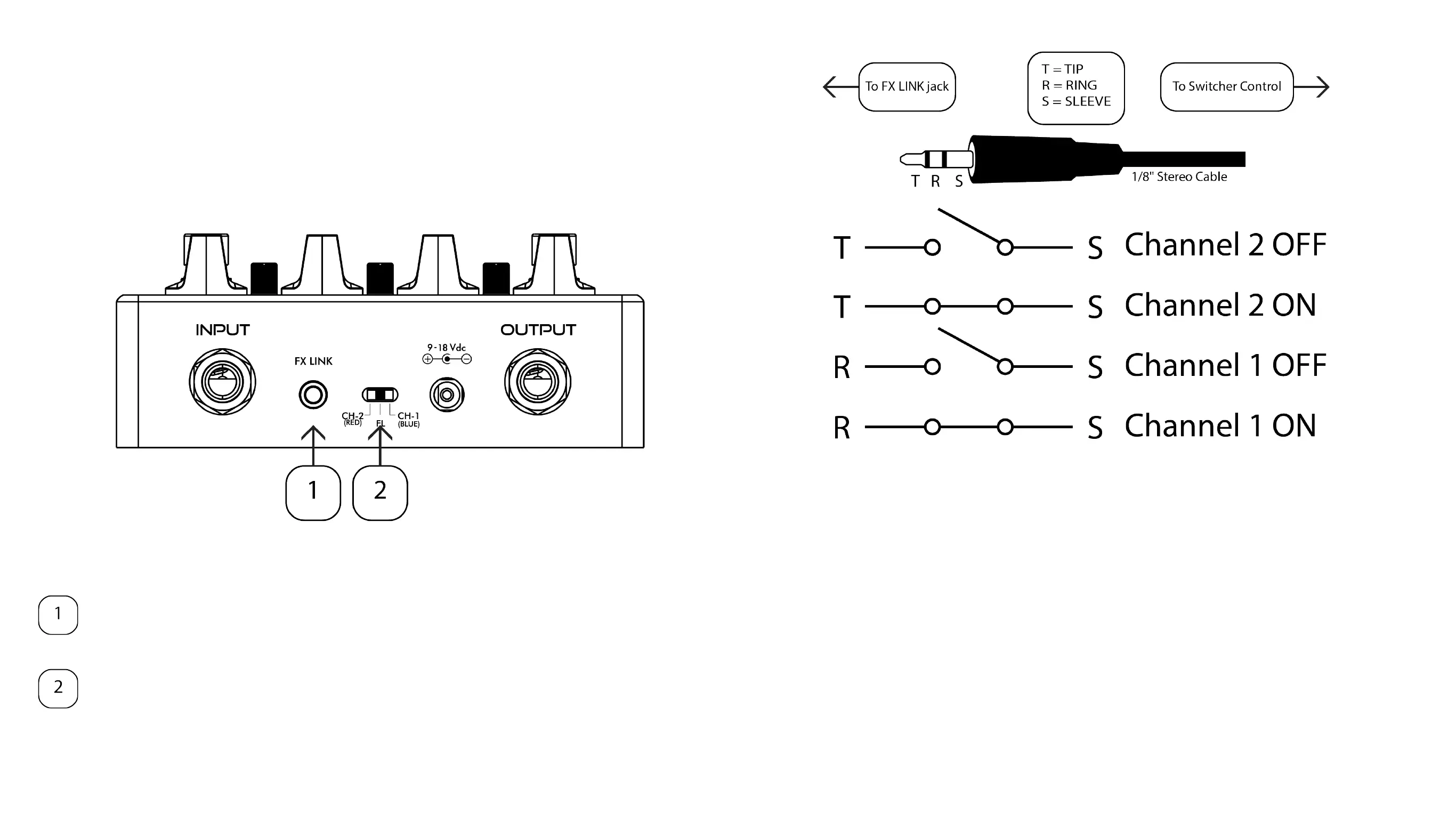
Eclipse contains an 1/8” stereo TRS input jack called FX LINK that allows
the pedal to be controlled by an effects switching system with TRS control
output jacks, such as the BOSS ES-8 or ES-5�
Connect a TRS 1/8” cable into the FX LINK jack from your effects
switching system� A 1/4” to 1/8” stereo cable would typically be used.
Set the 3-position slide switch to the center (FL) on startup for external
control
A connection between the Tip and Sleeve controls Channel 2’s ON/OFF
state�
• When Tip is connected to Sleeve, Channel 2 is ON
• When Tip is disconnected from Sleeve, Channel 2 is OFF
A connection between the Ring and Sleeve controls Channel 1’s ON/OFF
state�
• When Ring is connected to Sleeve, Channel 1 is ON
• When Ring is disconnected from Sleeve, Channel 1 is OFF
Tip (Channel 2) has priority over Ring (Channel 1) when both are connected
at the same time.
Setup



 To Next Page